Thursday, December 17, 2020

#818 OIC --> Insight --> embeddable Dashboards

A big thanks to my colleague Sandhya for her help here. 

Scenario here is very simple - I have a Visual Builder app that allows users to register their eCars, BMW i3's and the like. These registration requests are sent on to approvers who then say Ye or Ne.

Topping all of this off are a couple of Insight dashboards that give business users insight into what's going on in the business process.

Here is my simple VB app  - 


Here is the simple Process approval form -


Here is my simple Insight Console and a couple of its dashboards -


Now the dashboards look great, but my business execs don't want to have to login to OIC to see such.
Here's where the embeddable Insight dashboards come in. 

This is a November 20 release feature.

Here I will embed a couple of dashboards in a Visual Builder page.

A simple exercise, well explained in the Insight docs available here


Essentially I need to build an url that will include the dashboards I want to present on the external page.


These IDs are listed in the Console Manifest -


So I want to add the Milestone Summary and ECars by PLZ (Postal Code).
My url parameters are then as follows - 


I can try the url is a browser, just leave out the output=embed -


I try again with layout=2,2


Now to embed this in my Visual Builder page, via iFrame -


Code is simple - 

Drop a Flex Container onto the page - and then add the iFrame


Run the VB App -


Monday, December 14, 2020

#817 OIC --> EPM adapter setup

 I have been asked to look at this adapter by a colleague -

Apparently, there are not many posts out there on setting up this adapter for use with OIC.

The EPM adapter documentation is good, if you know EPM, which I don't.

So here are a couple of screenshots to help you find your way.

Let's begin with the instructions from the adapter docs - 


1 - Create a Connection -


2. Create an Integration for the Connection - 


Now on to the next set of instructions - 


3. Create a new Task Type


4. Create a Connection to Oracle Integration - 


Now let's test this out...

Create an EPM Connection in OIC -


Create an App Driven Integration in OIC -

Drop the EPM Connection as the Trigger -


Check out the following doc for a functional description of synchronizing opening and closing of financial periods across applications - the following doc

finally for this to work, you need to add the OIC CSF key to EPM via its/soa/composer

As per usual, this is a concatenation of Identity Domain and Service Instance.


Monday, November 30, 2020

#816 - OIC --> Visual Builder Cookbook

I was about to prepare a simple VB demo for this week's UKOUG, when I noticed the following Cookbook option, when creating a new VB app.  


I start the app - 


Worth checking out!

Thursday, November 26, 2020

#815 OIC --> Netsuite to Object Storage

 simple use case here - customer wants to extract data from Netsuite and store it in Object Storage -


Step 1 is to create a bucket in object storage. This will be where the data will be stored.

My colleague Daniel T. has a great post describing how to do that here 
A big thanks to my colleague Ravi P. for the Object Storage setup.

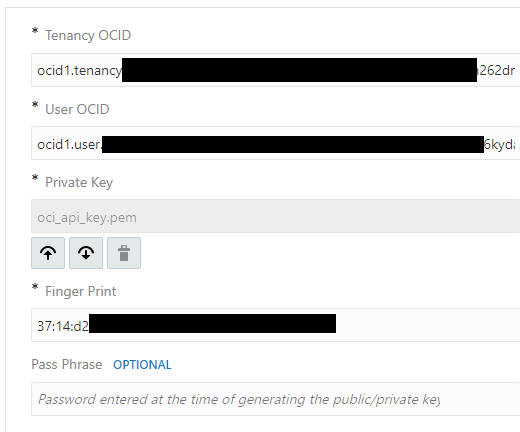
Step 2- Create the REST connection to Object Storage Service in OIC.


Tenancy OCID can be found here -


User OCID can be found here - 


Private Key is what you uploaded to Object Storage Service

Fingerprint can be found here - 


Step 3 - Now to the Integration itself - 

I use the Netsuite adapter to get customers whose name include "Dublin" -

I have a lot of such.

I use the Search option in the wizard and configure the mapping as follows -


operator is set to "contains"

I loop over each customer returned and use the STAGE FILE action to write customer data (company name, date created) to a "nn.txt" file in the OIC VFS (Virtual File System)


Note I also assign the file reference to a variable. I can use this later when writing to object storage.


Once all customers have been processed - 


I use the Object Storage REST connection (StoreData) - configured as follows - 


Note the resource uri - 


Check out the full REST api doc for Object Storage Service here

Mapping is simple - I just pass the file reference from the variable - 


Step 4 - Test 


5 Dublin customers processed -

I validate the result in Object Storage -