
Showing posts with label OSB. Show all posts
Showing posts with label OSB. Show all posts
Tuesday, February 17, 2015


Monday, December 1, 2014
#357 Configuring email server on Service Bus 12c
Here is my simple scenario -
Service Bus proxy accepts in an order.
The only pipeline logic is to raise an Alert.
I am using James as my email server.
The server is running as localhost.com.
I have created a couple of demo users - niallc and admin
The process -

The pipeline -

The Alert Definition -

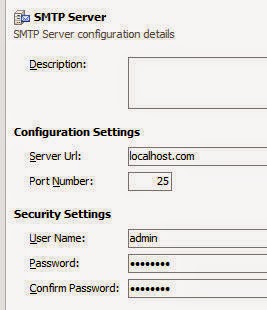
The SMTP Definition -
The AlertDestination definition


Test result -

Simple, isn't it?
Service Bus proxy accepts in an order.
The only pipeline logic is to raise an Alert.
I am using James as my email server.
The server is running as localhost.com.
I have created a couple of demo users - niallc and admin
The process -
The pipeline -
The Alert Definition -
The SMTP Definition -
The AlertDestination definition
Test result -
Simple, isn't it?
Monday, October 6, 2014
#338 SOA 12c --> testing REST enabled services in your browser
I have exposed a simple BPEL process via Service Bus -

I can test the RestService in JDev easily -

But how about testing this with just the browser URL?
Easy, as well.
I first edit the REST Service -

I edit the operation bindings -

I then generate a sample URL for the operation.


I am using 12c Quickstart so host and port is
localhost:7101
The proxy-uri is a concatenation of JDev project name and Proxy Service name.

So, in my case, this will be
/SB-Kista5/RestService/
all together, we get -
http://localhost:7101/SB-Kista5/RestService/checkOrder?input=Order1
All the BPEL process does is echo the input -
here is a test result.

You can also find the URI via SBConsole -

I can test the RestService in JDev easily -
But how about testing this with just the browser URL?
Easy, as well.
I first edit the REST Service -
I edit the operation bindings -
I then generate a sample URL for the operation.
I am using 12c Quickstart so host and port is
localhost:7101
The proxy-uri is a concatenation of JDev project name and Proxy Service name.
So, in my case, this will be
/SB-Kista5/RestService/
all together, we get -
http://localhost:7101/SB-Kista5/RestService/checkOrder?input=Order1
All the BPEL process does is echo the input -
here is a test result.
You can also find the URI via SBConsole -
Thursday, April 25, 2013
#243 Harvesting OSB artifacts to Oracle Enterprise Repository
Simple example showing the use of the harvester.
Here are my projects in OSB -

export these projects via the OSB console to a sbconfig.jar file.
OER Configuration
I need to install harvester Solution Pack


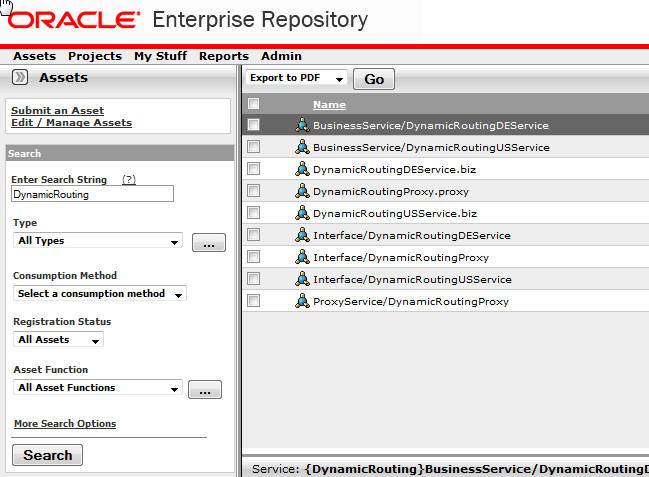
Then review the result in OER - let's check out the DynamicRouting OSB project -

Now wasn't that easy!
Here are my projects in OSB -

export these projects via the OSB console to a sbconfig.jar file.
OER Configuration
I need to install harvester Solution Pack
The Harvester is
available in 11.1.1.x.x-OER-Harvester-Solution-Pack.zip,
which is bundled with the Oracle Enterprise Repository 11g
installation.

The installation of
the Harvester Solution Pack requires use of the Import /Export tool.
This tool
is available from the Admin tab of Oracle Enterprise Repository in the Import
Export option.
The asset types delivered as part of the Harvester Solution Pack
are required by the Harvester tool.
In OER, click on Admin then Import/Export. Then click on Import/Export client.

Import the Harvester Solution pack zip.

New asset types etc. have been created -

OSB configuration
We need to do some preliminary steps before running the harvester. all relevant files are here -

Amend HarvesterSettings.xml to specify harvesting from the sbconfig.jar file created earlier.

Run encrypt.bat to encrypt the password.
encrypt.bat HarvesterSettings.xml HarvesterSettings.xml
Then run setenv.bat
Then run osb11g-harvest.bat

Subscribe to:
Posts (Atom)

