I was about to prepare a simple VB demo for this week's UKOUG, when I noticed the following Cookbook option, when creating a new VB app.


I start the app -


Worth checking out!

The All in 1 Business Process Automation Toolkit, Powered by AI
I was about to prepare a simple VB demo for this week's UKOUG, when I noticed the following Cookbook option, when creating a new VB app.
I start the app -
simple use case here - customer wants to extract data from Netsuite and store it in Object Storage -

Step 2- Create the REST connection to Object Storage Service in OIC.


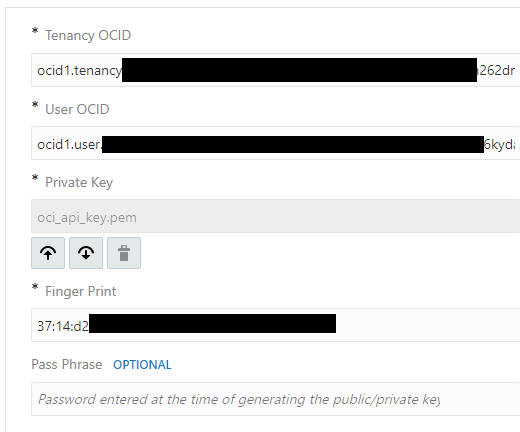
Tenancy OCID can be found here -

User OCID can be found here -

Private Key is what you uploaded to Object Storage Service
Fingerprint can be found here -

Step 3 - Now to the Integration itself -
I use the Netsuite adapter to get customers whose name include "Dublin" -
I have a lot of such.
I use the Search option in the wizard and configure the mapping as follows -


operator is set to "contains"
I loop over each customer returned and use the STAGE FILE action to write customer data (company name, date created) to a "nn.txt" file in the OIC VFS (Virtual File System)

Note I also assign the file reference to a variable. I can use this later when writing to object storage.

Once all customers have been processed -

I use the Object Storage REST connection (StoreData) - configured as follows -

Note the resource uri -

Check out the full REST api doc for Object Storage Service here
Mapping is simple - I just pass the file reference from the variable -

Step 4 - Test


5 Dublin customers processed -
I validate the result in Object Storage -

Simple example here, sure aren't all of my examples simple?
As Schiller says -
Man only plays when he is in the fullest sense of the word a human being, and he is only fully a human being when he plays.
So without further ado -
here are my DB tables - nc_master and nc_detail

Here is the Integration -

I have a simple REST Trigger based integration with the following payload -

DB Adapter Invoke - configured as follows -


How to decide if an SQL statement is complex?
Easy for me - if it goes beyond the basic SELECT x FROM y WHERE ... then it's complex for me.
Here I have the following statement that retrieve data from my CUSTOMERS table -
SELECT CUST_NAME, CREATED_DATE, MODIFIED_DATE, DEFAULT_ADDRESS, COMPANY_SIZE FROM CUSTOMERS WHERE CREATED_DATE > #lastDate ORDER BY CREATED_DATE DESC OFFSET #offset ROWS FETCH FIRST 1000 ROWS ONLY

I execute the SQL in SQLPLUS -

Looks good - now to trying this in OIC -

Essentially a REST trigger.
Then the DB adapter (GetCustomers) - configured as follows -


The Mapping - as you can see, I simply hard code test for test purposes -

I then loop over each customer and simply LOG the customer name -


I finally return all customer names.
Now to testing -


Now -

In this simple example I will select an Inventory item, based on its internalId.
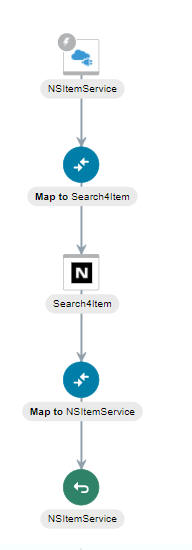
The mapping is as follows - Note I am filtering on mapped fields -

operator is set to anyOf as this is a MultiSelectFieldOperator
I activate and test - btw. another new November 20 Release feature is that the body you use when testing is saved between tests -

The only response field I map is the display name.

Now a quick look at the structure returned by Netsuite -

Note the different item types, listed under recordList.
Now I test for this Assembly Item with the internalId 724.

I don't need to change the request mapping -

The Response mapping has been changed -


Introduction I've blogged extensively about monitoring dashboards, but there's always either some new metrics or new aspects that I...


