Showing posts with label OIC REST API. Show all posts

Wednesday, September 25, 2024

#1026 - OIC REST API Log file download - How To for OIC3


This OIC Gen2 api lets you download -

  • ICS Diagnostic Log
  • ICS flow log
  • Audit Log
The request format is as follows - 

https://oicpm-oicpm-px.integration.ocp.oraclecloud.com/ic/api/integration/v1/monitoring/logs/log


The valid log values are -

  • icsdiagnosticlog
  • icsflowlog
  • icsauditlog

Download the Diagnostic Log

I now download the diagnostic log and see the following, when I unzip it -
Note the structure -


The following files are weblogic specific -

  • access.log
  • oic_server1.log
  • oic_server1.out
  • oic_server1-nodemanager.log

As you can see, this is essentially of little use to an OIC admin.

Now to the ics-flow.log

It does contain OIC relevant data e.g. 


ActionID:y0][ActionName:InvoicesToATP][ActionType:Return]: Response received from InvoicesToATP
[2024-09-09T16:45:09.088+00:00] [oic_server1] [NOTIFICATION] [] [oracle.ics.trace.soa.bpel] [tid: 102] [userId: niall.commiskey@oracle.com] [ecid: d505d8d9-9d4e-48cb-9f6f-ee1c4a2edd04-002e7192,0] [APP: soa-infra] [partition-name: DOMAIN] [tenant-name: GLOBAL] [FlowId: 0000P7NfC8v5uXdLxe4EyW1anhva0002yu] [oci.instanceName: OICPM] [oci.identityDomain: identityDomainName]  [ICS Activity Stream Logging]: [Code:INVOICESTOATP][Version:01.00.0000][Instance:62405859][Operation:execute][ActionID:y0][ActionName:InvoicesToATP][ActionType:Return]: Integration execution has completed

However, it's not that readable.

Same applies to the oic_servern_diagnostic.log -


I'll skip the nodemanager log as that is pure weblogic.

Net, net, these logs are useful for checking out engine errors, but are not useful from a compliance perspective, e.g. these files don't help you prove that orderNr 123 was processed on a certain date.

Download the ICS Flow Log


The Structure of the downloaded zip - 


I executed the following simple integration, before running the REST request -


Now I activate the integration with trace enabled - 

I download the log file again, and now I see the payload in the log -


Net, net - the ICS flow log is useful, when you enable tracing / include payload.

Download the Audit Log

This log details who did what in the designtime -

e.g. here my activation of the integration has been audited - 

[2024-09-25 13:29:17.577] [userId: niall.commiskey@oracle.com] [niall.commiskey@oracle.com,ACTIVATE,ICS_ProjectV2,AA_SIMPLE_SYNC_WITHCHIL,AA-Simple-Sync-WithChild,01.00.0000] User niall.commiskey@oracle.com activated Integration AA-Simple-Sync-WithChild 01.00.0000
[2024-09-25 13:29:17.361] [userId: niall.commiskey@oracle.com] 

So now we have looked at what's available from OIC gen2.

Let's turn to OIC3.

OIC3 Retrieve Audit log


Note the structured format of the response, easier to read and process, compared to OIC Gen2.

The following OIC3 api can be used to retrieve instance flow details, similar, but not the same as the OIC gen2 ICS Flow log. - 


The response is as follows - 


As you can see, even in debug mode, the request payload is not returned.

What we do see, however, is the tracking fields and their values.

So how can we retrieve the integration flow request payloads?

First, let's take a step back - 
Customers usually use the OIC gen2 log api on a daily basis, for example, run the job to download the ICS flow log on a daily basis and push the response to a monitoring / analysis tool such as Splunk.

So, from an OIC3 factory api perspective, I could do the following - 

1. Retrieve integration flow instances for the time period e.g. for the last day.

2. For each of those instances, retrieve the request payload.

Let's look at 1 - 


note the id returned - 

that from the screenshot is as follows - 
na1TEHvfEe-BH8NDEl59ew

I will now use this to retrieve the payload via the activity stream, this is task 2 -


Final step is to automate this with OIC. Here I create a scheduled integration that will invoke both apis. In my simple demo, I will write the instances + payloads to a file.


Friday, July 26, 2024

#1021 - OIC REST API - Use OAuth with REST API calls

The OIC REST api docs tell us how to use OAuth with REST API calls -


Let's try these out -

Pre-requisite is an integration application you set up in your identity domain -


Open this and copy the client id and secret to a file of your choice. While you're at it, also copy the scope and redirect url.

Get an Authorization Code

Now compose the following url to retrieve the auth code - the sample in the docs is as follows - 
https://<idcs_URL>/oauth2/v1/authorize?client_id=<client_ID>&response_type=code&scope=<scope> offline_access&redirect_uri=<URL_to_receive_response>

My version is as follows - https://idcs-10809....identity.oraclecloud.com/oauth2/v1/authorize?client_id=9b...&response_type=code&scope=https://1EA....integration.us-phoenix-1.ocp.oraclecloud.com:443urn:opc:resource:consumer::all offline_access&redirect_uri=https://myOICInstance.integration.us-phoenix-1.ocp.oraclecloud.com/icsapis/agent/oauth/callback

I run the request in a browser and get the following error - [OAuth Callback] Failed retrieving access token from service provider.

However, the url has been replaced with -
https://myOICInstance/icsapis/agent/oauth/callback?code=AgAgNjNiM2...

It's this code that I need. 

Base64 Encode Client Id and secret

Use the Authorization Code to Get an Access Token

The example in the doc uses curl, so I'll do the same


I'm on Windows so I replaced the single quotes in the doc sample with double quotes -

curl -i  -H "Authorization: Basic myEncodedClientIdSecret" --request POST "https://idcs-...8c.identity.oraclecloud.com/oauth2/v1/token" -H "Content-Type:application/x-www-form-urlencoded" -d "grant_type=authorization_code&code=AgAg...15A="

As you can see, the access_token is returned.
I can then drop the curl request into Postman. I need to get a new code, before executing the request


Note: the encoded client id and secret is entered as a unbroken string, without the BEGIN, END lines

Concrete Usage of the OIC3 Factory APIs

Here's a screenshot of the confidential app configuration - 

A you can see, I've activated Client credentials as well as Authorization code.

I create an integration that will retrieve all Projects in my OIC3 instance, using the factory api.

Step 1 is to create the REST connection - 


The api I want to call is the following - 

The invoke is defined as follows - 


I test the integration - 


One can also execute this request from Postman using Client Credentials -

Note that here I am using the OIC3 runtime url - see my post here for details.

Summary

auth code can be used for approaches where interaction is possible (e.g. browser based). 

for "machine to machine" use client credentials.


Wednesday, September 6, 2023

#987 OIC Integration Dependencies - who calls what?

This is a question I often get asked by customers - "Can I have a report of my integrations, listing their dependencies?"

e.g. Integration 1 invokes ATP and then another integration via local invoke.

Simple with the OIC APIs - let's start with a simple integration flow - 


Here I have a REST Trigger as source and 2 targets - 

1. ATP - Write2ATP
2. LocalAsync3 - Local Invoke

I create an OIC integration that will use the OIC Factory apis to get this information.

Here is the integration I created to retrieve the information - 


This integration invokes the following factory apis - 


Firstly, Retrieve Integrations - then I take the id returned and use it in Retrieve an Integration

I test the apis in Postman, before implementing the integration - 

Here is an extract from the Retrieve Integrations response - 

As you can see - the connection structure contains the salient info.


But let's use the 2nd api - the key is the id found here - 


So, with this id, I invoke the 2nd api - Retrieve Integration -  

/ic/api/integration/v1/integrations/AA_EF_ASYNC2|01.00.0000?integrationInstance=myOICInstance

Here we get more detail - note the connections structure - this lists the 2 connections explicitly used in the integration, namely the REST Trigger and the ATP invoke. But what about the local invoke? EF_ASYNC2 invokes EF_ASYNC3.

This info is in the endpoints section - 


  Here I see - 


In OIC, COLLOCATED always refers to Local Invoke. Note the name attribute - I set this in the integration to LocalAsync3 - I edit the integration AA_EF_ASYNC2 and change the name to that of the integration being invoked - 


Adhering to such a simple naming convention for local invokes allows me to plot the dependencies using the OIC factory apis. 

My integration simply logs this data, naturally, I could, also write this to a file.


Tuesday, October 27, 2020

#804 OIC REST API for Lookups


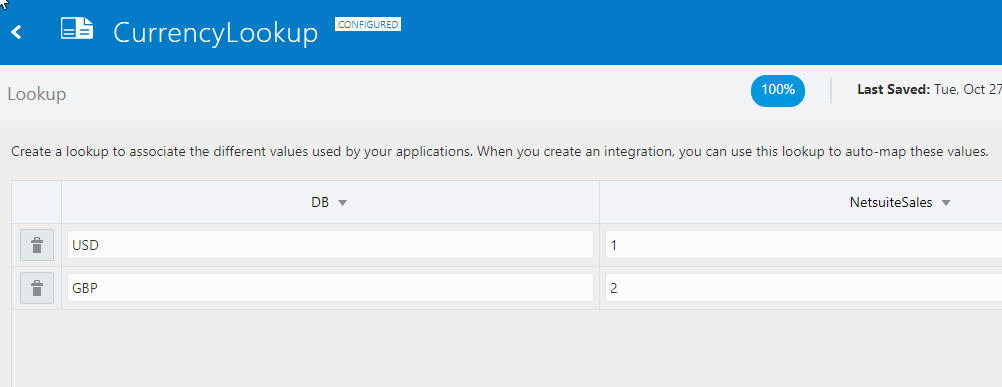
Above, my lookup.

Here are the Lookup REST APIs -


Retrieve is easy -


Per default, retrieve does not show me the row values e.g. USD, GBP etc.

I just need to add the following query parameter, in order to retrieve the contents -


Update - let's add a couple of new entries

EURO / 3 and CAD / 4


So what does my request look like?


Now let's check the Lookup in OIC - 


As you can see, the original entries have been overwritten.

In this case, update means essentially replace..

So how can I have a scenario where I just want to augment the lookup list?

Simple enough with OIC - I create a REST connection in OIC -


I will essentially do what I did in Postman - with one exception -

Here is my completed integration -


The REST Trigger Request payload is as follows -


GetLookupData Invoke is configured as follows -


The Map to GetLookupData  is as follows -


I set expand to "datarow"


UpdateLookupData Invoke is configured as follows -


Map to UpdateLookupData is configured as follows -

Here I need to merge the original entries from the initial GET with the new entries in the REST Request payload.


I begin by repeating the rows below - 


I map the result of the GET to 1 of 2 rows -


I map the new values from the initial request to 2 of 2 rows -


Time to test - here are the current contents of the Lookup - 


Here is my test payload -


Here is the result -