
Download from Here
Showing posts with label SOA Suite. Show all posts
Showing posts with label SOA Suite. Show all posts
Friday, October 23, 2015

Tuesday, May 5, 2015
#398 BPEL-> Mediator -> BPEL: Passing Business Errors back thru Mediator
Scenario:





Sync BPEL1 calls Mediator that calls Sync BPEL2.
SyncBPEL2 throws a Business Error, Mediator needs to pass this back to SyncBPEL1.
In the following example I have the following components -
Sync BPEL 1 = BPELProcess3
Mediator = Route2BPEL1
Sync BPEL 2 = ErrorThrower
Here they are, in all their grandeur -
ErrorThrower

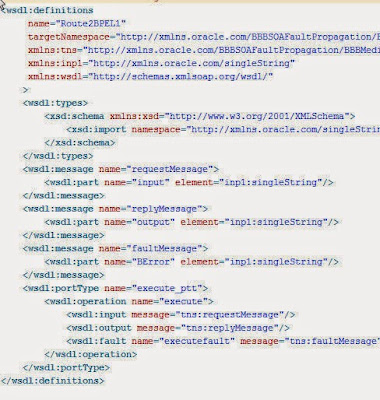
Note the explicit definition of the fault in the wsdl -

Route2BPEL1

Again, this Mediator is defined from wsdl (Interface Definition from WSDL)
Note, the fault is also defined here -

Note: I do not include any fault-policy definition in the Mediator project.
BPELProcess3

Catch configuration -

Test

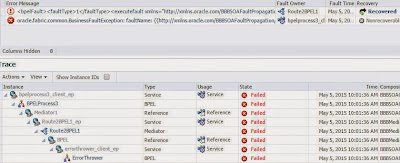
Here is the expected error message -

Here is the process audit trail -


JDev workspace here
Monday, May 4, 2015
#397 SOA 12c Fault Handling
Here is my composite - a Sync BPEL process, invoking a web service -

The web service validates a credit card nr and returns "invalid" for those starting with 123.
I deploy and test -


Looks good!
I now stop the web service -

I re-test the BPEL process -
I get the following error, which is to be expected -

I now look in the EM Error Hospital -

The error is marked as non-recoverable, this is because the
error occurred on the Invoke thread. i.e. Error needs to be handled by
calling client.
I re-start the web service.
I add a dehydration activity to the process and re-deploy -

I test - all goes well!
I then stop the web service and re-test.
I see the expected error -

I check the error hospital -

I see 1 recoverable fault.

I deploy and test, having stopped the ws.

I see 2 error messages -
1. remoteError
2 -Timeout for sync req-response

I check out the error hospital -

Now let's try the same with an Async process -


I deploy and test, stopping the ws beforehand -

I check out the error hospital -

I see one instance awaiting recovery.
However, if I search for the instance at composite level, it looks as if
it completed successfully -

I need to check the audit trail to see the error -

Now I remove the CatchAll from the process and re-deploy and
then execute 2 tests -
I see the errored instances, at Composite level -

I check out in the error hospital -


The web service validates a credit card nr and returns "invalid" for those starting with 123.
I deploy and test -


Looks good!
I now stop the web service -

I re-test the BPEL process -
I get the following error, which is to be expected -
I now look in the EM Error Hospital -

The error is marked as non-recoverable, this is because the
error occurred on the Invoke thread. i.e. Error needs to be handled by
calling client.
I re-start the web service.
I add a dehydration activity to the process and re-deploy -

I test - all goes well!
I then stop the web service and re-test.
I see the expected error -
I check the error hospital -

I see 1 recoverable fault.
Using Fault Handlers and their effect on the Error Hospital

I deploy and test, having stopped the ws.

I see 2 error messages -
1. remoteError
2 -Timeout for sync req-response

I check out the error hospital -

Now let's try the same with an Async process -


I deploy and test, stopping the ws beforehand -

I check out the error hospital -

I see one instance awaiting recovery.
However, if I search for the instance at composite level, it looks as if
it completed successfully -

I need to check the audit trail to see the error -

Now I remove the CatchAll from the process and re-deploy and
then execute 2 tests -
I see the errored instances, at Composite level -

I check out in the error hospital -

Wednesday, April 8, 2015
#389 SOA Suite 12c & BAM
Many folks were impressed by the auto-creation of BAM data objects on deployment of a BPM project.
So how this work with BPEL?
Here is a simple example - My project is called NCTest and
it contains the following simple order process -

I deploy and note that no relevant artifacts have been auto-created for me in BAM.

I now add some BI metrics to my BPEL process -
I click on the analytics view (rightmost icon)

Here I create a Single Mark to track the price of the product ordered -

I then create a new business indicator -


I rename the measurement mark -

I now configure analytics (2nd icon from the left)

Note: the default value(Do Not Generate)

I select Inherit From Composite Default.
I can also set analytics at composite level -

Now we go to EM -
Go to the System MBean browser -

I navigate to -

Check out the properties -

Note : DisableProcessMetrics is set to true.
I re-deploy the composite.
and check the BAM data objects -
Note the two new data objects at the bottom of the following screenshot -

Check out the NCTest Activity DO -
Here are the price columns -

Check out the Process DO -

Now I add some more measurements etc. to the process -

I add a product dimension -

and bind it as follows -

I re-deploy the composite and refresh the BAM DO -

I create an instance of the process

and then re-visit the BAM DO - NCTestActivity -

Note: we have 7 rows here.
Now, just as a recap, here is the BPEL process -

Let's look at some other column values in the 7 rows -

So this DO is very useful if I want to track changes in the value of,
for example, the price as the order moves from activity to activity.
To illustrate this, I add a new activity to the process of type ASSIGN.
Here I compute the final order price, by applying a 10% discount.

I deploy and test -


The value of 1000 is from the receiveInput Activity.
Now look at the contents of the NCTestProcess DO - after the first test.

Note: only 1 row here.
Now, I test my process again for an iWatch order, price 500.

Note: the discount has been applied.
Here is some more data from the DO.

Now I add a 30 second WAIT to the process - so we can see if the
price value in the NCTestProcess DO changes.

I test with the following payload --

I immediately check the value in NCTestProcess DO

I then wait a bit and re-check -

This makes it very easy to imagine the different use cases
for NCTestProcess DO and NCTestActivity DO.
So how this work with BPEL?
Here is a simple example - My project is called NCTest and
it contains the following simple order process -
I deploy and note that no relevant artifacts have been auto-created for me in BAM.
I now add some BI metrics to my BPEL process -
I click on the analytics view (rightmost icon)
Here I create a Single Mark to track the price of the product ordered -
I then create a new business indicator -
I rename the measurement mark -
I now configure analytics (2nd icon from the left)
Note: the default value(Do Not Generate)
I select Inherit From Composite Default.
I can also set analytics at composite level -
Now we go to EM -
Go to the System MBean browser -
I navigate to -
Check out the properties -
Note : DisableProcessMetrics is set to true.
I re-deploy the composite.
and check the BAM data objects -
Note the two new data objects at the bottom of the following screenshot -
Check out the NCTest Activity DO -
Here are the price columns -
Check out the Process DO -
Now I add some more measurements etc. to the process -
I add a product dimension -
and bind it as follows -
I re-deploy the composite and refresh the BAM DO -
I create an instance of the process
and then re-visit the BAM DO - NCTestActivity -
Note: we have 7 rows here.
Now, just as a recap, here is the BPEL process -
Let's look at some other column values in the 7 rows -
So this DO is very useful if I want to track changes in the value of,
for example, the price as the order moves from activity to activity.
To illustrate this, I add a new activity to the process of type ASSIGN.
Here I compute the final order price, by applying a 10% discount.
I deploy and test -
The value of 1000 is from the receiveInput Activity.
Now look at the contents of the NCTestProcess DO - after the first test.
Note: only 1 row here.
Now, I test my process again for an iWatch order, price 500.
Note: the discount has been applied.
Here is some more data from the DO.
Now I add a 30 second WAIT to the process - so we can see if the
price value in the NCTestProcess DO changes.
I test with the following payload --
I immediately check the value in NCTestProcess DO
I then wait a bit and re-check -
This makes it very easy to imagine the different use cases
for NCTestProcess DO and NCTestActivity DO.
Subscribe to:
Posts (Atom)

