Showing posts with label CPQ. Show all posts

Thursday, May 11, 2023

#968 - OIC for Oracle CPQ

Introduction 

This post covers using the Oracle CPQ adapter as well as the generic OIC REST adapter to interface with Oracle CPQ. The use case is very simple - set the Prepared By Title value for a set of Quotes, the latter known as Transactions in CPQ.


Oracle CPQ from an Integration Perspective

For those who don't know - Oracle CPQ = Configure, Price, Quote. This is one of the CX SaaS family of apps; often used together with another CX app such as Oracle Engagement Cloud or SFDC.

Before drilling down into OIC for CPQ, let's look at CPQ itself. A Quote in CPQ, as already stated, is known as a Transaction. Let's look at one of these - 


A quote essentially is comprised of a header section and then the individual line items.

The CPQ UI uses the CPQ REST apis - and it's easy to check out which are being invoked - 


Now, when it comes to updating a quote/transaction, we need to know about CPQ's collaborative quoting. This allows multiple users to work on the same quote simultaneously. 

We will see this explicitly when it comes to the OIC integration - here we will need 2 invokes of CPQ - the first is to "open" a quote and the second takes care of the update. The first invoke will return a cacheId and this will be used for the update along with the quoteId to identify the quote/transaction. Again, this 2 phase approach is necessary for collaborative quoting.

I now update the Quote header, title field in the UI - and then check which api has been invoked.


The actual url is - 

https://myCPQ/rest/v14/commerceDocumentsOraclecpqo_bmClone_1Transaction/45384001/actions/cleanSave_t

Ok, so let's try this out the se case in OIC.

Create an OIC Connection for CPQ


Create the CPQ Integration

I begin with setting up some variables - offset and limit will be used for fetching the quotes from CPQ.

I will iterate over the batch read until no more quotes are returned - 


Now to the first use of the CPQ connection - here we get a collection of Transactions (yes, transactions = quotes in CPQ speak).
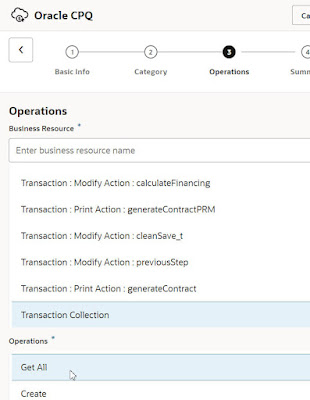


I map the following fields to the similarly named variables I created earlier - 


Then comes a Switch on whether Quotes have been returned - The condition is configured as follows - 


The Otherwise Path just flips the variable to 'false' - 


I add an Assign action to Route 1 - this is essentially a placeholder for logic to come later. I also increment the offset - 


I then test the integration - I see the fetch count is 15 - 

I execute the following in a browser 
https://myCPQ/rest/v14/commerceDocumentsOraclecpqo_bmClone_1Transaction?totalResults=true

and see the totalResults = 306


This fits in well as the counter started at 0, so we had 16 fetches - 15 with 20 quotes and 1 with 6 quotes.

Back to the Integration Canvas - I now iterate over the quotes returned and select each for update. I use the same REST api as I see, when doing the same in the CPQ UI - _open_transaction


I specify this as follows in OIC - 


I need to map the following field - 


The source is here - 


I also need to set the target field to a value of "-1". This ensures a new cache id will be generated.


The next step is to update the quote header and save the quote. We use the cleanSave_t api. 

This is the modus operandi in OIC - here I use the generic OIC REST adapter, just to show how that works with CPQ - 

Creating a Generic REST Connection to Oracle CPQ


I will invoke the following api - 


btw. the api docs are here.

Back in the design canvas - I have dropped the REST connection and named it SaveUpdatedQuote.


It is configured as follows - 


The full request payload can be found at the end of the post. In this simple scenario, I am only updating the following field - Title. 

You will see this field in the Documents structure of the request payload. 


The mapping is simple - 


Map the id from the current quote.
Map the Cache instance id returned by the _open invoke. 
I also hardcode the Prepared By Title to "Set By OIC".

I run the integration and validate in Oracle CPQ -

The Prepared by Title for each quote has been set accordingly - 


We can improve throughput for this use case by splitting the integration in 2 - 

Integration 1 - reads from CPQ in batches of 20, while integration 2 does the _open and _cleanSave. Both integrations are async, with integration 2 giving us a degree of parallelism. 


Sunday, September 12, 2021

#877 OIC Integrating Oracle Hospitality and Oracle CPQ

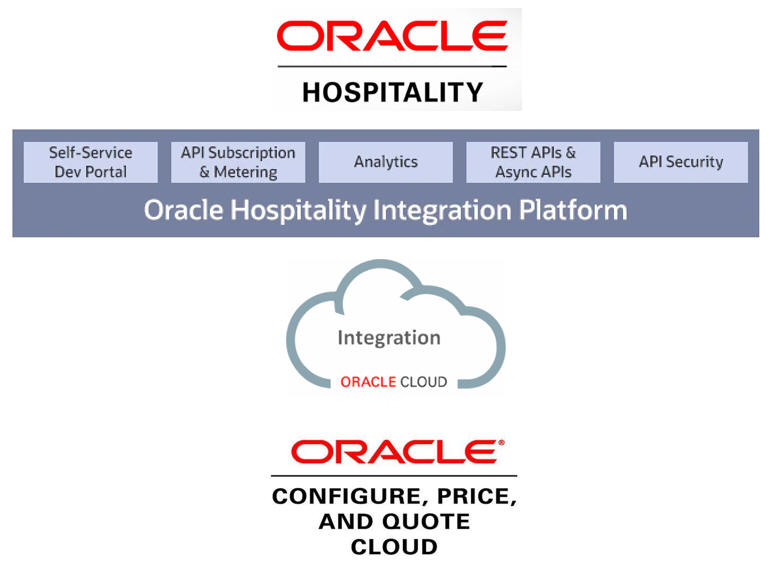
This is an interesting assignment - show how bi-directional integration between Oracle Hospitality and Oracle CPQ could work. In this case, CPQ is being used as the hotel call center reservation app. Here is a component overview -


Think of a chain of hotels, leveraging CPQ in their call center as their room reservation tool. Commiskey Hotels has 7 properties, scattered across the northside of Dublin city, and I need to get their room rates into CPQ, so that my call center folks can start providing visitors with the holiday of a lifetime.
  
The base data for the reservations - room availability - is stored in a CPQ Data Table, format is as follows - 


The reservation UI, surfaced in Oracle CPQ, leverages this data for finding the right room for the guest.


Data Tables are used to store product and commerce data. They can be accessed from any part of the Oracle CPQ application where BML is used. BML = Big Machines Extensible Language - Oracle CPQ's scripting language.
Finally, a BML script will be used in Oracle CPQ to invoke the OIC integration to create the room reservation in Oracle Hospitality.  

OIC interfaces with Oracle Hospitality via OHIP (Oracle Hospitality Integration Platform). Check out the posts here for an introduction to OIC and OHIP.

Integrations - Oracle Hospitality to CPQ

Here I have 5 integrations - 
  1. getRoomRates 
    1. invokes the OHIP api to get rates
    2. invokes the integration - updateCPQDataTable
  2. updateCPQDataTable
    1. invokes the CPQ REST api to update the Data Table with the daily rate info.
  3. deployCPQDataTable
    1. invokes the CPQ REST api to deploy the Data Table, essentially making the data live and visible in the reservation UI.
  4. getRatesForProperties
    1. invokes getRoomRates for each property.
  5. updateOHIPToken
    1. This is a scheduled OIC integration that updates the Authorization token (stored in an OIC Lookup) every 45 minutes. 
Firstly, a short discourse on the subject of room rates. Hotels have different types of rooms e.g. king Room, 2 queens room, suite, junior suite. Room types could also include a reference to such things as views e.g. King Room with Lake view etc. Net, net, hotels can have many room types.

Each room type can have different rates. You have probably heard of the rack rate - this is the price that a hotel charges for a room before any discounts have been applied. This can often be set artificially high, to make discounts sound really compelling. 

Room rates can differ for a stay in the same room. We are all used to business hotels charging less at the weekend, so a stay from Thursday to Sunday could include different room rates. 
Room availability and the relevant rates are retrieved using the OHIP api - 

{{OHIPHostName}}/par/v0/hotels/{{HotelId}}/availability?roomStayStartDate=2021-09-01&roomStayEndDate=2021-09-02&roomStayQuantity=1&adults=1&children=0&limit=20&includeClosedRates=true

Note the parameters - limit - specifies the number of records to be returned, includeClosedRates will ensure that rates for unavailable rooms (e.g. already booked) are also returned.

I try the availability api in Postman to get a handle on the data structure returned - here I check for a room from 01 to 05 October - essentially for 4 nights 01, 02, 03, 04 October.


As you can see, the Rack rate for a Superior room for the 4 nights 01 - 04 Oct is $400. 
The target Data Table in CPQ has rates per night, so for the above, I would need to create 4 rows with the same rate amount in the CPQ Data table. As discussed above, we could of course have multiple rates for this stay period.

In this particular scenario, I need to sync rate data between Oracle Hospitality and CPQ. I will need to do this for more than 1 hotel, and, per default, syncs will be executed with start and end dates being within the same month. The latter is for the POC only,  making date processing easier for me.

In the OIC integration, I will need to do some array processing, i.e.

Within roomStays
  • For Each  set of room rates
    • For Each set of rates
      • For Each rate...


But this is simple to design in OIC. 


Next step is to insert the room rate data into the CPQ Data Table. This functionality is not currently covered by the CPQ adapter which focuses on supporting the CPQ Commerce api.

Therefore I use the OIC REST adapter and invoke the CPQ REST api directly. 
Step 1 is to create a new REST adapter based connection e.g. OHIP-REST-CPQ. I provide the CPQ base url and enter my CPQ username / password. 

I consulted the CPQ REST api docs - finding the Create Data Table Row api. The endpoint is as follows - /rest/v12/adminCustomYourDataTableName.


As usual, I try this REST invoke in Postman then "transcribe" it to OIC.


Once the data is in CPQ, the data table needs to be deployed. This will ensure data changes are reflected in the UI. Again, same modus operandi - try out in Postman, transcribe to OIC - creating a separate integration for this functionality.


 -


I mentioned earlier the need to process multiple properties. I create a separate integration for this, it accepts an array of properties and invokes getRoomRates for each property.

Finally, I also have a scheduled job that updates the OHIP token every 45 minutes. The token is used for authorization purposes in each call to OHIP. This scheduled job, retrieves the token from OHIP via - 


It then invokes the OIC REST api to recreate the lookup table (AA-Hospitality-Lookup) that includes the Bearer token value. 


I also have a couple of other lookups - 


For example, each hotel will have it's own rate plan codes. Room types have a code and a description e.g. code ABCD may equate to Classic King Non-Smoking.
  

Integrations - CPQ to Oracle Hospitality

Very simple integration here - create a reservation in Oracle Hospitality - 


Check my previous post for details on implementing the Reservation integration.
This integration will be invoked from CPQ - all we need is OIC endpoint and credentials, naturally I could put OCI API Gateway in between to mask the credentials. This invoke is implemented in CPQ BML -