Showing posts with label SOA CS. Show all posts

Monday, July 17, 2017

#585 APIP CS managing Service Bus REST APIs

Simple scenario here -
I have a BPEL process running on SOA CS. This BPEL process validates the status of a visa.
The functionality is then REST enabled, via a Service Bus process, also running on the Oracle Cloud Platform.

Defining the API in Apiary

Just to show the API Design First Approach -


Naturally, I can test the API in Apiary, via it's Mock Server.
This allows my mobile developer to go off and create her
compelling mobile app, while I concentrate on the backend business
service implementation.

The Business Service Implementation


Here is the BPEL process - not much to it, but you get the idea!


Here is the Service Bus process -


I test this locally, using the embedded SOA Server that comes with JDeveloper.

The SOA CS Environment


I check for the IP address of the SOA Server by going to the Compute Cloud Service Console -

I have obfuscated the public and private ips in the following screenshot -

I will use this when deploying the artifacts from my local JDeveloper to SOA CS.

Deploying to SOA CS

I deploy the SOA composite to a SAR file and import it intoo SOA CS via enterprise manager.
Now to the Service Bus project -
Ok, one should script this, use a deployment plan etc. but the lazy man's way is simply
to change the references to localhost in the Service Bus project -


Again, the ip address in the screenshot has been obfuscated, but you get the drift.
Note: there are 2 occurrences of the ip address in this file - I change both of them.

I now export the Service Bus project and then import into Service Bus on SOA CS -


Networking on SOA CS


You may have noted port 9074 on the wsdl screenshot.
This is my https port, 9073 is http.
I need to ensure these are open. I do this via the Compute Cloud Service console - Networking


Here is the security application -


I have done the same for port 9074.

Test the API using Postman


Yes, I have wiped the name and surname.

So it is working fine.

Now back to API Platform CS to manage the API.

Create the API Definition in API Mgr Console


The REST endpoint is
http://mySBIP:9073/VisaChecker1SB/VisaCheckREST/visaCheck?emiratesId=12345

I create an API definition based on this. Check out my posts on API Platform CS on the atomic steps
to do this.

Here are a couple of screenshots -


Here I create the link to the project in Apiary -


I then deploy the API to a gateway and publish to the APIP CS developer portal -

The developer can find the API and test it out.


Great Stuff!


Wednesday, June 28, 2017

#584 SOA CS / MFT CS 17.2.5 released


New Features include -

    - In-Memory SOA
    - IWS reports
    - Circuit Breaker
    - Includes WLS Continuous Availability pre-requisite


Provisioning has also been simplified - auto-creation of Oracle Storage Cloud Container etc.

Also a new look & feel for the SOA CS UI.


Click here to read.

Tuesday, June 6, 2017

#579 SOA Suite / SOA CS Training from the best

Great opportunity to skill up on SOA Suite or SOA CS from the best.


A live virtual class from Middleworks - check it out here

Thursday, May 4, 2017

#567 Oracle Integration adapters Matrix

Excellent doc recently published on OTN.

This doc provides clarity in respect of adapter availability on ICS, SOA CS and SOA Suite on premise.


Click here to view.


Tuesday, November 29, 2016

#537 Leveraging the Eloqua Adapter in SOA CS

SOA CS setup


1. download the Eloqua certs and install on SOA CS via em


Note the 3 certs -
Symantec
Verisign
Eloqua

This reflects the following -


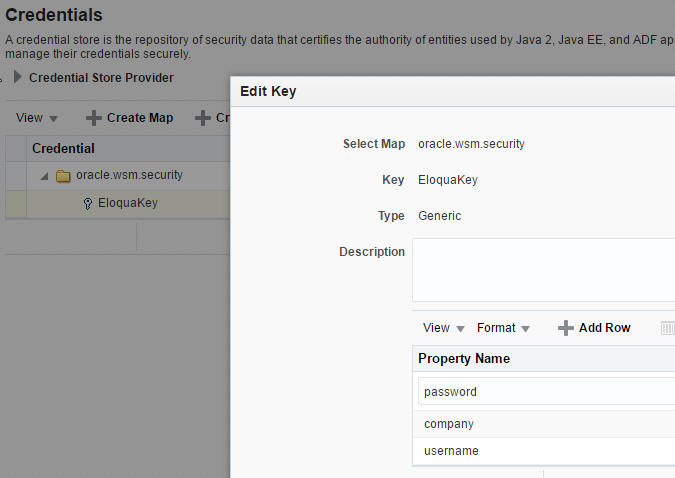
2. Create an entry for the EloquaKey you will be using in your SOA composite -


Create a new Map oracle.wsm.security
Within that, create your EloquaKey -


3. amend setDomainEnv.sh to leverage the store -


Change the EXTRA_JAVA_PROPERTIES related to the trust store
Replace: • -Djavax.net.ssl.trustStore=%WL_HOME%\server\lib\DemoTrust.jks 
with:
-Djavax.net.ssl.trustStore=kss://system/trust - Djavax.net.ssl.trustStoreType=kss

Re-boot the SOA Server

Create a simple BPEL process that leverages the Eloqua adapter 


The BPEL process -


Deploy and test on SOA CS


Validate in Eloqua


Monday, April 4, 2016

#482 - Oracle Partner Webcast on ICS and SOA CS

Calling all ORCL partners in EMEA -


Click Here for more details and registration.

Thursday, February 18, 2016

#476 Increasing the DB size on SOA Cloud Service

This is a relatively simply process -

Go to Database Cloud Service Console and select your DB -

Then click the menu option - Scale Up/down


You will see the following message afterwards -


So, now, go to the Java Cloud Service console and Stop/Start your SOA Instance.


Friday, January 22, 2016

Wednesday, December 16, 2015

#463 SOA CS --> API Manager Flavour

This is essentially a revamp of a previous post on API Manager,
albeit for the SOA CS environment.

You can read the original post here

I created an API Manager instance on SOA CS -


Here are the menu options -


Let's look at the Fusion Middleware Control -
Here we can create API Manager users.
I have covered this is a previous API Manager post, but to save you time,
here are the screenshots -


I create 2 users, curator, consumer -


Set the roles -


Above, the 2 api manager roles.
I assign my users to these.


I can now login to the API Manager Portal -

Url format: https://yourAPIManagerHost:7002/apimanager


The catalog is empty -


I create a simple credit card validation service and deploy it to a war file.


I then go to the weblogic console of API Manager and deploy the war.


Check out the WSDL

-


Now I go to the service bus console on API Manager -

Here I create a simple Service Bus process to call the web service and
validate a credit card.


I test the Proxy Service -


Next step is to publish the proxy, so that it will appear in the catalog -


Now I go back to the API Manager Portal -


Managed / Unmanaged

From the docs:

A managed API is an access-controlled API. Per-user metrics are also available for
managed APIs. In order to successfully invoke a managed API, a user will first need to
create an application and subscribe to a given managed API. The client must then invoke
the API providing the API Key for the call to be successful.

Unmanaged APis can be invoked without subscription and without passing an
entitlement key at runtime.

Here are the details from the console -


So how do I make this managed?
Simply go back to the SB console and set it.


The API Manager console is updated accordingly -


Now how does a consumer use this API?


Login to the portal as the consumer user -


Subscription is done via applications -


Now I just need to click on the icon on the right, to add the ValCC API.


Note the API Key: c77ab0d8-abc7-4d95-96fa-22fbba99077a

Embed this entitlement key as a http user header - X-API-KEY when invoking the API
X-API-KEY: c77ab0d8-abc7-4d95-96fa-22fbba99077a

The following test from SOAP-UI was done on another cloud instance, hence the different X-API-KEY value -


I get the following response, if I delete the header from the request -