Showing posts with label Eloqua Adapter. Show all posts

Wednesday, August 5, 2020

#789 OIC - Syncing Netsuite customers and contacts with Eloqua

Introduction

What follows is a simple example of syncing Netsuite Customers/Primary Contacts
with Eloqua Accounts/Contacts


I create a new customer in Netsuite - Commiskey Botanicals with Joe Strummer as a contact


I run the integration - and validate in Eloqua -


So how did I do this?

An raibh sé draíochta? - you may well ask, but no, no magic, just OIC.

So back to the integration -

I began by creating a Saved Search in Netsuite - think of this like SQL for dummies - you pick the business object you're interested in, join with other related objects and then you're finished; you have the data you require.


In the Results tab, I specify the fields I want returned. Notice the Contact: First Name etc. - this is the join I'm talking about.


The list of fields available in Saved Search for Netsuite objects is available in the Netsuite Records browser here


I run the Saved Search in Netsuite -


I will invoke this from the integration -

Anatomy of the Integration


I create a scheduled orchestration, adding a parameter - dateLastRun - this I will update at the end of the integration.

That parameter is used when invoking the Saved Search.

GetNewCustomers - configuration


I check the total number of records returned.
If > 0, I use the Eloqua adapter to create the account and contact.


Mapping to ImportAccount -


ImportContact -


Last step is to update the schedule parameter with the current date time -


Very simple and succinct - granted this is the bare bones of the integration;
I have not added any error handling. For those interested, this topic is covered in a previous post here.


Friday, April 7, 2017

#558 ICS Eloqua adapter revisited

I sometime get questions on which use cases can be supported via the ICS Eloqua adapter.
So here are some details from the docs -

The Oracle Eloqua Cloud Adapter enables you to create an integration with an Oracle Eloqua Cloud application. You configure the Oracle Eloqua Cloud Adapter as a trigger (inbound) connection (Oracle Eloqua Cloud to Oracle Integration Cloud Service) or as an invoke (outbound) connection (Oracle Integration Cloud Service to Oracle Eloqua Cloud).
Oracle Eloqua Cloud provides cloud-based marketing software that delivers marketing automation for industries such as finance, health, media, real estate, sports, entertainment, and so on. Oracle Eloqua Cloud simplifies marketing procedures by delivering leads targeted to new customers. Oracle Eloqua Cloud helps manage and organize marketing segmentation and marketing workflow.
The Oracle Eloqua Cloud Adapter accelerates integrations between Oracle Integration Cloud Service and Oracle Eloqua Cloud systems. The Oracle Eloqua Cloud Adapter synchronizes accounts, contacts, and custom objects from Oracle Integration Cloud Service to Oracle Eloqua Cloud systems. Accounts can only be synchronized from Oracle Integration Cloud Service to Oracle Eloqua Cloud systems, and not in the other direction.

The salient sentences are -

The Oracle Eloqua Cloud Adapter synchronizes accounts, contacts, and custom objects from Oracle Integration Cloud Service to Oracle Eloqua Cloud systems. Accounts can only be synchronized from Oracle Integration Cloud Service to Oracle Eloqua Cloud systems, and not in the other direction.

Here is how it is implemented in the ICS adapter -


So this is a one way adapter for keeping the Eloqua Business Objects - Accounts, Contacts, Fusion Leads, Opportunity, purchase History in sync with other apps. I assume that "Vehicel" is a custom business object defined by one of the Eloqua instance users,

The Eloqua adapter can be used as Trigger as well as Invoke, since version 16.4.5.
Use of the Eloqua adapter requires an Eloqua app to be installed.
Details can be found here


So what about other use cases?
Eloqua provides a rich REST api.


REST API details can be found here

Now let's look at the Eloqua adapter as a trigger in ICS -


btw. the Eloqua adapter uses the Eloqua Bulk API under the hood.


Happy Marketing!


Tuesday, November 29, 2016

#537 Leveraging the Eloqua Adapter in SOA CS

SOA CS setup


1. download the Eloqua certs and install on SOA CS via em


Note the 3 certs -
Symantec
Verisign
Eloqua

This reflects the following -


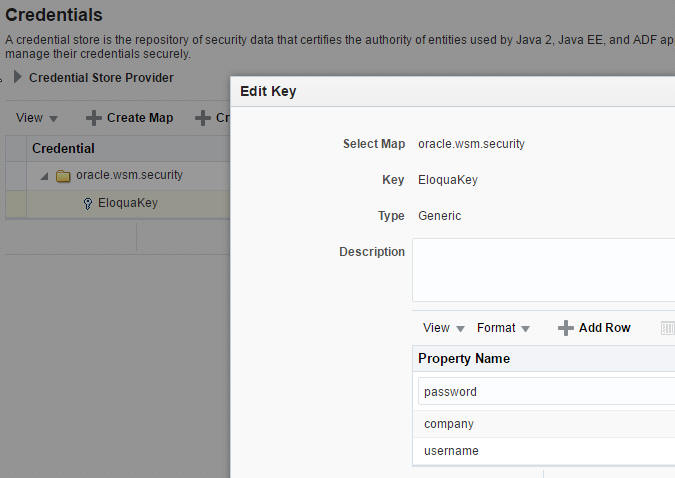
2. Create an entry for the EloquaKey you will be using in your SOA composite -


Create a new Map oracle.wsm.security
Within that, create your EloquaKey -


3. amend setDomainEnv.sh to leverage the store -


Change the EXTRA_JAVA_PROPERTIES related to the trust store
Replace: • -Djavax.net.ssl.trustStore=%WL_HOME%\server\lib\DemoTrust.jks 
with:
-Djavax.net.ssl.trustStore=kss://system/trust - Djavax.net.ssl.trustStoreType=kss

Re-boot the SOA Server

Create a simple BPEL process that leverages the Eloqua adapter 


The BPEL process -


Deploy and test on SOA CS


Validate in Eloqua