Simple scenario here -

All the composite does is accept in an order and then PUTs the order to the FTP server.
As FTP server I am using Cerberus FTP.
I configured a new user niall

Note: the root folder for user niall is D:\Work\envs\CerberusFTP\NcFolder
Here are the Constraints -
niall can only use sftp


So user niall will use the above public key to authenticate.
So where did this key come from?
I used PuttyGEN to create public/private keys on the machine, hosting SOA Suite.

These keys are stored here on my machine - in D:\Work\keys

Now back to the composite -
Here is the configuration of the FTP adapter -

Note the JNDI Name eis/Ftp/ncSFTPAdapter.
I now go to the Weblogic console and configure this resource -

Properties 1 - 10: no changes.
Properties 11 - 20: change Host value to FTP Server host

Here is the ip address from the FTP Server console -

Properties 21 - 30: no changes.
Properties 31 - 40: change ListParserKey = WIN

Properties 41 - 50: set PrivateKeyFile to point to the SOA Host
private key.
change port to 22.

Properties 51 - 60: no changes.

Properties 71 -74:
Set UseSftp to true

Save and update the ftpAdapter deployment

Deploy the composite and test -

--- GET ---
Here is my composite -

Adapter config as follows -


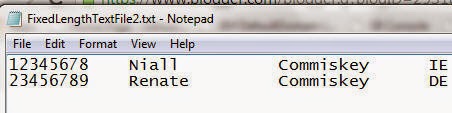
I drop a file into NcFolder

It is picked up and an instance of the composite is instantiated.

All the composite does is accept in an order and then PUTs the order to the FTP server.
As FTP server I am using Cerberus FTP.
I configured a new user niall
Note: the root folder for user niall is D:\Work\envs\CerberusFTP\NcFolder
Here are the Constraints -
niall can only use sftp
So user niall will use the above public key to authenticate.
So where did this key come from?
I used PuttyGEN to create public/private keys on the machine, hosting SOA Suite.
These keys are stored here on my machine - in D:\Work\keys
Now back to the composite -
Here is the configuration of the FTP adapter -
Note the JNDI Name eis/Ftp/ncSFTPAdapter.
I now go to the Weblogic console and configure this resource -
Properties 1 - 10: no changes.
Properties 11 - 20: change Host value to FTP Server host
Here is the ip address from the FTP Server console -
Properties 21 - 30: no changes.
Properties 31 - 40: change ListParserKey = WIN
Properties 41 - 50: set PrivateKeyFile to point to the SOA Host
private key.
change port to 22.
Properties 51 - 60: no changes.
Properties 61 - 70: Set
ServerType=win
Username=niall
(niall is, of course, our ftp user)
Properties 71 -74:
Set UseSftp to true
Save and update the ftpAdapter deployment
Deploy the composite and test -
--- GET ---
Here is my composite -
Adapter config as follows -
I drop a file into NcFolder
It is picked up and an instance of the composite is instantiated.