Tuesday, April 19, 2016

#490 IaaS - Compute Cloud Service - Creating a simple Instance


Introduction


In this post I detail the creation of a simple instance in Compute Cloud Service.

I view the details -


Note: The REST Endpoint.
This facilitates us in performing operations on an Oracle Compute Cloud Service resource by using
REST API calls.

The steps are essentially as follows -

1. Generate an SSH key pair on your local system.

2. Upload the SSH public key to your Oracle Compute Cloud Service.

3. Reserve a public IP address for your instance.

4. Create storage volumes to boot the instance from, or to store your data and
applications.

5. Create your instance, associate a public IP address with it, configure it for
SSH access, and attach the storage volumes that you created, if any.

6. Configure the instance for HTTP access.

Generate the key pair

I use putty for this -


Upload to Compute Service


Reserve a public IP Address


Create Storage Volumes

By default, Compute Cloud Service instances are set up to boot from a nonpersistent disk.
However, we can create a bootable storage volume and use this as a persistent boot disk.
That ensures any changes you make to the boot disk aren't lost even when you
delete the Compute Cloud Service instance.


Wait a couple of seconds...


Create the Instance


Wait a couple a seconds...


Now I can access this instance over ssh, once I have the private key.
I use Putty and set Autlogin user to opc




Monday, April 18, 2016

#489 IaaS Partner workshop in Dublin, week beginning May 9th

My colleague and I are running a 5 day IaaS workshop for Oracle Partners in Dublin
the week beginning May 9th.

The broad agenda covers -

  1. IaaS - Infrastructure as a Service
  2. DB CS - Database Cloud Service
  3. JCS - Java Cloud Service
Full agenda here

(you will need an Oracle.com account to view)

How to Register is detailed here
You can always ping me if you have any questions.

See you in Dublin!

Friday, April 15, 2016

#488 ICS 16.2.1. FTP Adapter and Scheduler

Simple example leveraging the above -

Here are my in / out directories in my ftp server -


Here is the simple test -


File is picked up and written to out directory -


Here is the configuration of my ftp adapter - thanks Angelo for the
ftp server access.


Here is the Integration -


Here is the Read Configuration -


Here is the Write configuration -


Scheduling

Here I can define a schedule -


I can Pause the Schedule at any time -


Schedule is now active.
Pause the schedule when you need to temporarily prevent this integration from running.


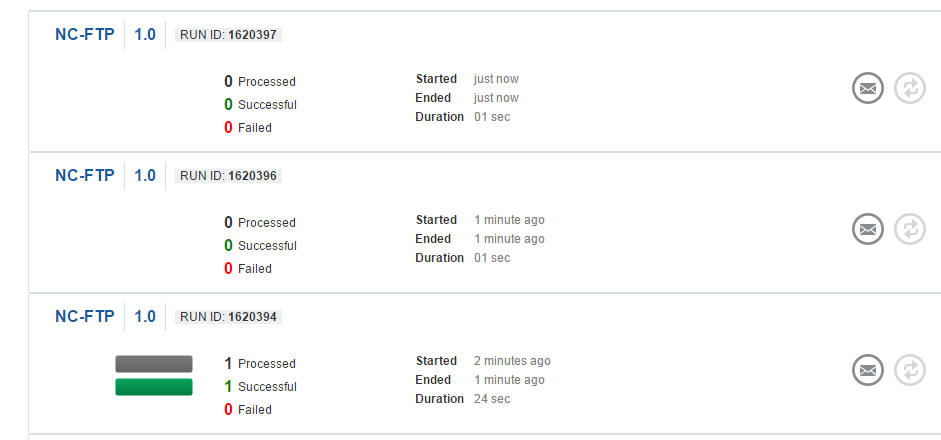
Tracking


Note, we see only the run - 1620394, actually processed a file.
I now click on the Run Id icon or the Message icon on the right.


I click on the File Name to see the actual instance.


Simple, yet very effective...


#487 ICS 16.2.1. DB adapter (INSERT)

Introduction

Not much change from the 15.x releases.

In this post I detail an example of leveraging the on-prem DB adapter
to INSERT a row into a DB table.

I also look at some troubleshooting, in this case PRIMARY KEY Violation.

Simple Integration

Here is my simple integration -


My source is based on an abstract customerService wsdl.
My target leverages the on-prem DB adapter.

It is configured as follows -


The adapter config in the integration is as follows -


The Mapping -


The Test -


The Result -


Troubleshooting

Now, what happens if we drop the customers table?


Firstly, let's look at the design time -


The query is still syntactically correct.
So no check is made against the DB to see if the table exists.

Now here is a second integration I am testing -


As you can see, CreateCustomer is expecting a response,
but none is returned from the Invoke on NC-DB.

So, currently, in order to get the status of the attempted DB insert,
one can embed the INSERT in a PLSQL Stored Procedure of Function.

Here is a simple example of such a Function -

   CREATE OR REPLACE FUNCTION f_ins_cust (
      in_custNr  IN  VARCHAR2,
      in_custName  IN  VARCHAR2,
      in_custSurname  IN  VARCHAR2)
RETURN VARCHAR2
IS
v_status varchar2(255);
BEGIN
      v_status := 'Success';
      INSERT INTO CUSTOMERS VALUES (in_custNr, in_custName, in_custSurname);
      Commit;
      RETURN v_status;
      exception
        when others
          then
            RAISE;
               
END;
  /

Here is the ICS integration that calls the above PLSQL function -


Here is the DB adapter Invoke configuration -


Request Mapping -


Response Mapping -


I activate and then test.


I now re-execute the test with the same payload.
I expect a Primary Key violation error - and that is what I get.


I can also download the ICS logs and see the error there -


Just in case you experience intermittent connectivity issues with your on-prem DB,
just go to the DB connection menu and click Refresh Metadata -
thanks to Umesh, for pointing this out.