Thursday, February 27, 2020

#753 - OIC --> Using the Shopify adapter


The Hare of the Dog Pub is on Shopify - at least for the next 14 days.
That's how long a trial account lasts.

Oracle Integration has just released the Shopify adapter -


So let's try this out -

First step is to create a private app in Shopify -


I copy the api key and password for future use.

I also create a customer and a product in Shopify -


Creating the OIC Shopify Connection


Now to the OIC Shopify adapter configuration -

Use the API Key / Password for username/password


Then Test - looks good - or, as we say in Ireland - it's grand!


Using the Shopify Connection in OIC


Query options -


Retrieve Customers 

Query Customer options -


REST API docs are here

My integration Trigger is of type REST and has 2 parameters -
idList - list of customer ids
limit - max nr of customers to retrieve.

I map as follows - note, I only map the limit -


I activate and test - getting the following error -


Permissions error on the part of Shopify.

So I return to Shopify and activate read-write on customers -


I test again -


Create a Shopify Customer


Now to create a new customer -


Here is target mapping -


I change the REST trigger to include a new customer payload -


I map the response -


I activate and test -


I validate in Shopify -


Now for the Update...

Update a Shopify Product via OIC


Logic here is that I loop over the products and set the Tag on each to Haut Couture.
What else would you expect from Hare of the Dog?

Get Products configuration -


Request mapping just sets the limit(50)


Switch condition -


ProductUpdate mapping -


I have created a variable for the tag -


I activate the integration and test -

BTW. here are my products in Shopify -


Here is the trace -


I check my products in Shopify -


Tuesday, February 25, 2020

#752 - OIC for Oracle SaaS on OIC Gen 2


Specifically, every integration you create has an endpoint in an Oracle Cloud SaaS application, 
every Visual Builder application you create uses at least one business object or API call from an Oracle Cloud SaaS application, and every process application you create includes at least one business object or API call from an Oracle Cloud SaaS application.

Read all about it here 

Thursday, February 20, 2020

#751 OIC - DocuSign adapter

I just had a customer asking me about this, so I thought it was time for me to try it out.
To be honest, I have not looked at this adapter previously, but nothing like customer questions to whet the appetite.

So what does DocuSign offer?
eSignatures - a way to digitally sign documents etc.
In fact, much more than this. You can check it out here

As usual I didn't start by reading the DocuSign adapter doc, the anarchist/autodidact in me rebels against such pedestrian behaviour; however, I strongly suggest you do peruse it. Just click here

btw. text taken from the docuSign REST api docs is shown in italics.


Creating a DocuSign Developer's Account

Step 1, as with all app adapters is to get access to the target app, in this case, DocuSign.
A very simple task - just create a DocuSign developer's account.


Create the developer account and a Sandbox.

Then login -


Click on Admin -

Check out the menu on the left -


Click on API and Keys -

Add an App - you will get an Integration Key generated -


Copy the Integration key, you will need this later.


Click on the App, in my case OICApp  -


Copy the Secret key, you will need this later.

add the OIC redirect URI to your App definition -

https://yourOIC:443/icsapis/agent/oauth/callback


Create the DocuSign connection in OIC 

Note the Scope: AFAIK - DocuSign supports 3 -
signature, signature extended and impersonation.

I choose signature extended.

Click Provide Consent -


The Provide Consent will require you to enter the following -

Client Id - Integration Key
Client Secret - Secret Key
Redirect URI - https://yourOIC:443/icsapis/agent/oauth/callback
Scope - signature extended
Path to persist Access Token - https://account-d.docusign.com/oauth/token

Now that our connection is complete - on to the integration.


Creating an integration with DocuSign

Now to my use case - Request Signature on Single Document by Email - in this case, a timesheet.


I convert this pdf to base64, I will need this later.

Now to the configuration of the DocuSign connection in this integration -


So what are Envelopes in DocuSign speak?
Check out their REST API docs here

Now let's look at the mapping -


The payload is loosely based on that described in the DocuSign API docs -


full doc here

Let's go thru the request fields I've set -


let's check out documents -

A Document object represents the document content to be reviewed or signed by a recipient and contains metadata such as the document’s ID, name, and file extension. Documents are always defined as part of the documents property in an envelope or a template.

The document file included in the object can be a file in a variety of formats, including PDF, Word, HTML, and others. When you add one of these files to an envelope, the DocuSign platform converts it to PDF and stores it as base64-encoded ASCII.


Hence me converting my Timesheet.pdf to base64 earlier.

Net, net, what I expect to happen here is that I get sent an email asking me to sign Timesheet.pdf.

I activate the integration and test - and, quelle suprise, I receive the email 


I click on Review Document - and then click on Start


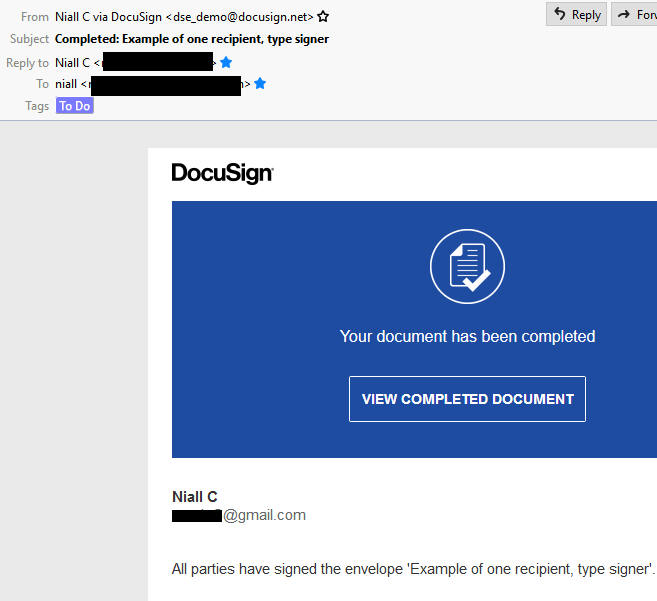
I click Continue and, in due course, receive the confirmation email 


I view the completed document -


All so easy with OIC.


Tuesday, February 18, 2020

#750 - Oracle Cloud Security - WAF et al - DDos protection for OIC

Great article from our security guru, Paul Toal


Read it here

Thanks to my colleague Matt B. for the pointer.

Saturday, February 1, 2020

#749 OIC Feature Flag - Data Stitch


Data Stitch action in Orchestration

Available to you as feature flag
(oic.ics.console.integration.stitch-action)

Available from version -


All text in italics is from ORCL docs.

This is a new capability within the orchestration designer that enables customers to initialize and progressively update complex variables within integration flows. IT specialists can now use the "Global Variables" section of the designer to define new variables in the integration flow that can hold complex content and use the data stitch action to progressively populate and/or manipulate whole or parts of the document. You can simply drag and drop the "Data Stitch" action from the component palette into the canvas and graphically model the data assignments as an ordered sequence of statements to populate scalar or complex variables wholly or partially.  Designers can add multiple data stitch actions at various points in the integration flow to update existing or append new sections to previously declared and populated variables using data from various sources. 

Couldn't have said it better myself, net, net -
Data Stitch allows us to create and manipulate complex variables within an integration orchestration.

This was something missing in OIC, for those coming from SOA Suite/SOA CS.


Now to a simple example -

Data Stitch Example

I retrieve a customer file from Box, as follows -
Box adapter how to is here


Above screenshot shows the file format.

My integration will be REST based -
Request will be the folder_id required to locate my file on Box.

Response is as follows -


As you can see, the response is simply a subset of the data returned by ReadFile.

Global Variables 

Another new feature in OIC, here I create a Global variable to hold the customer data -


Note the new (x) icon above.


I set the variable to the type of CustomerList (the ReadFile response).

Note: you can include up to 20 Global Variables in an Orchestration.

Again, very similar to what we currently have in SOA Suite -


Data Stitch Action 

Now I map the response from the file read (CustomerList)
to this variable via the Data Stitch action -


Note the other Operations available -


Append essentially provides the same functionality as its pendant in SOA Suite -


Now back to OIC...


I can now leverage this in the mapping of the Integration response -

I deploy and test the integration -


Built-in OIC REST API Tester

Note the new built-in Tester for REST interfaces - this allows one to test on's integration from within OIC; this certainly saves me for having to open Postman, in order to do the same.


Net, net, OIC is going from strength to strength - so get onboard!