Tuesday, October 17, 2023

#991 OIC Healthcare


OIC 23.10 includes the first release of OIC Healthcare. Initially, this is feature flag driven, but should be generally available soon. Thanks to my colleague Steve T. - the real Healthcare SME - for his support here!


The above screenshot shows the Healthcare-> Documents page, where you can create your entries for HL7 documents, such as patient registration etc. The UI is very intuitive - 


The document standard supported is HL7V2.


The Document Versions supported range from 2.3.1 to 2.9.

Finally, the Document type list - this includes an exhaustive list of HL7 docTypes -


I will use the following in the example integration below -


Within Healthcare, you can also create your own schemas - 


These are useful when you need to deviate from the standard HL7 definitions. This is probably very much the case, as with B2B. There is a standard but many users have their own custom segments/ fields etc. 

Here I have created a schema for Patient Registration based on the standard ADT_A04 definition, note how easy it is to add custom entries etc.


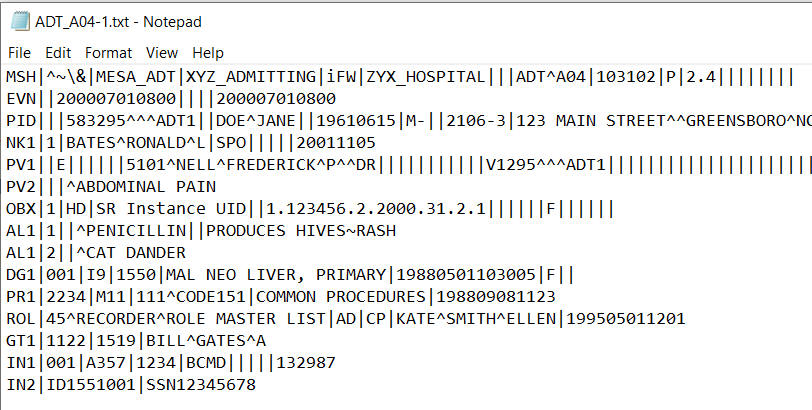
Maybe now is a good point to look at the message structure - I'm new to HL7 but there is plenty of collateral out there on how these messages are structured.


I will not go through each individual fields but let's look at the segments - 

MSH - Header - this contains sender and receiver information, dateTime, message type etc.

EVN - Event Type
PID - Patient Identification 
NK1 - Next of kin
PV1 - Patient Visit
PV2 - Patient Visit (Additional Info) 
OBX - Observation / Result
AL1 - Allergy Information 
DG1 - Diagnosis Information
PR1 - Procedures
ROL - Role (from a personnel perspective e.g. Recorder/Registrar
GT1 - Guarantor information (from a financial perspective)
IN1... - Insurance information

It's good to have an appreciation of the document, before we start processing it.

Now to the OIC Healthcare action - this provides the following functionality - 


Let's go through these operations, pardon the pun.

Match and Translate inbound message - this is the inbound pre-processor, so to speak. It validates if the incoming document adheres to the type specified, e.g. is this a valid ADT_A04? 

Convert message reference to document - One of the outputs of the previous operation is a healthcare message reference. This convert operation takes that reference and extracts the payload data into xml format.

Translate to outbound message - this converts the xml format into HL7 for outbound processing.

My demo will be an inbound use case so I will be using the first 2 operations.
The integration is simple - a scheduled integration that downloads HL7 files from the OIC file server, via the ftp adapter.


ftp download action is configured as follows - 


Healthcare - match and translate configured as follows - 


The output of this action is shown below; as you can see, it includes the healthcare message reference.


The input to this action is the File Reference from the FTP Download action -


The next action is Healthcare - Convert message reference to document - it is configured as follows - 

The input is the healthcare-message-reference from the previous Healthcare action


Let's test this!

I check the output of the convert action -


One would probably adopt the following pattern, when implementing such integrations -

Integration 1 - Dispatcher Router (match and translate)

Integration 2 - Message Processor - (Convert message reference to document + downstream processing).  

Summa Summarum

OIC Healthcare is another compelling offering within the OIC toolkit. As you have seen, OIC supports HL7 today. We support FHIR (Fast Healthcare Interoperability Resources) via the OIC REST adapter. OIC also ships an MLLP adapter - 


The Minimal Lower Layer Protocol is commonly used in HL7 document exchanges.  
For those interested, Steve has created a more detailed post here. So check it out!


Thursday, October 12, 2023

#990 - OIC Projects - RBAC

Here I look at the OIC Monitoring Role in respect of Projects RBAC. To this end, I have created a new OCI user and assigned them the OIC Service Monitor role - 


The user has been assigned the ServiceMonitor role. I see the following, when I login to OIC - 


At this level, I can monitor all integration flows, outside of projects.


However, I also need to be able to monitor integrations in a project - AA-ERP-Project -


The project has the following RBAC permissions - 


I try to access this project as my ServiceMonitor user - Niall MacCumascaigh - 


I now allow the Niall MacCumascaigh user to monitor the project -


Now I can monitor - note, the Design and Deploy buttons are disabled -


Summary

The table stakes for monitoring projects flows is the ServiceMonitor role. This will also give the user the ability to monitor all flows outside of projects. 


Tuesday, October 10, 2023

#989 OIC 23.10 - OIC Events Enhancements


The 23.10 release includes the following enhancements - 

  • Ability to retain subscription on "subscriber" integration deactivation
  • Large Payload support

Retain Subscription

In 23.08 you see the following, when you click on deactivating a OIC Events "subscriber" integration - 


 As you can see from the initial screenshot, 23.10 allows me to retain the subscription. Let's check it out -


Here are my 2 integrations - pub & sub.

I run the publish integration - 


I check in Observability - 


I now deactivate the "sub" integration -


Note: I do NOT check the Delete event subscription box.

I now publish the new orders 3, 4 & 5.


Checking in Observability -> Subscriptions, I see 3 retained events -


Let's reactivate the "subscriber" integration - 


check in Observability --> Instances - the 3 orders have been processed -


This retention feature currently applies only to events created in 23.10 +.


Large Payload Support

The payload size limit for the event is now dependent on the limit of the inbound (trigger) adapter.  

Monday, October 9, 2023

#988 OIC3 23.10 - xsl:for-each-group


Here is a simple example, in which I will read the following file - 


The goal is to parse this file and extract distinct band names. 

Ergo, grouping will be done based on band name e.g. Jethro Tull.

Again, the output file should just include distinct band names, in my case, the following - Jethro Tull, Horslips, Pink Floyd.


The input file, albums.xml, will be read via the FTP adapter, I then write the output file, which will have the following structure - 


for-each-group will be used in the mapper, so here is the map definition - 


Here are the settings - 

for-each-group is set to album
group-by is set to @band
name is set to band

I run the integration and check the output file - 


Wednesday, September 6, 2023

#987 OIC Integration Dependencies - who calls what?

This is a question I often get asked by customers - "Can I have a report of my integrations, listing their dependencies?"

e.g. Integration 1 invokes ATP and then another integration via local invoke.

Simple with the OIC APIs - let's start with a simple integration flow - 


Here I have a REST Trigger as source and 2 targets - 

1. ATP - Write2ATP
2. LocalAsync3 - Local Invoke

I create an OIC integration that will use the OIC Factory apis to get this information.

Here is the integration I created to retrieve the information - 


This integration invokes the following factory apis - 


Firstly, Retrieve Integrations - then I take the id returned and use it in Retrieve an Integration

I test the apis in Postman, before implementing the integration - 

Here is an extract from the Retrieve Integrations response - 

As you can see - the connection structure contains the salient info.


But let's use the 2nd api - the key is the id found here - 


So, with this id, I invoke the 2nd api - Retrieve Integration -  

/ic/api/integration/v1/integrations/AA_EF_ASYNC2|01.00.0000?integrationInstance=myOICInstance

Here we get more detail - note the connections structure - this lists the 2 connections explicitly used in the integration, namely the REST Trigger and the ATP invoke. But what about the local invoke? EF_ASYNC2 invokes EF_ASYNC3.

This info is in the endpoints section - 


  Here I see - 


In OIC, COLLOCATED always refers to Local Invoke. Note the name attribute - I set this in the integration to LocalAsync3 - I edit the integration AA_EF_ASYNC2 and change the name to that of the integration being invoked - 


Adhering to such a simple naming convention for local invokes allows me to plot the dependencies using the OIC factory apis. 

My integration simply logs this data, naturally, I could, also write this to a file.