Sunday, August 26, 2012

#197 Oracle Fusion CRM - Web Services part 1

Here is a short intro to FCRM web services, one of the main integrations points for Fusion Apps.
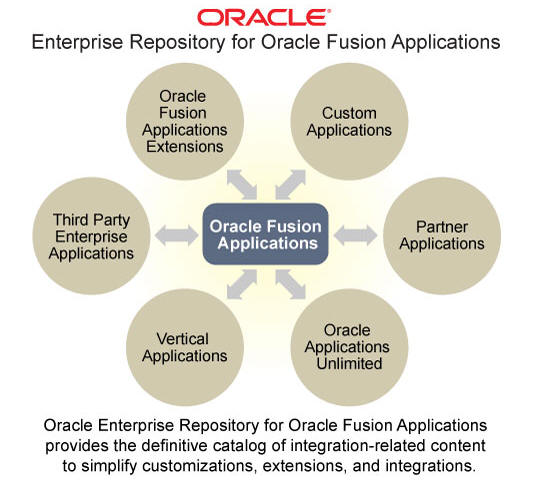
A previous post covered the Fusion Apps Repository which details which services are available.
Please see http://niallcblogs.blogspot.de/2012/07/fusion-apps-enterprise-repository.html

Let's take it from there...
The post covers basic get and create functionality and also details how to leverage FSM to find lookup values for web services call. A big thank you to my colleagues AngeloS and ChrisV for the latter! 

In the following scenarios I am using the CustomerInteraction Service.


Notice the Keyword External - If you are doing 3rd party integrations with Fusion Apps, make sure you leverage services with the Keyword: External. A good explanation for this keyword etc. can be found at http://rraheja.wordpress.com/2012/08/13/five-qs-fa-ext-webservices/

Import the WSDL into your tool of choice - this could be, for example, Oracle JDeveloper - HTTP Analyzer or some other tool such as SOAP UI.


Here you see 2 sections - callbacks and requests.

We will concentrate on the request operations.


The 2 GET operations are get and find

findInteraction - will return all interactions, if no search criteria is specified.
getInteraction - will return 1 particular CustomerInteraction object. The key – InteractionId, is the required input.


This is the general modus operandi for all Fusion Apps web services.
Here is a sample test of findInteraction with no search parameters specified.


Request -


Response -


Ok, so let's do a find - using one of the InteractionIds returned.


Request payload -


Very intuitive!
Deja vu for those used to working with ADF BC Service Interfaces!

How about the createInteraction operation?

Let's begin by looking at the customer in the FCRM app.


Here are the current interactions -


I get the following dialogue when I click the create button on the UI -


So the web service call will have to include essentially the same information.

But let's take Type - how do I know which types are available?
We could extrapolate from the create UI above, however you should do the following -

Go to FSM (Functional Setup Manager)


Click on Go to Task
(please expand image, if you do not see it!)


Click on ZMM_INTERACTION_TYPE


So Meaning is what we see in the UI.
Lookup Code is what we must enter in the web service call.

createInteraction request payload


More later...


Tuesday, August 21, 2012

#196 Oracle Fusion CRM Application Composer - Creating Links

I've started doing some extensibility work with Fusion CRM Application Composer.
Great tool - wizard/meta-data driven.

To quote the official guide -

The Oracle Fusion CRM Application Composer is a browser-based configuration
tool that enables business analysts and administrators, not just application
developers, to customize and extend an Oracle Fusion CRM application. Make
the type of data model changes which, for non-CRM applications, can only be
made by application developers. For example, easily create a new object and
related fields, then create new Enterprise pages where that object and its fields
are exposed to users. The Application Composer is a design time at runtime tool,
which means that you can navigate to the Application Composer directly from
a CRM application, make your changes, and see most changes take immediate
effect in real time, without having to sign back in to the application.


So what does it look like?


Now in this simple scenario, I want to add a link to Google on the Customer/Sales Account Details page. Customer is naturally an important business object within Fusion CRM. There are a standard set of UI Pages that can be used to interface with it.


 So here we see links to configure Overview/Creation/Details pages. Very intuitive!

There is also a menu option - Action and Links. Here I create my link.


  The Groovy expression used is very simple -

PartyUniqueName is a field on the Details page that I want to pass to Google.

Now that my link is created, I just need to add it to the Details page


Then call up the Customers app to test


Select a Customer and open the details page


Click on the Google link - Google the Customer


Tuesday, August 14, 2012

BPM 11g - aggregating orders example

Scenario: Customer places an order, it is processed within 2 hours.
If in the meantime the customer orders more goods these will be added to the original order.

So I considered the following approach -

2 processes - OrderEntry and OrderShipping.

In this post I look at the OrderEntry process

I decided to use a simple DB table TEMP_ORDERS to flag orders in process. So the first step in my OrderEntry process is to check if there is already an open order for this customer.

I use the DB adapter (OrderListSelect) here.


Now the first challenge is how to process the output from the DB adapter.
The first time we call this for, let us say, Order123, the order does not exist.

So the DataOutput mapping I chose was -


I created a process Data Object v_orderExists (type boolean)

The From above:
boolean(bpmn:getDataOutput('tempShippingCollection')/ns:TempShipping[1]/ns:customer)

v_orderExists is then used in the Exclusive Gateway condition.

More soon...

Monday, July 16, 2012

BPM Process Accelerators

Well worth looking into -

"PAs deliver business process solutions built using Oracle BPM Suite, leveraging other Oracle solutions and applications as needed by the business process being supported. Accelerators undergo rigorous product-level testing, and can be deployed as-is, including key application interfaces, yet are conceived and architected to be extended to meet unique customer business and environment requirements. "

Check out the collateral at
BPMProcessAcceleratorsOTN

To get access to the BPM process accelerators themselves - just drop an email to


oracle_process_accelerators@beehiveonline.oracle.com


Wednesday, July 11, 2012

Fusion Apps Enterprise Repository

Your first port of call for looking at Fusion Apps Integration points.


URL is https://fusionappsoer.oracle.com/oer/
or simply click here

Click Login as Guest

A good place to start is with the ADF Service offering


Let's look at the services available for HCM


Here I am looking at Absence Case


WSDLs -


Tuesday, July 3, 2012

BPM UserTask -->complex assignment

Scenario:

I have a simple order approval BPM app.
An order needs to be approved by an Approver.
An Approver is someone, who according to our LDAP directory, belongs to the NCGroup1 and NCGroup2.

In this post I discuss how to access LDAP for the relevant info.

I create such a user - nc - leveraging weblogic's embedded LDAP.


nc is a member of NCGroup1 and NCGroup2
rc is a member of NCGroup1

I now need to write some Java to retrieve this information -

Extracting the user nc's information as follows -
------------------------------------------------------------

public static void main(String a[])
{
String ENTRYDN = "uid=nc,ou=people,ou=myrealm,dc=nc_domain";// This is rootDN

// ou=people,ou=myrealm,dc=nc_domain
Hashtable env = new Hashtable();
env.put(Context.INITIAL_CONTEXT_FACTORY,"com.sun.jndi.ldap.LdapCtxFactory");
env.put(Context.PROVIDER_URL,"ldap://127.0.0.1:7001");// This is your ldap URL

try{

env.put(Context.SECURITY_PRINCIPAL,"cn=Admin");//DN
env.put(Context.SECURITY_CREDENTIALS,"welcome1");//This is password

DirContext ctx = new InitialDirContext(env);
   
//
   
  String[] attrs = new String[4];
        attrs[ 0 ] = "cn";              /* Get canonical name(s) (full name) */
        attrs[ 1 ] = "sn";              /* Get surname(s) (last name) */
        attrs[ 2 ] = "wlsMemberOf";            /* Get email address(es) */
        Attributes result = ctx.getAttributes(ENTRYDN, attrs);
    
System.out.println("Result " + result.size());   
System.out.println("Result " + result.get("cn"));   
System.out.println("Result " + result.get("wlsMemberOf"));

---------------------------------------------------------

Output -


However, I really need to look up the group -


  I take the memberURL and use as follows -


    System.out.println(" ****************************************************************");
       
// Look for members of NCGroup1
 Attributes userAttrs = new BasicAttributes(true);
 userAttrs.put("cn", null);
  NamingEnumeration answer = ctx.search(
     "ldap://localhost:7001/ou=people,ou=myrealm,dc=nc_domain??sub?(&(objectclass=person)(wlsMemberOf=cn=NCGroup1,ou=groups,ou=myrealm,dc=nc_domain))", userAttrs); 
    while (answer.hasMoreElements()){
        System.out.println("Group Members of NCGroup1 =" + answer.nextElement().toString()); 
       
    }
    System.out.println(" ****************************************************************");
    // Look for members of NCGroup2
      answer = ctx.search(
         "ldap://localhost:7001/ou=people,ou=myrealm,dc=nc_domain??sub?(&(objectclass=person)(wlsMemberOf=cn=NCGroup2,ou=groups,ou=myrealm,dc=nc_domain))", userAttrs); 
        while (answer.hasMoreElements()){
            System.out.println("Group Members of NCGroup2 =" + answer.nextElement().toString()); 
           
        }
---------------------------------------------------------


Output -


Now another approach could be taken, if there is a hierarchy at work -

Let's use groups with more relevant names -


In this case -
NCGroup1 = IE_EMPS
NCGroup2 = IE_EMPS_ACCOUNTS

so amend IE_EMPS_ACCOUNTS as follows -


I create a new group IE_EMPS_SALES and assign IE_EMPS as its parent group.

I assign the users as follows -

rc is a member of IE_EMPS_SALES
pc is a member of IE_EMPS_ACCOUNTS
nc is a member of IE_EMPS


I deploy and test the above -


Log in to the BPM workspace as user nc


He sees no tasks


Log in to the BPM workspace as user rc


She sees the BasicApproval task


Log in to the BPM workspace as user pc


He sees no tasks

Variation of the theme...

I have 3 groups
IE_EMPS = IE_EMPS_SALES AND IE_EMPS_ACCOUNTS
IE_EMPS_SALES
IE_EMPS_ACCOUNTS


I have 3 users -
nc  belongs to IE_EMPS

rc belongs to IE_EMPS_SALES
pc
belongs to IE_EMPS_ACCOUNTS

Now the process is as follows -


Deploy and Test

Only nc sees the task


Ergo rc doesn't


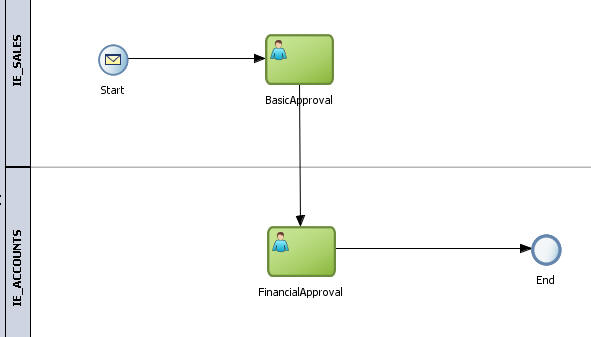
I add another swimlane to the process


Re-deploy and test

I login as nc and see the order - I approve it.

User nc now sees the Financial Approval task as nc has the role IE_EMPS that includes IE_EMPS_SALES and IE_EMPS_ACCOUNTS.

User pc naturally also sees the task as he has the role IE_EMPS_ACCOUNTS

User rc doesn't see the task as she has the role IE_EMPS_SALES


End of Part 1...


Monday, July 2, 2012

BPM 11g - Extending Timers

Scenario: Order Process includes a timer e.g. we have to wait a certain amount of time for clearance before processing the order. This time may need to be extended e.g. for large orders etc.

Basic flow is as follows -


Extension achieved via an event sub-process.

Start -


I use a variable to set the Timer to 50 seconds -


Here I set the variable v_timerDuration to "PT50S"
Please see my previous blog postings for an in-depth on this format.
http://niallcblogs.blogspot.co.uk/2011/08/using-timers-in-bpm11g.html


I configure the WAIT as follows -


The Event sub-process is configured as follows -


I update the timer duration as follows -


I set an indicator to signal update -


This is queried in the Exclusive Gateway after the Wait.

I also add logging here -


Now the process assumes that updates are coming in the required format e.g. PT50S for an extension of 50 seconds. Naturally we can make this user friendlier.