excellent resource for Oracle partners and those wanting to be one...
http://blogs.oracle.com/imc/
Thursday, April 7, 2011

Monday, March 21, 2011
BPM 11g and Notifications
Simple scenario I want to send an email Notification from my BPM process informing a customer that her order has been approved.
I am using JAMES for this simple scenario –
I created the users –
• bpelsender/welcome1
• jcooper/welcome1
Email Setting as follows –


I created a new BPM app in JDev and included the following myOrders.xsd
-------------------

-------------------
• Add Order definition to the Business Catalog

Create a Process Data Object v_order, based on the Order type.
• Start Activity --> Implementation --> Define Interface


• Add a User task to approve large orders (Large order >= 10000)


• Add a BPEL process to the composite

Add an EMAIL activity

All we are really interested in is – NotificationService.wsdl & NotificationService.xsd.

• So we can delete the BPEL process

• Implement NotifyCustomer


• Deploy & test


• Check email inbox

Wednesday, March 9, 2011
Correlation with BPM 11g - cancelling a running instance
Scenario:
My esteemed colleague Angelo and I got this example together...
So what did we do?
We thought up the following simple scenario -
An order is passed on to a Salesperson for approval.
However, the customer can cancel the order while it is in flight.
So essentially we need to cancel a running BPM process based on an event -
So while our BPM process is doing it's thing, we also want to "listen" for any relevant "cancel" messages.
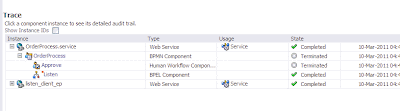
Steps
So what did we do?
We created a simple BPM app that included a User task to approve the order.
The BPM app will also start an instance of the listening BPEL process.

The BPM app will also contain an event handler that listens for a cancellation message from BPEL.
The simple BPEL process that will listen for cancellations -

We amended the BPEL wsdl to define the "cancelMsg" type and also included 2 new operations for the cancel - 1. to "receive the cancel", the other to do the cancel callback.
We created a correlation set on the Receive activity.
This is also leveraged by the OnMessage, which captures the cancellation and does the required callback.
Full doc and JDev project at -
https://docs.google.com/document/d/1tIYeEZM1kBmf2piGaeE5U0-59nGyQKaBand5kET-wUg/edit?hl=en&authkey=CJrT2pYK
and
https://docs.google.com/leaf?id=0B7YrnfO7h717ZDNjYTZmYWUtMDAxMy00MDIxLWExOGYtMWY0YzI5MWQxMzVi&hl=en&authkey=CIaZwMQL
My esteemed colleague Angelo and I got this example together...
So what did we do?
We thought up the following simple scenario -
An order is passed on to a Salesperson for approval.
However, the customer can cancel the order while it is in flight.
So essentially we need to cancel a running BPM process based on an event -
So while our BPM process is doing it's thing, we also want to "listen" for any relevant "cancel" messages.

Steps
So what did we do?
We created a simple BPM app that included a User task to approve the order.
The BPM app will also start an instance of the listening BPEL process.

The BPM app will also contain an event handler that listens for a cancellation message from BPEL.
The simple BPEL process that will listen for cancellations -

We amended the BPEL wsdl to define the "cancelMsg" type and also included 2 new operations for the cancel - 1. to "receive the cancel", the other to do the cancel callback.
We created a correlation set on the Receive activity.
This is also leveraged by the OnMessage, which captures the cancellation and does the required callback.
Full doc and JDev project at -
https://docs.google.com/document/d/1tIYeEZM1kBmf2piGaeE5U0-59nGyQKaBand5kET-wUg/edit?hl=en&authkey=CJrT2pYK
and
https://docs.google.com/leaf?id=0B7YrnfO7h717ZDNjYTZmYWUtMDAxMy00MDIxLWExOGYtMWY0YzI5MWQxMzVi&hl=en&authkey=CIaZwMQL
Wednesday, February 23, 2011
Invoking SOA Composite via EJB Service
Scenario - Invoke a composite via EJB passing a complex payload.
My payload is as follows -

I create a synchronous BPEL process that accepts inputOrder as input/output.
all the BPEL process does is Assign In 2 Out.

I then create an EJB Service (Generate Java interface from WSDL)


Wire together

Review the classes that have been created.

Make InputOrder and OrderType serializable
public class InputOrder implements Serializable{
public class OrderType implements Serializable{
Change the interface (BPELOrderProcess) to get rid of Holder dependency (I had
serialization issues with javax.xml.ws.Holder)
public void process(@WebParam(targetNamespace="http://www.example.org",
partName="payload", name="inputOrder", mode=Mode.INOUT)
bpelorderprocess.complexpayloadejbservice.complexpayloadejbservice_app.com.oracle.xmlns.InputOrder payload);
}
Deploy to SOA Server
Check the JNDI tree using the WLS console to see if our EJB is visible.

Create the EJB Client - I did this in the same project to save time -

Actual Code -
public class MyEJBClient {
public static void main(String [] args) throws Throwable {
try {
final Context context = getInitialContext();
Proxy proxy = (Proxy)context.lookup("ejb/BPELOrderProcessService");
// preparing the method to be called on the remote EJB
Method method =
BPELOrderProcess.class.getDeclaredMethod("process", new Class[] {InputOrder.class});
InputOrder id = new InputOrder();
id.setKey(12345);
id.setCustName("NiallC");
OrderType ot = new OrderType();
ot.setComments("Good Customer");
ot.setProduct("Oracle SOA Suite 11g");
ot.setProductGroup("FMW");
ot.setProductKey(new Long(12345));
id.setOrder(ot);
InvocationHandler handler = Proxy.getInvocationHandler(proxy);
InputOrder response = (InputOrder)handler.invoke(proxy, method, new Object[] { id });
} catch (Exception ex) {
ex.printStackTrace();
}
}
private static Context getInitialContext() throws NamingException {
Hashtable env = new Hashtable();
// WebLogic Server 10.x connection details
env.put( Context.INITIAL_CONTEXT_FACTORY, "weblogic.jndi.WLInitialContextFactory" );
env.put(Context.PROVIDER_URL, "t3://localhost:7001");
return new InitialContext( env );
}
}
Add the Weblgic Thin Client Library to the project
Run the client
Check the instance in em


Thursday, February 10, 2011
Part 2: Getting Component instance state...
Leading on from the previous post - I've kicked off the process, now I want to check on the instance state.
Again, a big thanks to Edwin -
http://biemond.blogspot.com/2009/11/invoking-soa-suite-11g-service-from.html
I added the following to my client Java class -
public String checkInstanceState(String uuid){
//
// connect to soa and find composite
//
Hashtable jndiProps = new Hashtable();
jndiProps.put(Context.PROVIDER_URL, "t3://localhost:7001/soa-infra");
jndiProps.put(Context.INITIAL_CONTEXT_FACTORY,"weblogic.jndi.WLInitialContextFactory");
jndiProps.put(Context.SECURITY_PRINCIPAL, "weblogic");
jndiProps.put(Context.SECURITY_CREDENTIALS, "welcome1");
jndiProps.put("dedicated.connection", "true");
Locator locator = null;
try{
locator = LocatorFactory.createLocator(jndiProps);
Composite composite = locator.lookupComposite("default/InvokeDirectBinding!1.0");
CompositeInstanceFilter filter = new CompositeInstanceFilter();
filter.setConversationId(uuid);
List cis = composite.getInstances(filter);
// for each of the returned composite instances..
for (CompositeInstance instance : cis) {
System.out.println(" DN: " + instance.getCompositeDN() +"\n" +
" Instance: " + instance.getId() +"\n" +
" creation-date: " + instance.getCreationDate() +"\n" +
" state (" + instance.getState() + "): " + getStateAsString(instance.getState()) );
}
}
catch (Exception e){
e.printStackTrace();
}
return "done";
}
private String getStateAsString(int state)
{
// note that this is dependent on wheter the composite state is captured or not
if (state == CompositeInstance.STATE_COMPLETED_SUCCESSFULLY)
return ("STATE_COMPLETED_SUCCESSFULLY");
else if (state == CompositeInstance.STATE_FAULTED)
return ("STATE_FAULTED");
else if (state == CompositeInstance.STATE_RECOVERY_REQUIRED)
return ("STATE_RECOVERY_REQUIRED");
else if (state == CompositeInstance.STATE_RUNNING)
return ("STATE_RUNNING");
else if (state == CompositeInstance.STATE_STALE)
return ("STATE_STALE");
else
return ("STATE_UNKNOWN");
}
I also had to add the JRF Runtime library -

I then invoked a new instance -

tested the new code ...

Again, a big thanks to Edwin -
http://biemond.blogspot.com/2009/11/invoking-soa-suite-11g-service-from.html
I added the following to my client Java class -
public String checkInstanceState(String uuid){
//
// connect to soa and find composite
//
Hashtable jndiProps = new Hashtable();
jndiProps.put(Context.PROVIDER_URL, "t3://localhost:7001/soa-infra");
jndiProps.put(Context.INITIAL_CONTEXT_FACTORY,"weblogic.jndi.WLInitialContextFactory");
jndiProps.put(Context.SECURITY_PRINCIPAL, "weblogic");
jndiProps.put(Context.SECURITY_CREDENTIALS, "welcome1");
jndiProps.put("dedicated.connection", "true");
Locator locator = null;
try{
locator = LocatorFactory.createLocator(jndiProps);
Composite composite = locator.lookupComposite("default/InvokeDirectBinding!1.0");
CompositeInstanceFilter filter = new CompositeInstanceFilter();
filter.setConversationId(uuid);
List
// for each of the returned composite instances..
for (CompositeInstance instance : cis) {
System.out.println(" DN: " + instance.getCompositeDN() +"\n" +
" Instance: " + instance.getId() +"\n" +
" creation-date: " + instance.getCreationDate() +"\n" +
" state (" + instance.getState() + "): " + getStateAsString(instance.getState()) );
}
}
catch (Exception e){
e.printStackTrace();
}
return "done";
}
private String getStateAsString(int state)
{
// note that this is dependent on wheter the composite state is captured or not
if (state == CompositeInstance.STATE_COMPLETED_SUCCESSFULLY)
return ("STATE_COMPLETED_SUCCESSFULLY");
else if (state == CompositeInstance.STATE_FAULTED)
return ("STATE_FAULTED");
else if (state == CompositeInstance.STATE_RECOVERY_REQUIRED)
return ("STATE_RECOVERY_REQUIRED");
else if (state == CompositeInstance.STATE_RUNNING)
return ("STATE_RUNNING");
else if (state == CompositeInstance.STATE_STALE)
return ("STATE_STALE");
else
return ("STATE_UNKNOWN");
}
I also had to add the JRF Runtime library -

I then invoked a new instance -

tested the new code ...

Wednesday, February 9, 2011
Invoking SOA Suite 11g Composite via Direct Binding
Scenario: I want to invoke a SOA Composite (essentially an Async BPEL process) via Direct Binding.
My starting point for this was Edwin's blog (which I can highly recommend!!!)-
http://biemond.blogspot.com/2009/11/calling-soa-suite-direct-binding.html
However, I had issues with namespaces in my complex payload, requiring me to switch to the Oracle XML parser --> thus this post!
I'm using the following xsd for my payload.

Step 1 - Create a SOA Composite that includes an async BPEL process with input/output types set to the order defined above. Do not expose as a SOAP Service.

Step 2 - Add a Direct Binding to the Exposed Services lane and point to the WSDL of the BPEL process.

Step 3 - Add an Assign (Input 2 Output) to the BPEL process.

Step 4 - Wire the Direct Binding to the BPEL Process.
In the BPEL designer, delete the processorders_client partner link and use the Direct Binding instead.

Step 5 - Deploy and go to http://localhost:7001/soa-infra


Step 6 - Create a new project in your JDev app e.g.
InvokeDirectBinding-Client and add the following libraries to it.

Step 7 - Add a Java class to the project and cut and paste in the following code. Then test. Note the use of the Oracle XML parser here, I had some issues with the default one... Thanks Silviu / Santosh for the tip.
package invokedirectbin;
import java.io.StringReader;
import java.util.HashMap;
import java.util.Hashtable;
import java.util.Map;
import java.util.UUID;
import javax.naming.Context;
import oracle.soa.api.JNDIDirectConnectionFactory;
import oracle.soa.api.PayloadFactory;
import oracle.soa.api.XMLMessageFactory;
import oracle.soa.api.invocation.DirectConnection;
import oracle.soa.api.invocation.DirectConnectionFactory;
import oracle.soa.api.message.Message;
import oracle.soa.api.message.Payload;
import oracle.soa.management.facade.Locator;
import oracle.xml.parser.v2.DOMParser;
import oracle.xml.parser.v2.XMLPrintDriver;
import org.w3c.dom.Element;
import org.xml.sax.InputSource;
public class InvokeComposite {
public InvokeComposite() {
super();
}
public void StartAsyncViaDirectBinding(){
//
// create a direct connection to the composite
//
Hashtable jndiProps = new Hashtable();
jndiProps.put(Context.PROVIDER_URL, "t3://localhost:7001/soa-infra");
jndiProps.put(Context.INITIAL_CONTEXT_FACTORY,"weblogic.jndi.WLInitialContextFactory");
jndiProps.put(Context.SECURITY_PRINCIPAL, "weblogic");
jndiProps.put(Context.SECURITY_CREDENTIALS, "welcome1");
jndiProps.put("dedicated.connection", "true");
Locator locator = null;
try {
DirectConnectionFactory factory = JNDIDirectConnectionFactory.newInstance();
String serviceAddress = "soadirect:/default/InvokeDirectBinding!1.0/DirectBinding2ProcessOrders";
DirectConnection dc = factory.createConnection(serviceAddress,jndiProps);
// Sample payload from em is as follows -
//
//
//
//
//
//
//
//
//
//
//
//
//
//
//
//
String inputPayload =
"\n" +
"RenateC \n" +
"rc@localhost \n" +
"123456 \n" +
"iPad \n" +
"100 \n" +
"500 \n" +
"none \n" +
"50000 \n" +
"pending \n" +
"none \n" +
" \n";
System.out.println("Input = " +"\n" + inputPayload);
//
// parse using the Oracle XML parser.
// Thanks Silviu!
oracle.xml.parser.v2.DOMParser op = new DOMParser();
op.parse(new InputSource(new StringReader(inputPayload)));
// just a print to check it
XMLPrintDriver pd = new XMLPrintDriver(System.out);
pd.setFormatPrettyPrint(true);
pd.printDocument(op.getDocument());
Map partData = new HashMap();
partData.put("payload", op.getDocument().getDocumentElement());
// Create the Message and pass in the payload
Payload payload = PayloadFactory.createXMLPayload(partData);
Message request = XMLMessageFactory.getInstance().createMessage();
request.setPayload(payload);
// Define conversation ID
String uuid = "uuid:" + UUID.randomUUID();
System.out.println("uuid = "+ uuid);
request.setProperty(request.CONVERSATION_ID, uuid);
// Invoke...
dc.post("process", request);
} catch (Exception e) {
e.printStackTrace();
}
}
}
Payload displayed incorrectly above so here it is again -

Anyway the source code is available at
https://docs.google.com/leaf?id=0B7YrnfO7h717ODIyNDU2MWQtOTJlOC00NTBkLWE5OTItOWRiMGM0ZGI4OTc1&hl=en&authkey=CIWLqqwL


My starting point for this was Edwin's blog (which I can highly recommend!!!)-
http://biemond.blogspot.com/2009/11/calling-soa-suite-direct-binding.html
However, I had issues with namespaces in my complex payload, requiring me to switch to the Oracle XML parser --> thus this post!
I'm using the following xsd for my payload.

Step 1 - Create a SOA Composite that includes an async BPEL process with input/output types set to the order defined above. Do not expose as a SOAP Service.

Step 2 - Add a Direct Binding to the Exposed Services lane and point to the WSDL of the BPEL process.

Step 3 - Add an Assign (Input 2 Output) to the BPEL process.

Step 4 - Wire the Direct Binding to the BPEL Process.
In the BPEL designer, delete the processorders_client partner link and use the Direct Binding instead.

Step 5 - Deploy and go to http://localhost:7001/soa-infra


Step 6 - Create a new project in your JDev app e.g.
InvokeDirectBinding-Client and add the following libraries to it.

Step 7 - Add a Java class to the project and cut and paste in the following code. Then test. Note the use of the Oracle XML parser here, I had some issues with the default one... Thanks Silviu / Santosh for the tip.
package invokedirectbin;
import java.io.StringReader;
import java.util.HashMap;
import java.util.Hashtable;
import java.util.Map;
import java.util.UUID;
import javax.naming.Context;
import oracle.soa.api.JNDIDirectConnectionFactory;
import oracle.soa.api.PayloadFactory;
import oracle.soa.api.XMLMessageFactory;
import oracle.soa.api.invocation.DirectConnection;
import oracle.soa.api.invocation.DirectConnectionFactory;
import oracle.soa.api.message.Message;
import oracle.soa.api.message.Payload;
import oracle.soa.management.facade.Locator;
import oracle.xml.parser.v2.DOMParser;
import oracle.xml.parser.v2.XMLPrintDriver;
import org.w3c.dom.Element;
import org.xml.sax.InputSource;
public class InvokeComposite {
public InvokeComposite() {
super();
}
public void StartAsyncViaDirectBinding(){
//
// create a direct connection to the composite
//
Hashtable jndiProps = new Hashtable();
jndiProps.put(Context.PROVIDER_URL, "t3://localhost:7001/soa-infra");
jndiProps.put(Context.INITIAL_CONTEXT_FACTORY,"weblogic.jndi.WLInitialContextFactory");
jndiProps.put(Context.SECURITY_PRINCIPAL, "weblogic");
jndiProps.put(Context.SECURITY_CREDENTIALS, "welcome1");
jndiProps.put("dedicated.connection", "true");
Locator locator = null;
try {
DirectConnectionFactory factory = JNDIDirectConnectionFactory.newInstance();
String serviceAddress = "soadirect:/default/InvokeDirectBinding!1.0/DirectBinding2ProcessOrders";
DirectConnection dc = factory.createConnection(serviceAddress,jndiProps);
// Sample payload from em is as follows -
//
//
//
//
//
//
//
//
//
//
//
//
//
//
//
//
String inputPayload =
"
"
"
"
"
"
"
"
"
"
"
"
System.out.println("Input = " +"\n" + inputPayload);
//
// parse using the Oracle XML parser.
// Thanks Silviu!
oracle.xml.parser.v2.DOMParser op = new DOMParser();
op.parse(new InputSource(new StringReader(inputPayload)));
// just a print to check it
XMLPrintDriver pd = new XMLPrintDriver(System.out);
pd.setFormatPrettyPrint(true);
pd.printDocument(op.getDocument());
Map
partData.put("payload", op.getDocument().getDocumentElement());
// Create the Message and pass in the payload
Payload
Message
request.setPayload(payload);
// Define conversation ID
String uuid = "uuid:" + UUID.randomUUID();
System.out.println("uuid = "+ uuid);
request.setProperty(request.CONVERSATION_ID, uuid);
// Invoke...
dc.post("process", request);
} catch (Exception e) {
e.printStackTrace();
}
}
}
Payload displayed incorrectly above so here it is again -

Anyway the source code is available at
https://docs.google.com/leaf?id=0B7YrnfO7h717ODIyNDU2MWQtOTJlOC00NTBkLWE5OTItOWRiMGM0ZGI4OTc1&hl=en&authkey=CIWLqqwL


Tuesday, February 1, 2011
Weblogic classloader analysis tool
Nice feature of the latest wls release.
Pick any app (e.g. em) and look at it's classloader details -


Pick any app (e.g. em) and look at it's classloader details -


Subscribe to:
Posts (Atom)