Tuesday, February 9, 2010

ADF11g calling Oracle Rules

Simple scenario here -

I have created a simple Rules component and deployed it to SOA Suite 11g.
I now want to execute the Rules from an ADF app. No coding required!!!

I create / deploy a very simple Rules app

Input XSD (simpleCheck.xsd)–


Output XSD (simpleResult.xsd)–


to soa_domain

The Rules are as follows –


Test using default WLS Tester

I test via http://localhost:8001/soa-infra


Test using ADF Web Service DataControl


Create a new ADF App in JDeveloper


location = file:///path to your simpleResult.xsd


Tuesday, February 2, 2010

Memory issues after installing SOA Suite 11g PS1?

I had issues starting the weblogic adminServer after installing PS1 on an older laptop of mine.

Solution -

amend the setSOADomain.cmd in the
D:\soaSuite11gPS1\user_projects\domains\soa_domain\bin
directory.

set DEFAULT_MEM_ARGS=-Xms512m -Xmx512m
set DEFAULT_MEM_ARGS=%DEFAULT_MEM_ARGS% -XX:PermSize=128m -XX:MaxPermSize=384m

Wednesday, January 13, 2010

ADF 11g and BAM Data Control

Simple scenario here -

I have a simple ADF input form that allows users to enter Orders.

On "Save" a Business Event is published - "NewOrderEntered".
(See a previous post on how to do this)

I have a simple SOA Composite that contains a Mediator and a BPEL process.
The Mediator subscribes to the Business Event and routes the on to the BPEL process.

I create a BAM data object "Orders".

Now I want to enrich the ADF input form with an overview of our current orders. This we can do by dropping a BAM data control onto the page.


Preparation -


1. use order.xsd/myOrder.xml


2. Create DB Table orders

drop table orders;
Create table orders(order_nr varchar2(20) not null,customer varchar2(50) not null,
email varchar2(50) not null,country varchar2(50) not null,phone varchar2(50) not null,product varchar2(50) not null,quantity number(10) not null,unitPrice number(10,2),supplier varchar2(50) ,totalPrice number(10,2), orderStatus varchar2(50) ,comments varchar2(256));


ALTER TABLE orders ADD PRIMARY KEY (order_nr);

Steps


Step 1 - Create an ADF/BC App


Model - Create BC from Tables (orders table)


ViewController - start.jspx (our entry page)

- createOrders.jspx
- create a Navigation case from start-->createOrders. Call it "create"


In start.jspx -

- Drop the Orders operation "CreateInsert" as an ADF Button.


- Set the action attribute to "create".

This essentially will initialise the orders form in createOrders.jspx.

In createOrders.jspx -

- Drop a Panel Splitter Layout control onto the page
- Drop OrdersView as an ADF Form... into the first facet
- Include a "Commit" button.


Step 2 - Create a BAM Data Object based on the Orders table


Step 3. Include the BAM Data Control in the ADF Page - createOrders.jspx


- Create a connection to the BAM Server


- Right-click on DB-Orders and select "Create Data Control"


-- Drop the Data Control onto the second facet of the Panel Splitter


-- Test the app by running start.jspx.


Wednesday, December 9, 2009

Thursday, November 26, 2009

BAM 11g Buttons disabled?

You log in to BAM 11g
http://localhost:9001/OracleBAM

as weblogic/welcome1 for example and the buttons - are disabled?

Then go to em
http://localhost:7001/em

Right-mouse click on soa-infra
Select Security --> Application Roles
Search for all roles
Check that "Administrators" is a member of the BAM Roles.


Login to BAM again

Wednesday, November 18, 2009

JDev 11g - ADF Mobile on my Blackberry

Pre-requisites
· Access to the SCOTT schema on an Oracle DB

· Blackberry Email/MDS server simulator > BlackBerry_Email_MDS_4.1.4.exe

· Blackberry simulator E.g.
> BlackBerry_Simulators_4.6.1.168_8900-Vodafone.exe
· Both downloadable from http://na.blackberry.com/eng/developers/browserdev/devtoolsdownloads.jsp


Install / Start Blackberry Software
· Install both simulators

· Start MDS emulator
--> Start Programs --> Research in Motion --> Blackberry Email and MDS Services Simulators 4.1.4 --> MDS

This will open a cmd window.

· Start Blackberry 8900 emulator
--> Start --> Programs --> Research in Motion --> Blackberry Smartphone Simulators 4.6.1. --> 4.6.1.168 --> 8900-Vodaphone

This will start up the Simulator.


Create the ADF Mobile App

· Create a new application in JDev 11g --> Fusion Web Application (ADF)
. Enter app name --> Accept defaults on all other screens
Create the data model
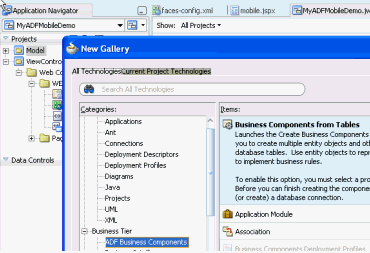
--> Right-mouse click on the Model project -->
--> New... ADF Business Components --> ...from Tables

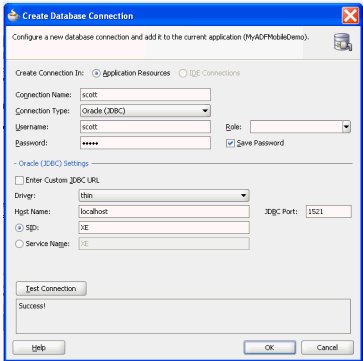
· Create a new DB Connection

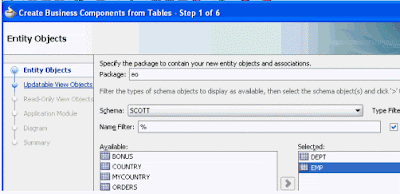
· Select Entity Objects

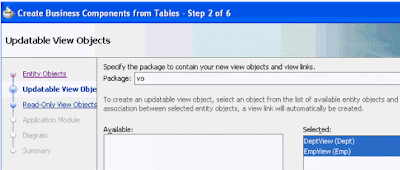
· Select View Objects

· Specify Application Module
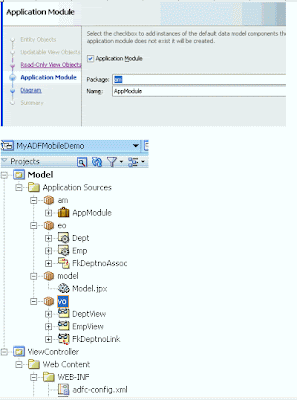

Create the UI

· Double-click on faces-config.xml in the ViewContrioller project
--> Drop a JSF page onto the designer
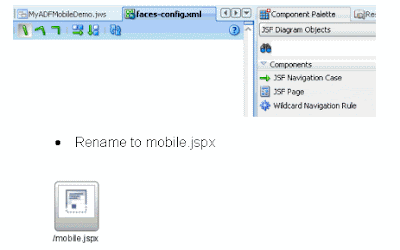

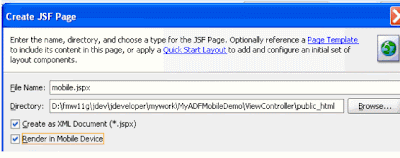
Double-click to create the page
--> Select Render in Mobile Device


Drop EmpView as a Tables --> Trinidad Read only table
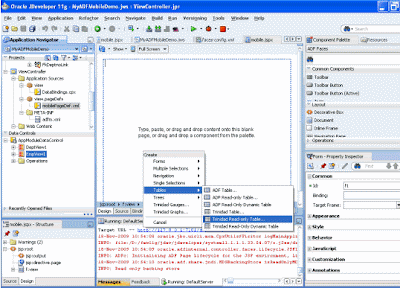


Run mobile.jspx
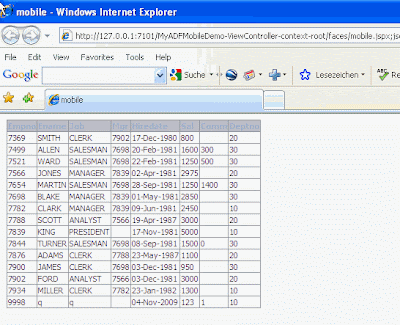


Looks good in IE, but let’s change the project setting so as to avoid having to type such a long URL in the Blackberry.

--> Right-click on ViewController project
----> Project properties --> Java EE Application Change context root to xyz
Re-test in IE

Test in Blackberry

Open browser
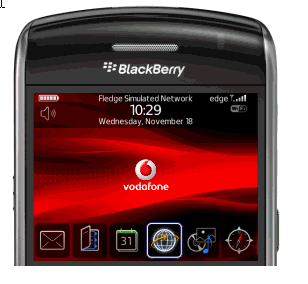

Type in the URL
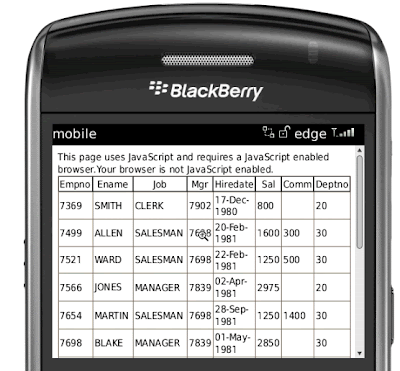
I have installed the MSFT loopback adapter on my machine (ip address = 1.1.1.1) so that is what I use here. e.g. http://1.1.1.1:7101/xyz/faces/mobile.jspx


You can enable JavaScript and create a couple of more interesting pages