Monday, July 16, 2012

BPM Process Accelerators

Well worth looking into -

"PAs deliver business process solutions built using Oracle BPM Suite, leveraging other Oracle solutions and applications as needed by the business process being supported. Accelerators undergo rigorous product-level testing, and can be deployed as-is, including key application interfaces, yet are conceived and architected to be extended to meet unique customer business and environment requirements. "

Check out the collateral at
BPMProcessAcceleratorsOTN

To get access to the BPM process accelerators themselves - just drop an email to


oracle_process_accelerators@beehiveonline.oracle.com


Wednesday, July 11, 2012

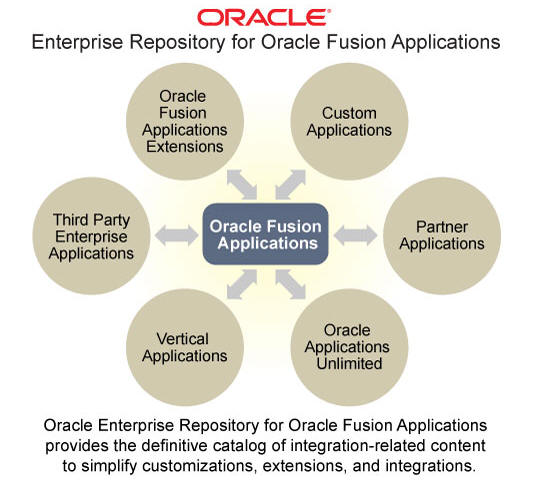
Fusion Apps Enterprise Repository

Your first port of call for looking at Fusion Apps Integration points.


URL is https://fusionappsoer.oracle.com/oer/
or simply click here

Click Login as Guest

A good place to start is with the ADF Service offering


Let's look at the services available for HCM


Here I am looking at Absence Case


WSDLs -


Tuesday, July 3, 2012

BPM UserTask -->complex assignment

Scenario:

I have a simple order approval BPM app.
An order needs to be approved by an Approver.
An Approver is someone, who according to our LDAP directory, belongs to the NCGroup1 and NCGroup2.

In this post I discuss how to access LDAP for the relevant info.

I create such a user - nc - leveraging weblogic's embedded LDAP.


nc is a member of NCGroup1 and NCGroup2
rc is a member of NCGroup1

I now need to write some Java to retrieve this information -

Extracting the user nc's information as follows -
------------------------------------------------------------

public static void main(String a[])
{
String ENTRYDN = "uid=nc,ou=people,ou=myrealm,dc=nc_domain";// This is rootDN

// ou=people,ou=myrealm,dc=nc_domain
Hashtable env = new Hashtable();
env.put(Context.INITIAL_CONTEXT_FACTORY,"com.sun.jndi.ldap.LdapCtxFactory");
env.put(Context.PROVIDER_URL,"ldap://127.0.0.1:7001");// This is your ldap URL

try{

env.put(Context.SECURITY_PRINCIPAL,"cn=Admin");//DN
env.put(Context.SECURITY_CREDENTIALS,"welcome1");//This is password

DirContext ctx = new InitialDirContext(env);
   
//
   
  String[] attrs = new String[4];
        attrs[ 0 ] = "cn";              /* Get canonical name(s) (full name) */
        attrs[ 1 ] = "sn";              /* Get surname(s) (last name) */
        attrs[ 2 ] = "wlsMemberOf";            /* Get email address(es) */
        Attributes result = ctx.getAttributes(ENTRYDN, attrs);
    
System.out.println("Result " + result.size());   
System.out.println("Result " + result.get("cn"));   
System.out.println("Result " + result.get("wlsMemberOf"));

---------------------------------------------------------

Output -


However, I really need to look up the group -


  I take the memberURL and use as follows -


    System.out.println(" ****************************************************************");
       
// Look for members of NCGroup1
 Attributes userAttrs = new BasicAttributes(true);
 userAttrs.put("cn", null);
  NamingEnumeration answer = ctx.search(
     "ldap://localhost:7001/ou=people,ou=myrealm,dc=nc_domain??sub?(&(objectclass=person)(wlsMemberOf=cn=NCGroup1,ou=groups,ou=myrealm,dc=nc_domain))", userAttrs); 
    while (answer.hasMoreElements()){
        System.out.println("Group Members of NCGroup1 =" + answer.nextElement().toString()); 
       
    }
    System.out.println(" ****************************************************************");
    // Look for members of NCGroup2
      answer = ctx.search(
         "ldap://localhost:7001/ou=people,ou=myrealm,dc=nc_domain??sub?(&(objectclass=person)(wlsMemberOf=cn=NCGroup2,ou=groups,ou=myrealm,dc=nc_domain))", userAttrs); 
        while (answer.hasMoreElements()){
            System.out.println("Group Members of NCGroup2 =" + answer.nextElement().toString()); 
           
        }
---------------------------------------------------------


Output -


Now another approach could be taken, if there is a hierarchy at work -

Let's use groups with more relevant names -


In this case -
NCGroup1 = IE_EMPS
NCGroup2 = IE_EMPS_ACCOUNTS

so amend IE_EMPS_ACCOUNTS as follows -


I create a new group IE_EMPS_SALES and assign IE_EMPS as its parent group.

I assign the users as follows -

rc is a member of IE_EMPS_SALES
pc is a member of IE_EMPS_ACCOUNTS
nc is a member of IE_EMPS


I deploy and test the above -


Log in to the BPM workspace as user nc


He sees no tasks


Log in to the BPM workspace as user rc


She sees the BasicApproval task


Log in to the BPM workspace as user pc


He sees no tasks

Variation of the theme...

I have 3 groups
IE_EMPS = IE_EMPS_SALES AND IE_EMPS_ACCOUNTS
IE_EMPS_SALES
IE_EMPS_ACCOUNTS


I have 3 users -
nc  belongs to IE_EMPS

rc belongs to IE_EMPS_SALES
pc
belongs to IE_EMPS_ACCOUNTS

Now the process is as follows -


Deploy and Test

Only nc sees the task


Ergo rc doesn't


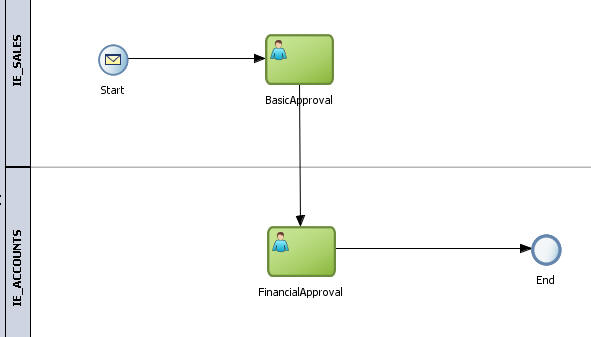
I add another swimlane to the process


Re-deploy and test

I login as nc and see the order - I approve it.

User nc now sees the Financial Approval task as nc has the role IE_EMPS that includes IE_EMPS_SALES and IE_EMPS_ACCOUNTS.

User pc naturally also sees the task as he has the role IE_EMPS_ACCOUNTS

User rc doesn't see the task as she has the role IE_EMPS_SALES


End of Part 1...


Monday, July 2, 2012

BPM 11g - Extending Timers

Scenario: Order Process includes a timer e.g. we have to wait a certain amount of time for clearance before processing the order. This time may need to be extended e.g. for large orders etc.

Basic flow is as follows -


Extension achieved via an event sub-process.

Start -


I use a variable to set the Timer to 50 seconds -


Here I set the variable v_timerDuration to "PT50S"
Please see my previous blog postings for an in-depth on this format.
http://niallcblogs.blogspot.co.uk/2011/08/using-timers-in-bpm11g.html


I configure the WAIT as follows -


The Event sub-process is configured as follows -


I update the timer duration as follows -


I set an indicator to signal update -


This is queried in the Exclusive Gateway after the Wait.

I also add logging here -


Now the process assumes that updates are coming in the required format e.g. PT50S for an extension of 50 seconds. Naturally we can make this user friendlier.


Tuesday, June 19, 2012

Fusion Apps --> great resource from OUG

I am getting more involved with Fusion Apps at the moment and am very grateful to my colleague Angelo S. for the following link.


Check out The Stations

Monday, June 18, 2012

Mediator Resequencing - simple example

Ok, so we lost against Spain - but at least now the world knows "The Fields of Athenry"

Her is a simple example of Mediator re-sequencing - a not so well known SOA Suite feature.
Very interesting for AIA style integrations e.g. multiple order updates in EBS being passed on to Siebel.

I have the following simple scenario -
Order processing - orders are defined as follows -


Notice the key fields - orderID / msgID. There can be multiple messages for the same orderID. Unfortunately they do not always come in the required sequence. For example we could receive -
orderID=1 msgID=3
orderID=1 msgID=2
orderID=1 msgID=1

Fortunately we have the Mediator which can do the re-sequencing for us, so that our output will be as follows -
orderID=1 msgID=1 orderID=1 msgID=2
orderID=1 msgID=3

To illustrate this, I create the following composite -


ReadOrder - is a ReadFileAdapter based on the XSD above.
WriteOrder - is a WriteFileAdapter based on the XSD above.

The Mediator is configured as follows -


Resequencing level is set to component, I could also set this to operation. This is useful when a mediator supports multiple operations and resequencing is not required for all of them.

I set the mode to standard - others are Best Effort and FIFO.

I set the Group By to orderID and the sort criteria (ID) to msgID. In other words, for each orderID - sort the messages in msgID order starting with msgID 1. Note the increment setting is also equal to 1.

Deploy and test.

I drop the orders into the inbox in the order - order1-3 (orderID=1/msgID=3), order1-2, order1-1.
I then re-test with the next 3 in the sequence order1-6 (orderID=1/msgID=6), order1-5, order1-4

I then view the outbox -


The meta-data is stored in the MEDIATOR_RESEQUENCER_MESSAGE table for Standard re-sequencing.


The last 6 entries are from my test today.

Now If I re-submit (orderID=1/msgID=6), order1-5, order1-4 - I get an error 


Checking the WLS log...

Caused by: java.sql.SQLIntegrityConstraintViolationException: ORA-00001: unique constraint (DEV_SOAINFRA.MEDIATOR_RESQ_MSG_UNIQUE1) violated

Another interesting table is MEDIATOR_GROUP_STATUS -


Note the entries for /ResequenceRoute - my Mediator.


So we see the next expected sequence id = 7.

The following blog post explains purge strategies for the above tables -

SOA Purge Strategies

We can purge the completed messages from the MEDIATOR_RESEQUENCER_MESSAGE table


There are my messages with status=2 which signals that they are completed.

btw. the relevant purge scripts are available at -

\Oracle_SOA1\rcu\integration\soainfra\sql\soa_purge\mediator