Monday, July 8, 2019

#716 OIC Process Forms & Rules - some Q&A

Question I often get now that we have Visual Builder as part of the OIC toolkit -

VB has OOTB integration with Process -


So why do we need web forms in Process?


Simple answer -

There are different use cases that each can address -
We have customers that are using our external UI capabilities for external Users -
for this area, they have their own UI team.
Process webForms are then used for the backOffice facing applications.


Can I use Decisions (Rules) outside of Process?


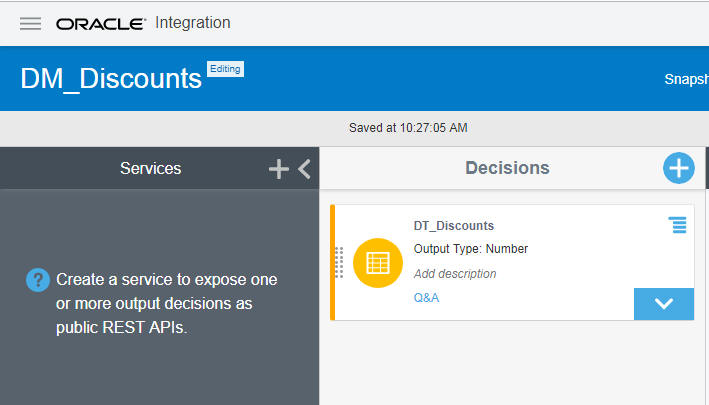
Yes, you can - via the Services panel above -


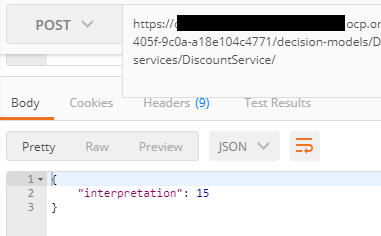
I copy the URL and test via Postman - I want the discount for an iBike -


Great stuff!


Thursday, July 4, 2019

#715 Visual Builder SaaS Look & Feel

I just noticed this today, while playing around with OIC.

Here I create a new VB application -


I define my usual Orders Business Object -


I then add it to a page and run the app -


Nice!

So what about customising this?


Instead of Flow2 and Flow3, I want HR and Finance.


root pages - shell


I re-run the app -


Clicking on HR will activate Flow 2 - so I need to amend that flow as well -


I then test -


The only thing that's bugging me now is the My Application title.

I need to amend the root pages - shell again -


Visual Builder - very intuitive, rich functionality.


#714 OIC & Autonomous Transaction Processing CS (ATP) - A Compelling Combination

Leading on from the previous post -

We now have the ATP adapter in OIC integration, how can we leverage this from the other OIC components?

ATP as the Business DB for Process Automation

Process comes with its own Archive and Purge Functionality


You could, conceivably, use this for compliance purposes. But there are some pre-requisites/caveats -

1. You need Storage Cloud Services


2. You will need to consider the format/level of detail of what is archived.

So one should consider using an external DB for this purpose.
Benefits include -
1. Full control of what data is stored.
2. Full access to that data, in a format that you have decided upon.
3. All of the benefits of ATP - highlighted in the previous post.

So it is very easy to add a call to the integration, created in the previous post.
That integration updated an Order Approvals table in ATP.


Note the StoreCompliancyData activity above. This called the aforementioned integration.


Now to a test - I enter an order and approve it


and above you see the salient data in ATP.

ATP as the Business DB for Visual Builder Apps

Similar modus operandi here - leverage the Integration in VB CS


Here is a simple example - check out the Order Business Object I have
defined in in Visual Builder 


I have created the following simple flow -
Browse Orders - Create Orders - Approve Orders


Let's use the ATP Integration for the "Approve" functionality -
I can add a connection to the aforementioned very easily -

This I do via Visual Builder Service Connections - 


I select the appropriate integration -


I can easily add a service call to the following page  - via Events


So what's the value add of ATP here?

1. VB CS has its own persistence layer. Business Objects are persisted,
but can only be accessed via the Business Object REST APIs.

2. The VB CS persistence layer has a fixed size. You cannot change this.

ATP addresses both of the above.


Tuesday, July 2, 2019

#713 OIC - First Steps with the ATP adapter

ATP = Autonomous Transaction Processing from Oracle.

Oracle Autonomous Transaction Processing delivers a self-driving, self-securing, self-repairing database service that can instantly scale to meet demands of mission critical applications.

More details about ATP here

First step was to get access to an ATP service.
I then connected to this via SQLDeveloper - here I created a new table -


Note, I have entered a test row.

There is a concise, yet detailed post on connecting SQLDeveloper to ATP here

Next step is to create the connection to ATP in OIC -


Note the use of the Cloud wallet for security.

I then leverage this connection in an Integration -


I then activate and test -


Validate via SQL Developer -


ATP - Self Driving, Self Repairing, Self Securing at a compelling price -