Monday, April 4, 2016

#480 ICS 16.2.1. New Features --> New Adapters & Orchestration Pattern

16.2.1 has been released with new adapters and a new integration pattern - Orchestration.

New Adapters -


We now have 40 adapters -


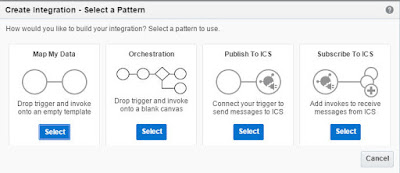
Orchestration Pattern -


Here you begin by adding the Trigger that kicks off the integration.

I have a Sale Cloud Connection I use here -


Here we see the available actions - Switch and Map.


Invokes List - provides access to our ICS connections.
Here I drop my ERP Connection


I can leverage the whole canvas -


Now I add a SWITCH activity -


Here I want to update a Contact on one of two Sales Cloud instances.
Irish contacts --> Irish Sales Cloud, others --> UK Sales Cloud.

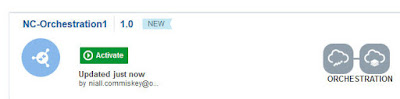


Simple stuff!


Wednesday, March 30, 2016

#479 ICS release 16.1.5 new features

Introduction


More exciting value add with the latest release of ICS.
Not just in respect of new adapters, also in monitoring.

Also, we have a new naming convention in ICS integrations.
We no longer have Source and Target; we now say, Trigger and Invoke respectively.

The what's new doc is available here

New Adapters


Yet more adapters with the latest release - now we have 35 in all.


You see the inclusion of more typical on prem tech adapters such as File and JMS.
So how do they work?

ICS File Adapter


The file adapter works via the ICS Agent.
i.e. the agent is installed on Prem, where the directory to be read is located.

The Connectivity Agent is discussed in detail here

Same procedure for the JMS adapter, you specify the Agent Group, the Host and Port.


ICS FTP Adapter

Another cool addition is the support for file processing via FTP.


I choose my ftp adapter connection


Now, for those used to working with the tech adapters in SOA Suite, the target could be anything.
For example, I could read in the file via ftp and then write it to a DB, using the database adapter.

This is currently not supported in ICS.

If you have ftp as a source, then it requires ftp as a target.
You get the following error message, if you try to leverage any other connection type.


Invoke must be FTP adapter because FTP adapter is selected as Trigger and currently only FTP adapter as invoke allowed if trigger is FTP adapter.

This limitation will be addressed in a future release.

But, in the meantime, I use the same connection for this simple example.


Note the OOTB encryption support.


Monitoring


Note the new submenu items - Design Time Metrics etc.


Also, more in-depth error monitoring -


Monday, March 14, 2016

#478 It's that time of the year again...OFM Partner Forum


Looking forward to meeting many of you at the forum this week in Valencia.

My main themes for the forum are Infrastructure as a Service (IaaS) and
Platform as a Service (PaaS).

For more info on both, simply visit cloud.oracle.com

Thursday, February 18, 2016

#477 REST enabled Oracle Database Cloud Service - my first experiences

I have heard that APEX supports REST so I decided to try this out on my SOA CS environment's
DB CS instance. AS per usual, I studiously avoided reading any documentation.
This should be simple, right?


I created a simple table Customers -


Now, as luck would have it I locked my ADMIN APEX user out.

This I fixed as follows -

ssh into the DB CS machine
start sqlplus

conn system/yourPwd@yourSOADB;

alter session set current_schema = APEX_050000;

select user_id, substr(user_name, 1,10), account_locked from wwv_flow_fnd_user;

update APEX_050000.WWV_FLOW_FND_USER
set web_password = 'yourNewPassword'
where user_name = 'ADMIN'
and user_id = yourUserId;
commit;
/

begin
wwv_flow_security.g_security_group_id := 10;
wwv_flow_fnd_user_api.UNLOCK_ACCOUNT('ADMIN');
commit;

end;

Then I logged into APEX and created a new workspace.
I then logged into this workspace -

I then clicked on SQL Workshop - RESTful Service -


As you can see, the request is based on the simple query -
Select custname from customers

Click on the Test button to get the URL

https://yourIPAddress/ords/yourDB/yourAPEXWorkspace/niall/customers

I now try this out in Postman -


I can now create a connection to this REST service in ICS.

For ICS, I create a variation of the above -

https://yourIPAddress/ords/yourDB/yourAPEXWorkspace/niall/customer/1

This REST request retrieves customer name based on custId.

Here is the result, when I test in Postman.


I create a REST connection in ICS based on the above.

See my blog post here  for the steps.


Good article on DB CS REST here


#476 Increasing the DB size on SOA Cloud Service

This is a relatively simply process -

Go to Database Cloud Service Console and select your DB -

Then click the menu option - Scale Up/down


You will see the following message afterwards -


So, now, go to the Java Cloud Service console and Stop/Start your SOA Instance.


Tuesday, February 16, 2016

#475 Oracle at Mobile World

Check it out

if you happen to be in Barcelona 22-25 Feb 2016.


Monday, February 1, 2016

#474 ICS Google Mail adapter

Introduction


Here is a simple example of the above.
To begin with, I need to set up my OAuth credentials@Google


As you can see, I have obfuscated my Client ID and Client secret, somewhat.
Notice, I have also entered an Authorized redirect URI below.
This will be needed when you click the Provide Consent button on connection creation in ICS.

Now, with this information, I can create the connection to GMAIL in ICS.


I click on Provide Consent and get the confirmation from Google.


Now I use this in an Integration -


Here is the Request mapping -

I am using the PartyId field in the Source message.

uploadType needs to be set to media

raw needs to be set in the following format -

From: emailAddress To: emailAddress Subject: Welcome to ICS Google Mail Adapter! MIME-Version: 1.0 Content-Type: text/plain; charset=us-ascii Content-Transfer-Encoding: 7bit Hi, This is your First Mail sent using ICS Google Mail Adapter! Thank You!! Regards, ICS Oracle


 I deploy and test from SOAP-UI -


I monitor in ICS -


Then I check my email inbox -