FYI:
Content Based Routing for Asynchronous Source will be supported very soon.
Content Based Routing is not supported for Fire and Forget pattern yet.
ICS gets a request to retrieve customer details from on-prem DB.
Customer is classed as either domestic or foreign.
Requests for domestic customer details have to be routed to the domestic customer DB.
Requests for foreign customer details have to be routed to the foreign customer DB.
The custId of domestic customers always begins with 1.
The custId of foreign customers never begins with 1.
So you get the idea?
I have 2 DB tables -

These are essentially my 2 databases.
My integration looks as follows -
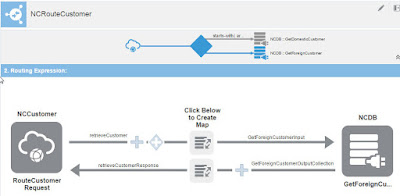
You see the icons representing the routing?
Here they are -

You can make out some of the routing condition I entered?
I use the string function starts-with
Here I check if the incoming custId starts with 1.
If so, I route to the "domestic DB".
Otherwise the request goes to the "foreign DB".
Here you see the icon to configure routing.

Here is the filter condition -

Once this node is selected in the upper routing pane, we configure/edit the Target.

Select the other node and you can do the same.

Here a customer input is mapped to an Oracle Sales Cloud contact.
I want to add a routing to my DB as well.
We can apply the same routing logic as above -
Here I check if the incoming custId starts with 1.
If so, I route to Sales Cloud.
Otherwise the request goes to the DB.

I enter the Expression Builder -

On the left we have the incoming message - the source.
Also the Components palette.

With these I can build my expression.


Click on the Routing Drawer to configure Routing.

The Conditional path is active and it defaults to the OSC target.
Now I need to specify the alternative route or path.
I click on the bullseye icon to make it active -

So now I just drop my DB adapter as the Target and
configure accordingly.

and the rest is just plain sailing...
Content Based Routing for Asynchronous Source will be supported very soon.
Content Based Routing is not supported for Fire and Forget pattern yet.
Simple scenario here
ICS gets a request to retrieve customer details from on-prem DB.
Customer is classed as either domestic or foreign.
Requests for domestic customer details have to be routed to the domestic customer DB.
Requests for foreign customer details have to be routed to the foreign customer DB.
The custId of domestic customers always begins with 1.
The custId of foreign customers never begins with 1.
I have 2 DB tables -

These are essentially my 2 databases.
My integration looks as follows -

You see the icons representing the routing?
Here they are -

You can make out some of the routing condition I entered?
I use the string function starts-with
Here I check if the incoming custId starts with 1.
If so, I route to the "domestic DB".
Otherwise the request goes to the "foreign DB".
Here you see the icon to configure routing.

Here is the filter condition -

Once this node is selected in the upper routing pane, we configure/edit the Target.

Select the other node and you can do the same.
Full Example
Here is another of my integrations -

Here a customer input is mapped to an Oracle Sales Cloud contact.
I want to add a routing to my DB as well.
We can apply the same routing logic as above -
Here I check if the incoming custId starts with 1.
If so, I route to Sales Cloud.
Otherwise the request goes to the DB.
You can see the funnel icon on the request message line.
I click on this to begin -

I enter the Expression Builder -

On the left we have the incoming message - the source.
Also the Components palette.

With these I can build my expression.


Click on the Routing Drawer to configure Routing.


The Conditional path is active and it defaults to the OSC target.
Now I need to specify the alternative route or path.
I click on the bullseye icon to make it active -

So now I just drop my DB adapter as the Target and
configure accordingly.

and the rest is just plain sailing...