
Wednesday, December 13, 2017


#609 - OIC - NetSuite example enriched
Following on from the previous post -
I add a call to a fraud service, if the contact already exists in NetSuite.
This fraud service is running on the Apiary Mock Server -


I leverage this via a REST connection in OIC -

I also add a Notification activity, to send an email, warning of the possible fraud.
I activate the integration and test with an existing contact -
I receive the email -

I add a call to a fraud service, if the contact already exists in NetSuite.
This fraud service is running on the Apiary Mock Server -


I leverage this via a REST connection in OIC -

I also add a Notification activity, to send an email, warning of the possible fraud.
I activate the integration and test with an existing contact -
I receive the email -

Tuesday, December 12, 2017
#608 OIC - NetSuite Adapter in action
Here is a very simple integration with NetSuite - the logic is as follows -
Check if a contact already exists in NetSuite, if not, create it.
The NetSuite adapter configuration is covered in an earlier post.
You can review it here
Here is my Orchestration -

The Trigger is a REST adapter, configured as follows -
input -

Now let's go thru these, at least the ones that are not obvious -
internalID: is the id assigned by NetSuite to a contact.
You can see this in NetSuite - (Reports -> New Search -> Contact -> Submit)…
If you do not see the Internal Id when you searching, then -
go to Administration/Settings and enable showing internal Ids.
Next we have the subsidiaryInternalID - a subsidiary is the contact's company.
Here is the one I will use -

As you can see, the internal ID is 1.
Here is the configuration of the Check4Contact Invoke -

Just a basic Get on Contact
The Mapping is as follows -

The only parameter we need to set is the internalId.
The Switch condition is very simple - count(Contact) > 0
I simply return the internalID and an appropriate message, if the Contact is found.
If the Contact does not exists - I create it.
Here is the configuration of the CreateContact Invoke -


I then return the new internalID and an appropriate message -


Check if a contact already exists in NetSuite, if not, create it.
The NetSuite adapter configuration is covered in an earlier post.
You can review it here
Here is my Orchestration -

The Trigger is a REST adapter, configured as follows -
input -

Now let's go thru these, at least the ones that are not obvious -
internalID: is the id assigned by NetSuite to a contact.
You can see this in NetSuite - (Reports -> New Search -> Contact -> Submit)…
If you do not see the Internal Id when you searching, then -
go to Administration/Settings and enable showing internal Ids.
Next we have the subsidiaryInternalID - a subsidiary is the contact's company.
Here is the one I will use -

As you can see, the internal ID is 1.
Here is the configuration of the Check4Contact Invoke -

Just a basic Get on Contact
The Mapping is as follows -

The only parameter we need to set is the internalId.
The Switch condition is very simple - count(Contact) > 0
I simply return the internalID and an appropriate message, if the Contact is found.
If the Contact does not exists - I create it.
Here is the configuration of the CreateContact Invoke -

Again, very simple, mapping is as follows -

I then return the new internalID and an appropriate message -

Now to testing - as usual, I am using Postman

Here I am creating a new contact - Cathal Brugha - one of the greatest Irishmen whoever lived.
Check him out on Wikipedia -

Anyway - let's execute the request -
The response is -
I validate in NetSuite -

I re-test in Postman, using the internalID returned - 2953


Great stuff!
.iar file available here
Friday, December 1, 2017
#607 Integration Insight in Oracle Integration Cloud (OIC)
Insight is a great value add to integration and process in OIC.
It allows you to see exactly whats going on in your Integrations and Processes,
be they in the cloud, on prem, or a combination of both. Here is an Analytics tool
that works OOTB with SOA Suite, SOA CS, ICS and PCS.
and on-premises environments
2. Define Business Milestones and Metrics from your browser with no coding
3. Identify problems when they happen
4. Facilitate business to IT communication
2. Puts business owner in control
3. Provides early warnings to prevent business failure
4. No costly development engagement
Check out the full OIC docs, which are available here
So now to Insight - what are the actual components and the mechanics of using it?
If you are new to it, then I suggest you check out my previous post here for a concise
introduction to the product and its components.
Within OIC - Insight is provisioned separately so -


2. If the organization doesn't already exist, then -
2.1. Create the new organization in Service Cloud
2.2. Set the response message and the org ID.
Step 3 - Create the Model



It allows you to see exactly whats going on in your Integrations and Processes,
be they in the cloud, on prem, or a combination of both. Here is an Analytics tool
that works OOTB with SOA Suite, SOA CS, ICS and PCS.
Key Features
1. Business Monitoring of Integration Cloud applications and heterogeneous cloudand on-premises environments
2. Define Business Milestones and Metrics from your browser with no coding
3. Identify problems when they happen
4. Facilitate business to IT communication
Benefits
1. Real-time visibility into the business2. Puts business owner in control
3. Provides early warnings to prevent business failure
4. No costly development engagement
Check out the full OIC docs, which are available here
So now to Insight - what are the actual components and the mechanics of using it?
If you are new to it, then I suggest you check out my previous post here for a concise
introduction to the product and its components.
Within OIC - Insight is provisioned separately so -
Step 1 - make sure Insight is registered in your environment

Step 2 - Create a data connection
to specify the Integration instance you connect to for mapping.

Now, before we go any further, here is a simple integration I will use -

Essentially, create an organization in Service Cloud - logic as follows -
1. If the organization already exists, set the response message and the org ID.
1.1. Email the customer to warn of potential fraud
1.2. Invoke a service to kick off a Fraud Investigation
2.1. Create the new organization in Service Cloud
2.2. Set the response message and the org ID.
Step 3 - Create the Model
An Insight model defines the milestones and business metrics of an end-to-end business process.
These milestones and metrics are mapped to an existing application implementation.
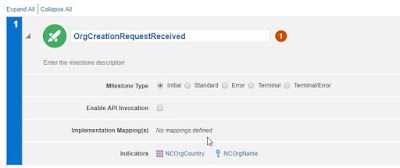
Here are my Milestones -

Excellent, self-explanatory icons!
Step 4 - Map Milestones to Integration Activities
This is the obvious next step.

Mapping is done by the integration person, so I return to my Integration -


Now this is really cool.
I see the Milestones on the left, my Orchestration on the right.
I just drag and drop the Integration flow actions etc. into the Model -
This version of Insight supports mapping to four actions:
1. trigger
2. schedule
3. invoke
4. return.
Other actions, such as Assign, will be supported in upcoming versions.
I map as follows -


All I need to do now is map values from my integration flow payload to the Insight
indicators I have defined.
I have 2 of these -
orgName
orgCountry


Now to the orgName -

I now return to the Insight console and see that the model is 100% complete
but still in draft.

I click on the menu and select Activate -


All I now need to do is execute a few calls to the integration -

Back to the Insight console -

Let's see what's happening -


Subscribe to:
Posts (Atom)

