Thursday, July 10, 2014

#14 SOA 12c New Features - Encrypting personally identifiable information (PII)

Great new feature enabling the encryption of sensitive data such as credit card number or SSN.

Here is a simple example of a order process where I can encrypt the (credit card number) field.

Here is my order XSD.


The BPEL process just assigns input to output.


Here is the composite view -


Notice the lock icon on the exposed service. Here I have defined the encryption.

Steps -


Select the data to be encrypted -


Note the key name -


I know this is probably preaching to the converted, however - to reiterate -
e.g. one needs to decrypt the ccnr before sending it on to the CreditCardValidation Service.


Now all we need to do is create the csf key.
We can use WLST to do this -

Open a CMD window in the following directory


Enter the cmd:
wlst
then
connect("weblogic","welcome1","t3://localhost:7101")
then you will see the prompt
wls:/DefaultDomain/serverConfig>
enter
 createCred(map="oracle.wsm.security",
key="pii-csf-key", user="weblogic", password="welcome1", desc="Key for
pii_security_policy")

You will see the confirmation


Now deploy and test -


Review the BPEL audit trail


Now wasn't that easy!

Now to decryption -


The BPEL process now calls the credit card validation service - the argument passed is the ccnr.
So I need to decrypt before calling -


The web service's logic is pretty banal -


Deploy and Test


Wednesday, July 9, 2014

#329 Oracle Event Processing book from Packt

Excellent book from Lloyd et al.


Applicable to OEP 12c.


Sunday, July 6, 2014

#328 Setting Heap size for Integrated WLS on JDev 12c

The integrated WLS coming with JDeveloper 12c has the SOA/Service Bus components pre-deployed.
The default setting is 2 GB.

Start the integrated server -


the cmd executed is C:\Users\ncommisk\AppData\Roaming\JDeveloper\system12.1.3.0.41.140521.1008\DefaultDomain\bin\startWebLogic.cmd

This calls setDomainEnv.cmd which, in turn, calls setSOADomainEnv.cmd


Open this file and you will see -


It also calls "%DOMAIN_HOME%\bin\setStartupEnv.cmd"

Open this file and go to the setting for the "AdminServerStartupGroup" -


Change to 3GB as shown.
Stop the Integrated server and then re-start it.


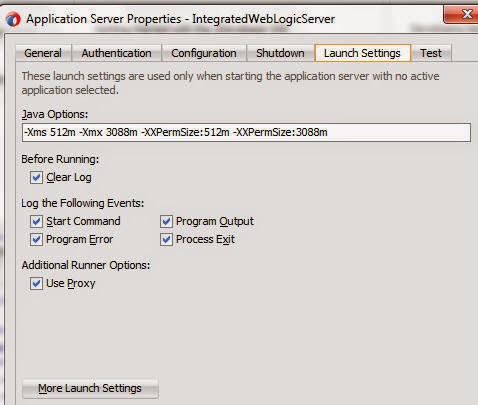
Now you can also set this in JDev -

right click on your integrated app server connection --> Properties


Click on More Launch Settings

Here I add a new Env variable USER_MEM_ARGS


Now close all applications in JDev then re-start the server.


view the server log - you will see -


Simple, isn't it?


Friday, July 4, 2014

#13 SOA 12c New Features - Unified Error Hospital

Here's a very simple example - I have a BPEL process that calls the StockChecker Service.


This is a web service, deployed to WLS.


I created a couple of test instances -


Now I stop the web service -


I re-test the composite -


Look at the Error Hospital -


I just search for errors from this composite


I see that one instance needs to be recovered.

I see the error -


So let's re-start the web service


Go back to the Error Hospital -


Select the row and do a bulk recovery.