Monday, November 6, 2023

#995 - OIC Healthcare - MLLP adapter

The latest release of OIC includes an MLLP adapter. MLLP, aka Minimal Lower Layer Protocol, goes hand in hand with HL7 message processing. So this new adapter is very interesting from an OIC Healthcare perspective. This post shows you how this works and details a simple demo you can use. 

Firstly a BIG thanks to my colleague Steve Tindall for his support here.


The MLLP adapter leverages the connectivity agent, as you can see.

I will be invoking an OIC MLLP triggered integration via a 3rd party tool, HL7 Inspector.

First use case will be as follows - HL7 invokes the following integration - 


The only action is a Logger, which will log the incoming HL7 message.

It is configured as follows - 


Let's look at the inbound connection definition - 


The listener port can be set to a value of your choice. The actual "listening" is done by the connectivity agent, which then triggers the integration.

I have the following setup, in this simple scenario -


So HL7 Inspector sends the request to localhost:6200. 

Time to look at how this is setup in HL7 Inspector


I click on the Send icon and then, the setup icon -


HL7 Inspector ships with a sample HL7 message, which I can use for this sanity test.

I click the Send button - 
Check out response - note the acknowledgement.


Now to OIC Observability - 


That's the basics working. But how would you implement such? I have a client or clients sending me HL7 messages over MLLP. The message types can, of course, vary. For example, messages of type ADT (Admit/Discharge/Transfer) can include messages such as -
  • ADT01 - Patient Admit
  • ADT02- Patient Transfer
  • ADT03 - Patient Discharge
  • ADT04 - Patient Registration
I can adopt the following pattern - Dispatcher/Router integration receives the message. It checks an OIC lookup to retrieve the correct target( Processor) integration -


Let's implement this - first back to our Dispatcher/Router integration - 


I've added a couple of actions, as you can see. First step is the Assign - here I get a handle to the incoming HL7 message.

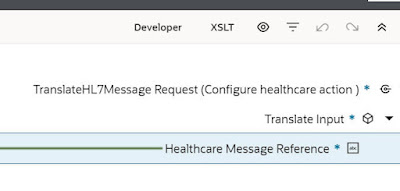
The next step is the HealthCare action - configured as follows - 


Note, I've selected all the HL7 documents I have created in the OIC instance.
These are available here - 

The Map to the Translate step is configured as follows - the target is set to the variable created in the Assign step.

The final activity, the Logger, outputs docType and version.

Let's this this with a valid 2.8 version of patient admission.

The activity stream output is as follows - 


Now a test with Patient Registration ADT^A04


I create 2 "processor" integrations, one for patient registration and one for patient admission.

These will have REST triggers and the input for both will be based on the output from the Translate step

The "processor" integration will then invoke Healthcare to convert the message reference to document - 

Here is the REST trigger definition of the "processor" integration for patient admission - 


The Healthcare action invoked is - Convert Message Reference to Document


The mapping is simple - the request stream is the source and the target is - 


I add a Logger as the final action, logging the patient. The final result - 


Now to the OIC Lookup, mentioned earlier - this will contain the routing rules  


The lookup will be used in the mapper, when the "dispatcher/router" invokes the "processor" integration - 

The "router" integration has been augmented as follows - 


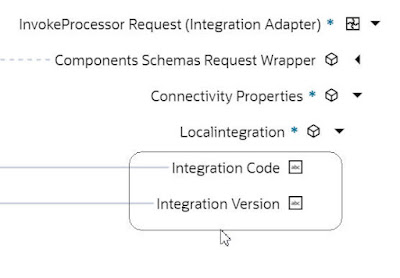
The Mapper for the InvokeProcessor step is configured as follows -


Integration Code and Integration version are set via the Lookup.
 

All that's left is to add a new "processor" integration for ADT_04 - Patient Registration - same modus operandi.

Let's test with a new ADT_01 ( Admit Patient ) document from HL7 Inspector


Now to OIC Observability


and here's our patient - Adam Everyman -


That's how simple it is! Summa Summarum, this is a compelling new feature of OIC. Currently it is available via a feature flag, so ping me if you want to try this out now.

Thursday, November 2, 2023

#994 - Monitoring Fusion Events in OIC

 I've touched this topic in a recent "new features" post, but let's look at this in a bit more detail. Fusion Apps can raise business events to which OIC integrations can subscribe. OIC now provides us with a view of these Fusion events and how they are being processed, from an OIC perspective. The post is truly a joint effort between my esteemed colleague, Ravi Pinto, and myself - so a big thank you to Ravi here.

Back to the Fusion events insight in OIC - this is available in OIC --> Observability --> Fusion Applications.

Here's a view of part of that UI in OIC- giving you an overview of the state of event processing.


But let's start with a simple example, an OIC integration subscribing to the Fusion event - Service Request Created.


The integration is banal, just the "subscriber" trigger and a Logger action. So, without further ado, let's create the SR - 


I check in OIC Observability - the event has been processed.


Now to the new Observability section - Fusion Applications


This page shows all Fusion connections in use in this OIC instance. AA-Sales-Service is the connection I am using.


This list classifies Fusion business events under the following states - 

  • Queued
  • Delivered
  • Retried
  • Maxed out Retries
Queued means the OIC integration has not, as yet, picked up the Fusion Business Event.
Delivered means the OIC integration has picked up and processed the Fusion Business Event. 
Retried refers to the number of times Fusion has tried to resent the event to OIC.
Maxed out Retries means Fusion has exhausted the number of retry attempts to send this event to OIC.

The runtime flow is as follows - Fusion attempts to deliver the event. If the integration is activated then you will see near real time delivery. But what happens if the integration is deactivated, but with event subscription still active? Yes, you got it - the event is placed in the queue. Now remember this queue is in Fusion, not in OIC. Fusion will retry to deliver the event from the queue multiple times, depending on how this has been configured at Fusion level. Let's say we have n retries with an exponential backoff of nn. The event delivery state is changed to maxed out retries, once these retries have been exhausted. 

Once an event is in this delivery state, the only way to process it from an OIC perspective is from the Observability --> Fusion Applications Page. That means, in the case of a deactivated integration being the issue, the OIC admin does the following -
  • re-activate the integration
  • resubmit the Fusion event from the Observability --> Fusion Applications page

Let's see this in action - I deactivate the subscribing integration and create a new SR is Fusion.


Note the ability to Delete event subscription. I do not check the box, this time. Checking this box, will delete the subscription, resulting in Fusion no longer pushing the event to OIC.  

Here is a new SR I just created - 


Back in Observability --> Fusion Applications -


Now we see the event is Queued for OIC delivery.


Note what is shown here is the Fusion Event Id and not the SR number.


I re-activate the integration - 
and, a couple of minutes later, see the event has been processed by OIC.


Next, an example with the maxed out retries - here I deactivate the integration , create a new SR and wait...


Now it has moved to state of Retried.

I go back to waiting for Godot...eventually I see - 


I check out the details -


The salient reason is - 

Now I re-activate the integration, 
and return to the event details page - 
here I can select the event and click Retry.


I see the instance in the Observability --> Instances page - 


Summa summarum, this is a game changer in respect of processing Fusion events. No other integration platform offers such functionality.

Finally, OIC Fusion event support also includes an all time status view - 


This is really compelling and a must-have for all those engaged in Fusion driven integration implementations.