Thursday, June 26, 2014

#4 SOA 12c New Features - OSB design time in JDev / REST services

In this post I will create a simple OSB process that calls the BPEL process, created in the previous post.


Now create a service bus project -


Here is the project structure -


Here is the design time -


Here is the palette -


So the first step is to get the BPEL process wsdl and use this in the
configuration of a HTTP Transport service.


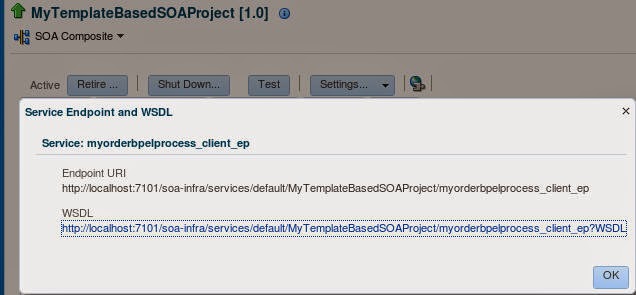
 You can either browse for the WSDL or cut and paste from em.


Notice the https url, you can change this to http and port 7101, if you like.

Run the Business Service -


Check the DB -


Now add a Pipeline -


Note: Create from Template will be discussed in a future post.

Use the same wsdl -


Note: the de-coupling of pipeline and proxy service.


Edit the pipeline and define the routing to the business service.
Add a pipeline pair


Add/define routing


Right click on the proxy service and test by clicking Run


Expose as REST


Configure as follows -


in Operation Bindings  - click the icon on the right to generate a sample payload -


Test by right clicking on the REST proxy service and selecting Run
OrderNr = Gabba


Check DB -


Gabba written to the DB.


#3 SOA 12c New Features - BPEL --> SubProcesses / Component Templates

Here is a quick overview of the new design time BPEL features -

I add my obquitous xsd to the project -


Notice the new compents available -

- Subprocess -


A subprocess is a fragment of BPEL code that can be reused within a particular
processor by separate processes. The subprocess extension provides the following
benefits:

BPEL process code reusability, which reduces the need to create the same activities
multiple times to perform the same tasks.

Code modularity.

Code maintenance (changes are propagated, which eliminates the need to
implement updates in multiple places every time a change is necessary).

Less overhead than invoke activities.

Memory footprint reduction, which can be considerable in a complex process.


- Component Template - 


A template is a reusable part of an Oracle SOA Suite project that you can use to create new projects.


Creating a Subprocess

Here I create a subprocess that writes an order to my orders DB table.
I created this table on JavaDB using the folowing SQL -

CREATE TABLE NCOrder
    (Ordernr VARCHAR(10) NOT NULL
    CONSTRAINT NCOrder_PK PRIMARY KEY, CustLastName VARCHAR(26),
        CustFirstName VARCHAR(26),CustEMAIL VARCHAR(26), Product VARCHAR(26),
        Quantity INT, Price INT, OrderStatus VARCHAR(10));


I add a db adapter to the composite. The sub process wil use this to write an order to the DB.


You can use the JNDI name /eis/DB/SOADemo this will save you having
to create a new entry under the DB adapter in the WLS console.


Wire up


Edit the sub-process - here are the available components -


Create a variable of type
Add the Invoke etc.


Now I create a new BPEL Process OrderProcess with an Order as input and output.


I edit the process -

Notice the Sub-process is available in the Subprocesses/Standalone section.

I drag this into the process -


Edit the Call -


set the in_order value -


Assign input to output -


Test -

Deploy to the embedded WLS 

Test via em


Check the DB -


Component Templates Demo


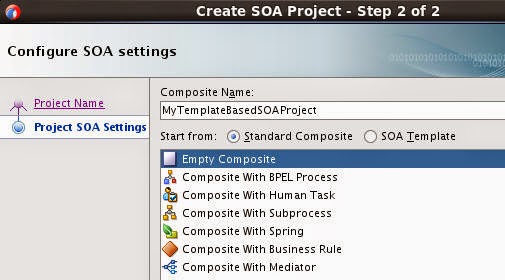
You can create a new project based on an existing template -
For example, you can click the plus icon and navigate to
/home/oracle/fmw/jdeveloper/integration/templates


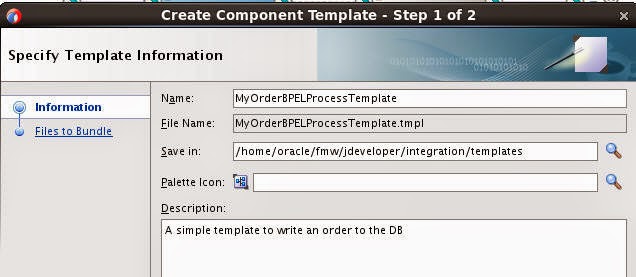
In this case, we go for a component template - so just do the following -


Select Component Template -


Here is the result -


# 2 SOA12c - New Features - Project Structure / Technology & Cloud Adapters

12c SOA Project Structure


With 12c we get a new project structure when we create a new SOA App/Project.
This is easier to read as the 11g equivalent.


Compare this to 11g -


Here are the tech adapters from 11g


Here are the tech adapters from 12c


Deltas

Web service (11g) has been renamed SOAP (12c)
There is a new section on the 12c palette for apps adapters and cloud adapters.

New 12c Tech Adapters

Coherence adapter
LDAP adapter
MFT adapter
MSMQ adapter
REST adapter

12c App / Cloud adapters


Other Cloud adapters include RightNow.

Most of the info below is straight from the ORCL docs -

Coherence Adapter -

Coherence provides replicated and distributed (partitioned) data management and
caching services on top of a reliable, highly scalable peer-to-peer clustering protocol.

A Coherence cache is a collection of data objects that serves as an intermediary
between the database and the client applications. Database data can be loaded into a
cache and made available to different applications. Thus, Coherence cache reduces
load on the database and provides faster access to database data. Objects in the cache
can either be of XML or POJO (Plain Old Java Object) type.

The Coherence Adapter enables you to perform useful Coherence operations such as
adding an item to a Coherence cache, obtaining an item from a Coherence cache,
removing an item and querying from a Coherence cache.

LDAP Adapter -

The Oracle LDAP adapter provides bi-directional connectivity with LDAP V3-
compliant directory servers. So now we can do CRUD operations on target directory servers.

MFT Adapter - I will discuss this in a separate post on MFT.

MSMQ Adapter - 

Microsoft Message Queueing (MSMQ) is a message infrastructure and a development
platform for creating distributed, loosely-coupled messaging applications for the
Microsoft Windows operating system.
Applications that use MSMQ create/locate a queue, connect to the queue, navigate the
queue, send/receive messages from a queue and use the MSMQ queue properties to
define the behavior of the queue where applicable and needed.

Some supplementary setup is required at WebLogic level - such an enabling jCOM etc. This is fully detailed in the adapters docs.

REST adapter - please see the next post for an example.


# 1 SOA 12c New Features - an overview

Welcome to SOA 12c.

Aligned with industry drivers such as Cloud, Mobile and Data.

Here are some of the new features I will detail in future posts -

General

1. Single JDev based developer install. Jdev's embedded WLS has the SOA engine deployed on it.
1.1. Uses JavaDB for soainfra schema

The weblogic server is installed here -

C:\Users\yourName\AppData\Roaming\JDeveloper\system12.1.3.0.41.140521.1008\DefaultDomain

2. Debugger

3. SOA Tester
3.1. Develop and test without having to go to EM

4. Continuous Integration support (Maven/Hudson)

5. REST support

6. SOA Templates

7. More flexible authorisation model

8. Exalogic optimisations

9. Enterprise Scheduler (ESS) New component

10. Improved EM console
10.1. Improved runtime visibility

11. Improved Error Hospital

12. Performance improvements
12.1. Composite lazy loading
12.2 DB Schema optimizations

13. Improved SOA Composer

14. MFT - New component - Managed File Transfer

15. Mobile Channel Enablement

16. Cloud Support

17. New JCA Adapters

18. B2B improvements

BPEL Specific

1. Support for inline and standalone sub-processes

2. Templates (Cmponent/Custom Activity)

OSB Specific

1. Design time in JDev

2. Mediator re-sequencer now available in OSB

3. OSB Mgt. Console in EM

4. Dynamic payload validation at runtime. Based on an expression.


OEP Specific

1. Design time in JDev

2. CQL enhancements

3. Spatial Improvements

4. Application compiler

5. Application and CQL testing

6. New and Improved adapters

7. Public Cartridge API

8. Improved Installer

9. Improved Coherence Cartridge

10. EDN integration

11. Business Rules integration

12. Performance optimizations


EDN Specific


1. Re-implemented on the basis of JMS

#323 SOA Suite 12c Unveiled


Check out the press release here


Check out the overview here


Check out the product management blog here

Thursday, June 5, 2014

#322 12c @SOA Community Summer Camp August 2014


Another great event organized by Juergen Kress -
details here