Showing posts with label Integration Cloud Service (ICS). Show all posts

Tuesday, October 31, 2017

#602 - ICS --> NetSuite to Zendesk integration

Here is a simple example of integrating NetSuite with Zendesk.
We will raise a ticket in Zendesk for a case, created in NetSuite.

I start by creating a NetSuite connection. This process is described in the previous post, available here

I then leverage the ICS REST adapter to access Zendesk. BTW. I logged in to Zendesk and took advantage of their free 30 day trial offer.


So my Zendesk account is as follows -


The REST connection in ICS in defined as follows -


Simple stuff!

I now create an Orchestration in ICS - trigger will be a schedule -


The logic is as follows - an internal NetSuite case id is passed into the process. The process variable is defined at Schedule level. This is then used to retrieve the Case from NetSuite. This case data is then used to create a ticket in Zendesk.

Here is the variable definition -


As you can see, I have hardcoded a value.

The NetSuite Invoke is configured as follows -


The NetSuite adapter offers comprehensive access to the product -


The Zendesk invoke is configured as follows -


Finally I add a Notification action to send out an email containing a link to the ticket in Zendesk -


Now to the testing -

Here is my case in NetSuite -


Hare of the Dog has gone missing - shock, horror!

I execute the test -


I click on the link in the email -


So easy, thanks to ICS.

#601 - ICS Netsuite adapter configuration


Here is an example configuration of an ICS connection


Yes, I have obfuscated some of the fields, but let's go thru them individually -

WSDL URL:

https://webservices.netsuite.com/wsdl/version/netsuite.wsdl


So from where did I get the version nr?

Now, I have little or no knowledge of NetSuite as an app, so I just logged in and searched.


so there it is, 2017.2

so my wsdl looks like -

https://webservices.netsuite.com/wsdl/v2017_2_0/netsuite.wsdl

Now to some NetSuite nomenclature -

A “user” is an individual who has access to a NetSuite account.
  •        Generally, most users are employees, but vendors, partners, and customers can also be users.


Email Address: This is your NetSuite user name

Account: This is your company account.

This information can also be garnered by logging into NetSuite and opening up any form within it,
then right click - view page source. Look at the bottom left of the page.

Role: the numeric value of the NetSuite role - for me it is 03. The NetSuite user has to have the
Admin role granted to it.

Application ID: You can generate this from within NetSuite -


Then test it -


Thursday, September 21, 2017

#597 Quick look at the ICS JDE adapter


Here is the adapter configuration -


Here is it in use as an INVOKE -


Wednesday, September 20, 2017

#596 ICS Fusion ERP adapter in action


File-based Data Import (FBDI): Import Journal Entries into Oracle Financials with ICS, 
incl. processing the Callback.

In this simple example we will do the following -

1. pick up a zipped file from an ftp server
2. unzip the file. It will contain many files
3. For each file -
3.1. Read the records in the file
3.1.1. For each record -
3.1.1.1. Transform and write to the output file
3.2. Upload the file to Fusion ERP - invoke the ERP Import Service.


Create the connections in ICS

Create the Fusion ERP Connection


Create and test the FTP connection


Create the ICS Orchestration


Drop in the ftp adapter -


I can delete the Map to DownloadZipfile


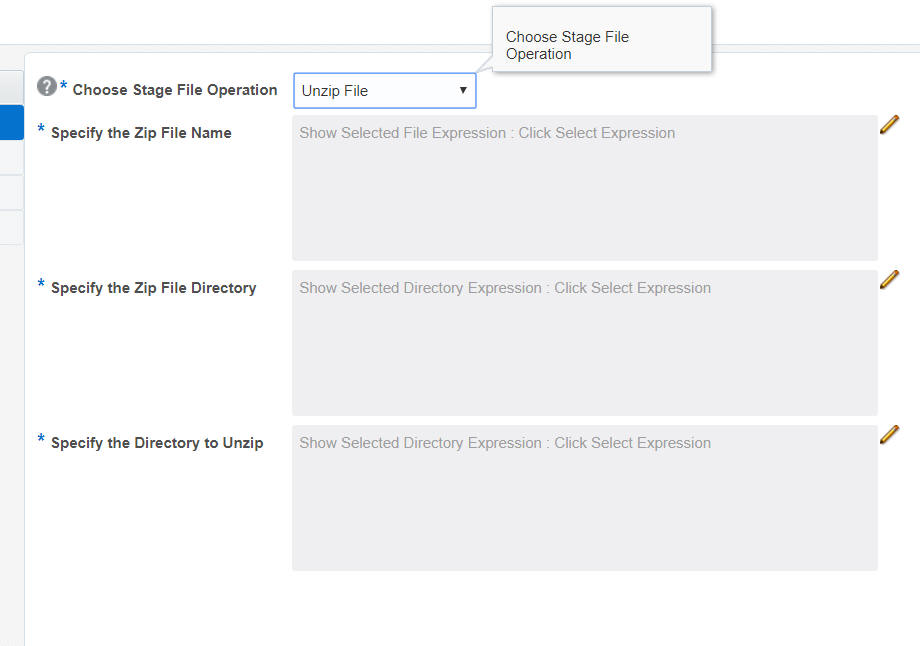
I now need to unzip the file -

I use the STAGE FILE ACTION for this -


I will then need to configure the following -


I do so as follows -


Note: I have hardcoded the Unzip directory


My Orchestration now looks as follows -


In my scenario, the zip contains only 1 file for processing -

So now we start processing the records in the file.

I will start by listing the contents -

Again, I use the STAGE FILE ACTION -


My Orchestration now looks like this -


Now to the actual file processing...

I add a FOR EACH ACTION to iterate thru the files.


I configure the above as follows -


The Orchestration now -


Now we add yet another STAGE FILE ACTION -

This will be used to Read the file.


I have a test .csv to use here -


The Orchestration now -


I now add yet another STAGE FILE ACTION to write the output file -


Now to the mapping...


I create the following 2 mappings -


All we now need to do is zip up the output file.
We do this again via the STAGE FILE ACTION -


The Orchestration now...


Now we will invoke the Fusion ERP Import Service -


The Orchestration now...


Now to the Mapping...


I now add a NOTIFICATION ACTION to send the confirmation code


I now create the Callback ICS process - this will be called on the successful completion of the ERP import.


Drag and Drop the ERP adapter connection


Add a NOTIFICATION ACTION -


Ensure the certificate for the ERP Cloud instance is imported into the ICS certificate store.


I activate the callback integration.

I copy the Identifier -


I now edit the main Orchestration again, leveraging the callback integration -


I now activate this orchestration


I then test via menu - submit now