Showing posts with label OIC Healthcare. Show all posts

Wednesday, September 18, 2024

#1025 OIC Healthcare - FHIR adapter


Introduction

So what is FHIR? 

The HL7® FHIR® (Fast Healthcare Interoperability Resources 1 ) standard defines how healthcare information can be exchanged between different computer systems regardless of how it is stored in those systems. It allows healthcare information, including clinical and administrative data, to be available securely to those who have a need to access it, and to those who have the right to do so for the benefit of a patient receiving care.

More details here.

Creating a Patient

Now the usual caveat to begin with - I am not a FHIR or healthcare expert - I just like showing how easy it is to use Oracle Integration. 

So, to our simple use case - Create Patient.

I tried this out first with an online FHIR server - kodjin from an Estonian company, Edenlab. 

I copied the request payload for use in OIC.

Next step is to create a FHIR connection in my OIC3 Project - 

I then created the following integration -

I used the request payload from kodjin as the REST trigger request body.

Now to the configuration of the FHIR invoke -  

I map the fields I see in the example request from kodjin.


I just return the id from the FHIR invoke response - 


Let's run it!


I create a new patient - Cathal Brugha - and copy the id returned.

I use this id to do a GET in the kodjin app - 


I now create a new integration - getPatient -


I create a new patient - Michael Davitt -

Now to the GET - 


Tuesday, November 7, 2023

#996 OIC Healthcare: MLLP Adapter Part II

Leading on from the previous post, let's now look at outbound, i.e. OIC sending HL7 messages to a target, in my case, HL7 Inspector

Th following connection will be used - note the port. This is what is configured in HL7 Inspector.


The use case here is very simple, I just send back the message received. Remember the patient admission integration from the previous post? In that integration, AA-ADT01-Processor, I converted the message stream received into an xml based version of the ADT01 message.

Now I will use the OIC Healthcare action to transform this canonical version of the message back to HL7 format and forward it to HL7 Inspector.

Here is that integration before I make the changes - 


I add a new Healthcare action, after the Logger, and configure as follows - 


The Target to be mapped is as follows - 


The Source is the xml representation of the HL7 message received - 


I map the relevant fields, then add the MLLP Invoke.


The final integration flow - 


I activate the integration and test by sending a new ADT01 message from HL7 Inspector. This message will trigger my router/dispatcher integration, which, in turn, will invoke AA-ADT01-Processor.

I check out the HL7 Inspector Receiver - 


You will notice some new field values in the above message, i.e. this is not a simple echo.

I put in these Sender values via the map - 

<0x0b><0x1c><0x0d>MSH|^~\&|OIC^AA-ADT01-Processor^Integration|Commiskey Healthcare Inc.^Commiskey Healthcare Inc.^Clinic for the disturbed|ADT1|GOOD HEALTH HOSPITAL|198808181126|SECURITY|ADT^A01^ADT_A01|MSG00001|P|2.8<0x0d> EVN|A01|200708181123<0x0d> PID|1||PATID1234 123456789^5|||||M<0x0d> NK1|1|NUCLEAR|SPO^SPOUSE||||NK^NEXT OF KIN<0x0d> PV1|1|I|2000||||004777^ATTEND^AARON<0x0d> <0x0d>


Tip for mapping - use the OIC mapper <copy-of> function at segment level to ease the mapping chore.

BTW. the following cmd is useful, if HL7 Inspector is not receiving messages - 
netstat -ano | find "2100"


Custom Schemas

The ADT01 data I used only leverages a couple of segments, so I could define a custom schema based on the standard ADT01 definition and delete the segments I don't require. This is what I did - 


The schema designer makes it very easy to delete unwanted segments or add new custom segments and elements.


Now I can use this schema when defining a new version of the ADT01 doc - 
First I create the doc based on the ADT01 version 2.8 and then edit it to use the custom schema based on ADT01 version 2.8. 


I could then use this document definition, when invoking the MLLP adapter. 

Summa, summarum, Healthcare is a compelling addition to the OIC toolkit, looking forward to helping our customers adopt it.


Monday, November 6, 2023

#995 - OIC Healthcare - MLLP adapter

The latest release of OIC includes an MLLP adapter. MLLP, aka Minimal Lower Layer Protocol, goes hand in hand with HL7 message processing. So this new adapter is very interesting from an OIC Healthcare perspective. This post shows you how this works and details a simple demo you can use. 

Firstly a BIG thanks to my colleague Steve Tindall for his support here.


The MLLP adapter leverages the connectivity agent, as you can see.

I will be invoking an OIC MLLP triggered integration via a 3rd party tool, HL7 Inspector.

First use case will be as follows - HL7 invokes the following integration - 


The only action is a Logger, which will log the incoming HL7 message.

It is configured as follows - 


Let's look at the inbound connection definition - 


The listener port can be set to a value of your choice. The actual "listening" is done by the connectivity agent, which then triggers the integration.

I have the following setup, in this simple scenario -


So HL7 Inspector sends the request to localhost:6200. 

Time to look at how this is setup in HL7 Inspector


I click on the Send icon and then, the setup icon -


HL7 Inspector ships with a sample HL7 message, which I can use for this sanity test.

I click the Send button - 
Check out response - note the acknowledgement.


Now to OIC Observability - 


That's the basics working. But how would you implement such? I have a client or clients sending me HL7 messages over MLLP. The message types can, of course, vary. For example, messages of type ADT (Admit/Discharge/Transfer) can include messages such as -
  • ADT01 - Patient Admit
  • ADT02- Patient Transfer
  • ADT03 - Patient Discharge
  • ADT04 - Patient Registration
I can adopt the following pattern - Dispatcher/Router integration receives the message. It checks an OIC lookup to retrieve the correct target( Processor) integration -


Let's implement this - first back to our Dispatcher/Router integration - 


I've added a couple of actions, as you can see. First step is the Assign - here I get a handle to the incoming HL7 message.

The next step is the HealthCare action - configured as follows - 


Note, I've selected all the HL7 documents I have created in the OIC instance.
These are available here - 

The Map to the Translate step is configured as follows - the target is set to the variable created in the Assign step.
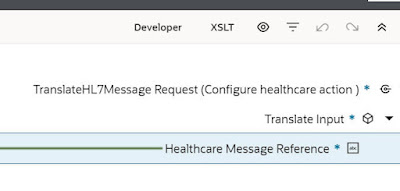

The final activity, the Logger, outputs docType and version.

Let's this this with a valid 2.8 version of patient admission.

The activity stream output is as follows - 


Now a test with Patient Registration ADT^A04


I create 2 "processor" integrations, one for patient registration and one for patient admission.

These will have REST triggers and the input for both will be based on the output from the Translate step

The "processor" integration will then invoke Healthcare to convert the message reference to document - 

Here is the REST trigger definition of the "processor" integration for patient admission - 


The Healthcare action invoked is - Convert Message Reference to Document


The mapping is simple - the request stream is the source and the target is - 


I add a Logger as the final action, logging the patient. The final result - 


Now to the OIC Lookup, mentioned earlier - this will contain the routing rules  


The lookup will be used in the mapper, when the "dispatcher/router" invokes the "processor" integration - 

The "router" integration has been augmented as follows - 


The Mapper for the InvokeProcessor step is configured as follows -


Integration Code and Integration version are set via the Lookup.
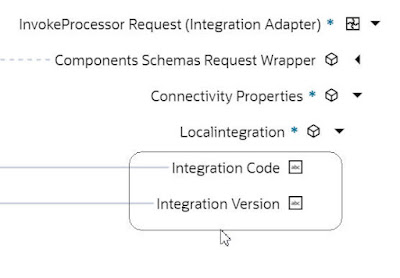
 

All that's left is to add a new "processor" integration for ADT_04 - Patient Registration - same modus operandi.

Let's test with a new ADT_01 ( Admit Patient ) document from HL7 Inspector


Now to OIC Observability


and here's our patient - Adam Everyman -


That's how simple it is! Summa Summarum, this is a compelling new feature of OIC. Currently it is available via a feature flag, so ping me if you want to try this out now.
