Wednesday, October 24, 2018

#662 OCI - Virtual Cloud Networks (VCNs) and Compute Instance Creation & Connectivity


According to the ORCL docs -

A Virtual Cloud Network is a virtual version of a traditional network—including subnets,
route tables, and gateways—on which your instances run. A cloud network resides
within a single region but can cross multiple Availability Domains. A VCN covers a single, contiguous IPv4 CIDR block of your choice.

Some more concepts/definitions -

1. Subnets - Subdivisions you define in a VCN (for example, 10.0.0.0/24 and 10.0.1.0/24). Subnets contain virtual network interface cards (VNICs), which attach to instances. Each subnet exists in a single availability domain  and consists of a contiguous range of IP addresses that do not overlap with other subnets in the VCN

2. VNICs - A virtual network interface card (VNIC), which attaches to an instance and resides in a subnet to enable a connection to the subnet's VCN. The VNIC determines how the instance connects with endpoints inside and outside the VCN. Each instance has a primary VNIC that's created during instance launch and cannot be removed. 

3. Private IP - A private IP address and related information for addressing an instance (for example, a hostname for DNS). Each VNIC has a primary private IP, and you can add and remove secondary private IPs. The primary private IP address on an instance doesn't change during the instance's lifetime and cannot be removed from the instance.

4. Public IP - A public IP address and related information. You can optionally assign a public IP to your instances or other resources that have a private IP. Public IPs can be either ephemeral or reserved.

5. Internet Gateway - An optional virtual router that you can add to your VCN. It provides a path for network traffic between your VCN and the internet. 

6. Routing Tables - Virtual route tables for your VCN. Your VCN comes with a default route table, and you can add more. These route tables provide mapping for the traffic from subnets via gateways or specially configured instances to destinations outside the VCN.

7. Security Lists - Virtual firewall rules for your VCN. Your VCN comes with a default security list, and you can add more. These security lists provide ingress and egress rules that specify the types of traffic allowed in and out of the instances. 

8. Dynamic Routing Gateway - A virtual router that provides a single point of entry for remote network paths coming into your VCN. You can use it to establish a connection with your on-premises network via IPsec VPN or FastConnect.


Check out the full docs here

VCNs


So let's go and create a VCN -


3 Subnets have also been created.


One subnet per Activity Domain.

This can be seen, when I then go to create a Compute Instance -


The relevant subnet is selected, based on AD.


Other resources have also been created -


Create a Compute Instance


Now back to the Compute Instance creation...


I can then login -


Just a note on Connectivity to on-premise -


3 options -

1. Public Internet
2. VPN - IPSec VPN
3. Fast Connect


#661 First steps with Oracle Cloud Infrastructure (OCI) - Users, Roles, Policies


When you subscribe to OCI you get a default administrator account.
So your first task may be to create other users and assign permissions to them.

Users can be natural persons or applications.

But first to some OCI concepts -

1. Regions - OCI is hosted in regions - different physical locations in the world e.g. Phoenix US, London UK, Frankfurt DE.

2. Availability Domains (AD) - Within a Region I have Availability Domains, which are isolcated from each other, thus giving me High Availability OOTB. Some OCI resources you create, e.g. storage volumes are AD specific.

3. Tenancy - essentially your account - your slice of OCI.

4. Compartments - containers you can define within your tenancy so you can organise and isolate the resources you create. For example, a large organization could assign different compartments to departments etc. Compartments are logical as opposed to the physical Regions and ADs. Resources can be shared across compartments.


Users, Roles and Policies

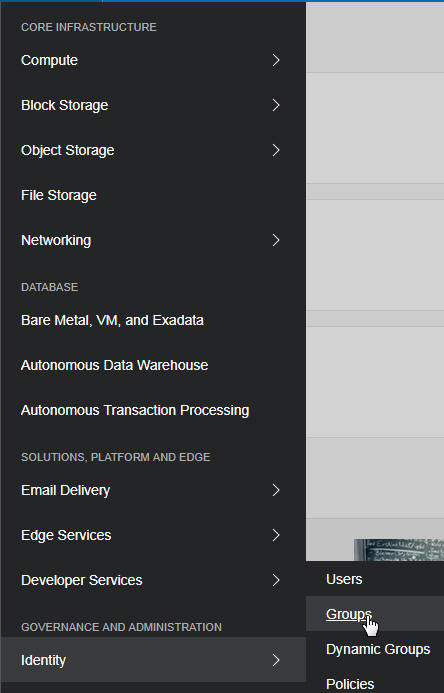
So let's try this out...


Now I create a Compartment -


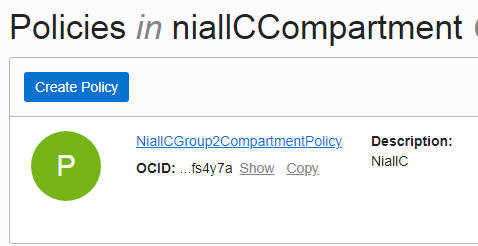
Next comes a Policy - it will give my group permissions within the compartment


The policy I create is as follows -
Allow group niallcOCI-usersGroup to manage all-resources in compartment niallCCompartment


The Policy is created -


Now to create a User -


I create a temp password for the user -


I now login as the new user -


I am prompted to change my password -


I go to Compute - Instances


I cannot select the Compartment - as I have not been granted that role



I logout and log back in as the admin.
I edit the user -


I log out and then back in as the new user -
I again go to Compute - Instances

Now I can select the Compartment


Tuesday, October 23, 2018

#660 - OIC --> using the OPA adapter

OPA = Oracle Policy Automation


Oracle Policy Automation is an end-to-end solution for capturing, managing, and deploying complex legislation and other document-based policies across channels and processes. Oracle Policy Automation is an end-to-end solution for capturing, managing, and deploying complex legislation and other document-based policies across channels and processes.

One creates process models in OPA - these contain the business logic - from the docs -
Oracle Policy Modeling is a desktop application used to build interactive interviews based on business requirements, complex policy and legislation. It can be used for modeling:
  • Policy eligibility
    • For example, determining whether a contact is eligible for a benefit, permit, loan, discount, license, product upgrade or parental leave.
  • Calculations
    • For example, determining a contact’s rate of benefit, allowance, deduction, tax, discount, waiting period or follow-up.

Essentially we will pass in a payload to OPA and it will process it via the policy model I select, then return a result.

As an OPA neophyte, I have worked out that it has two main parts -

1. the Policy Modeling Tool - which you download to a Windows machine.
This is where you design the policies.

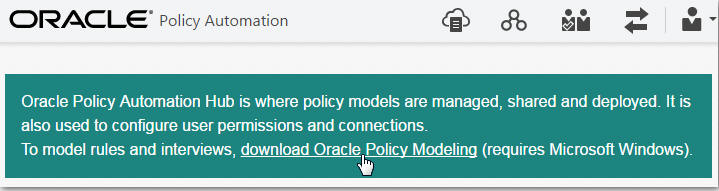
2. OPA Hub - for policy model management and deployment.


A colleague has kindly created a simple policy model for me - OIC_test.
The policy is very simple -


The order will be approved, once I pass in those 3 attributes.


As you can see, he has checked Web Services - Assess - so what is that?

From the docs -

The generic assess service uses supplied data to determine one or more outcomes, 
can work out what additional data is needed to reach a conclusion, 
and provides reports on how decisions were reached.

OIC_test will simply assess an incoming purchase order and return an approval value -
true or false.

Creating the OIC Integration with OPA

I create the following integration in OIC -


Test is the Invoke of OPA.

The OPA Connection is defined as follows -


The Access Token URI = OPA Hub URL/opa-hub/api/auth

Note the OAuth requirements - for this, some preparatory steps in OPA are required -


Full setup info -

OPA Adapter Guide here
Supplementary OPA doc for Integration here
OPA REST API here


Now to the mapping -


Let's look at it in detail -


OPA processes cases, think of a social welfare entitlement case and the complex rules
that need to be applied to it.
As already explained, my simple example processes a purchase order case.
Note the outcomes field - This structure contains the case field(s) which will hold the response from OPA. In my simple example, this is the order_approved field. Again, as already mentioned, OPA will return a value of true or false.
The orderId, order_date and order_value fields are all related to the purchase order I will be validating.

The final field, id, is the case unique id field and needs to be set. I just set it to the orderId.

Now to the response mapping -


As you can see, I map the order_approved field to my result field.

Now to testing, via Postman -


Very succinct!

Monday, October 22, 2018

#659 OIC 18.4.1 New Features

New features are documented here

One that I really like is the Integration Updates support in Process -
Easily keep integrations in process applications up-to-date. On the Integrations view, icons identify integrations that have been deactivated or deleted, or active ones whose definitions have changed. Choose the update option that works for your process application.

Here is a simple example -


I have a process that calls the following integration -


As you can see, I have a warning icon - telling me something has changed.


Integration definition has been updated successfully


Now I deactivate the Integration -


This is immediately reflected in the Process design time -