Tuesday, May 17, 2011

Basic JMS Clustering with Weblogic 11g - Uniform distributed destination

JMS is an integral part of many SOA/Integration projects.
Like any other resource, we want scalability and reliability for our JMS artifacts.

So here is a simple example based on the following simple WLS cluster I've set up


Example 1: Using a UDD(Uniform distributed destination)

Thanks to my colleague Santosh for his support here.

UDDs make sense for both reliability and scalability. Essentially the UDD Queue
will be deployed to my cluster and thus available on both of my managed servers.

Step 1 -Create a JMS Server (JMSServer1)
-- FileStore= JMSFileStore1
-- Target= MgdServer1(Migratable)


Step 2 - Create a JMS System Module for the ConnectionFactory & UDD Queue (JMSModuleCluster)


Step 4 - Test with a JMS Client

--------------------------------------------------
package jmsclient;

import java.util.Hashtable;

import javax.jms.JMSException;
import javax.jms.Queue;
import javax.jms.QueueConnection;
import javax.jms.QueueConnectionFactory;
import javax.jms.QueueSender;
import javax.jms.QueueSession;
import javax.jms.TextMessage;

import javax.naming.Context;
import javax.naming.InitialContext;
import javax.naming.NamingException;

public class JMSClient {
public static void main(String [] args) throws JMSException,
NamingException {
final Context ic = getInitialContext();
System.out.println("*** CONTEXT =");
final QueueConnectionFactory qcf = (QueueConnectionFactory)ic.lookup("jms/MyCF");
// Lookup should specify the queue name that is mentioned as "mappedName" in MessageDriven Bean.
final Queue destQueue = (Queue)ic.lookup("jms/MyDistQueue");
ic.close();
final QueueConnection connection = qcf.createQueueConnection();
try {
final QueueSession session = connection.createQueueSession(false, 0);
final QueueSender sender = session.createSender(destQueue);
final TextMessage msg = session.createTextMessage("Hello from Lichtenau - fans of FCN");
sender.send(msg);
} catch (Exception ex) {
ex.printStackTrace();
} finally {
connection.close();
}
}

private static Context getInitialContext() throws NamingException {
Hashtable env = new Hashtable();
// Add InitialContext property assignments here.
env.put( Context.INITIAL_CONTEXT_FACTORY, "weblogic.jndi.WLInitialContextFactory" );
// Note that by default WebLogic server is not created with security, so credentials are not needed.
// TODO: Verify the server address and port number
env.put(Context.PROVIDER_URL, "t3://localhost:7003,localhost:7004");
env.put(Context.SECURITY_PRINCIPAL, "weblogic");
env.put(Context.SECURITY_CREDENTIALS, "welcome1");
return new InitialContext( env );
}
}

------------------------------------------------------------

You can stop any of the 2 managed servers and re-test.
The Queue is alway available.

Tuesday, May 10, 2011

SOA Suite 11.1.1.5.0 now available

software
http://www.oracle.com/technetwork/middleware/soasuite/downloads/index.html

docs
http://www.oracle.com/technetwork/middleware/soasuite/documentation/index.html#111150

Monday, May 9, 2011

EDN via PL/SQL

Scenario:

Raise an event on an insert to a DB table. Event is then consumed by a SOA composite.
In this case, this is a viable alternative to using a DB adapter(polling) as our table, in this scenario, only gets a couple of inserts per day.

XSD used


Create a sample ORDERS table in SCOTT's schema


Create a SOA app/project in JDev

Create an Event Definition in the project


Import the XSD


Here is the edl file


Create a PLSQL stored procedure that will call the following –


Our parameters, taken in part from the edl above, are as follows –
NAMESPACE – http://www.example.org
LOCAL_NAME - anything you like e.g. Our Event Name - NewOrder
PAYLOAD – This is our order


PRIORITY – DEFAULT is 5 so we don’t need to enter this.
However there is some “wrapper” overhead.


eb:business-event xmlns:eb=http://oracle.com/fabric/businessEvent
This is the default, so no need to change.

xmlns:ob="http://schemas.oracle.com/events/edl/NewOrder">
Set to the namespace from our edl.

eb:name ob:NewOrder
This is set to the EventName e.g. NewOrder

eb:content
Contains the actual payload i.e. our Order

Test the PLSQL
There should be an entry in the dev_soainfra.EDN_EVENT_QUEUE_TABLE


Now back to the SOA app...

Create a Mediator that subscribes to the event


Then create a File Adapter(Write) using the same xsd


Deploy and test
- You can execute the procedure directly in JDev
- View the result in em


View the output file


Now we need to include the PLSQL code in the POST-INSERT trigger logic.
Create a POST-Insert trigger on the nc_orders table


Insert a row

Wednesday, May 4, 2011

BPM ADF Form--> streamlining Save/Approve actions

Scenario: I have a simple BPM app that accepts in an order which is approved in parallel by our 2 erstwhile users jcooper and jausten. The users can also update the payload and normally they would have to complete 2 actions --> Save (the changes made) and Approve(the order). Our job is to combine this into 1 button click.

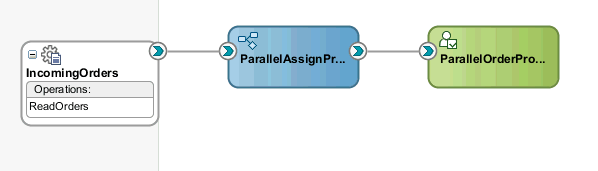
I created the following composite -


Essentially I drop an order into the /in directory. It's picked up by the File Adapter and passed on to the BPM process.

The Human workflow is defined as follows -


I then autogenerate the task form.


Now I want to combine the Save and Approve functionality.

Save is available via the update() operation.


Approve, naturally via the APPROVE() operation.

Now I need to create a new button called ApproveSave with the combined functionality.

1. Drag and Drop the update() and APPROVE operations onto the page.


2. Double-click on one of the buttons to create backing bean and binding code.


3. Double-click on the other button to create the binding code.


4. Drag and drop a Button onto the page, then double-click to create backing bean code.


5. Add the following code ...


6. Delete the other 2 buttons as we no longer need them.

7. Deploy and test. Login as jcooper


8. Edit the Order Status


9. Click the Save/Approve button

10. login as jausten


11. update the Order Status and click the Save/Approve button


12. Validate in em - check outgoing payload from the process.


13. Clean up by deleting the default APPROVE button

You have to be careful here - we want to delete the button but not the bindings.
You can delete it from the Source Code view to preserve the bindings.

However, if you did as I did - deleted it from the structure or design view - then you can simply add the binding again. Go to the taskDetails.jspx and click on the Bindings tab.


Re-deploy and test

Thursday, April 14, 2011

SOA Suite 11g --> Performance Tuning Part1

Scenario- we have a SOA composite that includes a synchronous BPEL process that calls a stateless session EJB (transferFundsBean) to transfer funds from account A to account B. So essentially a synchronous/transient process. The composite itself is exposed via an EJB Service interface.

We can tune on different levels -


  • EJB - transferFundsBean


  • BPEL


  • SOA Suite


  • WLS


  • JVM


  • O/S

EJB tuning

Avoid, if possible, using the RequiresNew transaction parameter - ours is set to Required.

We can pre-load the bean pool by amending the weblogic-ejb-jar.xml


max-beans-in-free-pool
should be set equal to the number of threads expected to invoke the EJB concurrently

initial-beans-in-free-pool
the cost of creating EJB instances is not incurred at run time


You can then monitor the Bean activity using WLS console.


I customized the table and added the Miss Total Count. This will show if my pool settings are adequate to cope with the loads I expect.

BPEL App Tuning
I added the following to the composite.xml -


SOA Server Tuning


Turning these off increases performance, but it does mean one doesn't see any instance results in the em console.


We assume that the only interesting one for us, as this is a SYNCHRONOUS process, is Dispatcher Invoker Threads.

However we also assume that, in our scenario, the EJB client thread executes the instance, thus bypassing these thread settings.

WLS Tuning

A possible issue here for us is JTA timeouts when running large performance tests.
So we increased the timeout setting appropriately.


JVM Tuning

For this exercise we are using JRockit.

Heap Size

According to the doc -
"A large heap decreases the garbage collection frequency but may take slightly longer to garbage collect. Typically a heap should be at least twice the size of the live objects in the heap, meaning that at least half of the heap should be freed at each garbage collection. For server applications you can usually set the heap as large as the available memory in your system will allow, as long as this doesn’t cause paging."

We began by setting the min/max heap size to 4GB.

Garbage collection
We stayed with the default here -

We have 3 alternatives -

throughput - optimizes garbage collection for application throughput (default)
pauseTime - optimizes garbage collection for short garbage collection pauses
deterministic - optimizes garbage collection for very short and predetermined garbage collection pauses(requires JRockit realtime)

Nursery Size
We didn't adjust this but it may be interesting for some applications.
Again to quote the official docc -

"The nursery is an area of the heap where new objects are allocated. When the nursery becomes full it is garbage collected separately in a young collection. The frequency and duration of young collections is determined by the nursery size. A large nursery decreases the frequency but the duration of each young collection might increase.

The nursery size is adjusted automatically to optimize for application throughput if you use the -Xgc:throughput or -Xgc:genpar option. Typically, the nursery size should be as large as possible while maintaining short young collection pauses. Depending on the application, a nursery size can be anything from a few megabytes up to half of the heap size."

I strongly suggest you use JRockit Mission Control to check on what's happening during your tests.


Also, if you think you are having thread contention issues, you can do a thread dump directly from the WLS console.

Tuesday, April 12, 2011

New Oracle Java Magazine on the way...

see http://blogs.oracle.com/java/2011/04/java_magazine_is_coming.html

Thursday, April 7, 2011

Valuable Oracle Partner Resource

excellent resource for Oracle partners and those wanting to be one...

http://blogs.oracle.com/imc/