Thursday, May 30, 2013

Wednesday, May 22, 2013

#246 Changing the BPM Workspace Logo

Oracle BPM 11g is just the thing for my wife's Feng Shui consultancy.
For those interested - her website is Here

Anyway - I need to replace the Oracle logo with hers -


I check on the file system and see the exploded war for the workspace app -


\user_projects\domains\newBPM_domain\servers\AdminServer\tmp\_WL_user\OracleBPMWorkspace\oij5bg\war\icons

As you can see, I copy the logo to this directory.

I now log into the workspace as weblogic and click on the Administration link.

I se the Branding Logo as follows - /icons/FSDZ.PNG


and voilĂ  -


Thursday, May 16, 2013

#245 BPM 11g PS6 Human Workflow Notifications

I have created a simple lab that shows the usage of the above. In this case, jcooper - my demo user - approves an order via email.


The lab includes the JAMES, BPM email and Human Workflow notification setup.

The Lab

Wednesday, May 1, 2013

# 244 Recommended reading around the Oracle SOA/BPM platform

One of our partners has been asking for some recommended reading -

I can wholeheartedly suggest the following titles -

Oracle Service Bus 11g Development Cookbook 
by Guido Schmutz et al.


Oracle BPM Suite 11g Handbook (Oracle Press) 
by Manoj Das et al.


Oracle SOA Suite 11g Developer's Cookbook 
by Antony Reynolds & Matt Wright


The following from Bruce Silver is a great book on BPM per se.


The following title from Lonnike Dikmans et al. is a great intro to SOA per se.


Still a very useful read from Jeff Davies et al -


Thursday, April 25, 2013

#243 Harvesting OSB artifacts to Oracle Enterprise Repository

Simple example showing the use of the harvester.

Here are my projects in OSB -


export these projects via the OSB console to a sbconfig.jar file.

OER Configuration


I need to install harvester Solution Pack

The Harvester is available in 11.1.1.x.x-OER-Harvester-Solution-Pack.zip, which is bundled with the Oracle Enterprise Repository 11g installation.


The installation of the Harvester Solution Pack requires use of the Import /Export tool. 
This tool is available from the Admin tab of Oracle Enterprise Repository in the Import Export option. 
The asset types delivered as part of the Harvester Solution Pack are required by the Harvester tool. 

 In OER, click on Admin then Import/Export. Then click on Import/Export client.


Import the Harvester Solution pack zip.


New asset types etc. have been created -


OSB configuration

We need to do some preliminary steps before running the harvester. all relevant files are here -


Amend HarvesterSettings.xml to specify harvesting from the sbconfig.jar file created earlier.


Run encrypt.bat to encrypt the password.

encrypt.bat HarvesterSettings.xml HarvesterSettings.xml
 
Then run setenv.bat   

Then run osb11g-harvest.bat


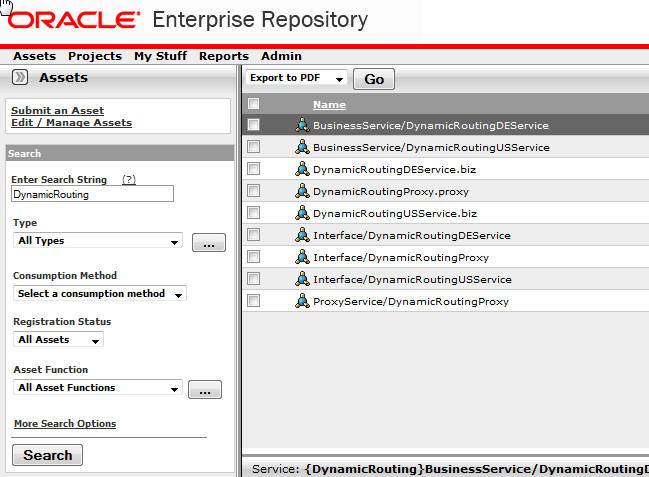
Then review the result in OER - let's check out the DynamicRouting OSB project -


Now wasn't that easy!