Monday, May 6, 2019

#705 Syncing Customers/Contacts from your CRM to Netsuite


Building on from previous posts -
Here I will sync Sales Cloud customer/contacts with Netsuite.

Essentially I will subscribe to the New Contact Event in Sales Cloud.

Here is an excerpt from the payload I receive in OIC -


AccountPartyId is the internal Sales Cloud Id for the Sales Account(Customer) -
MacCumascaigh Clan.

FirstName/LastName refer to the Contact.

First step will be to check whether the Customer already exists in Netsuite.
I do that leveraging the Search supported by the OIC Netsuite adapter,
the workings of which is detailed here

If the customer already exists - I store the internalId from Netsuite in a process variable, I defined previously (Assign).

If not, I invoke the Sales Cloud adapter - SalesAccount (GET) using the
AccountPartyId as key.


I then create a new Customer in Netsuite, using the data returned from Sales Cloud.


For this simple example, I just use the OrganizationName.


I then store the internal id of the newly created Customer in the process variable mentioned above.

Finally, for both of the above cases, I create the new contact in Netsuite.


Very simple and easy to implement.

Sales Cloud Specifics

OIC Sales Cloud Connection - need to specify the EVENT URL -


Don't forget to register your OIC instance with Sales Cloud

https://yourSalesCloud/soa/composer


csf-key is the concatenation of your OIC Identity Domain and your OIC Service Instance.
You can see this in the OIC About Box -


OIC Switch condition


Ok, now to testing -

I create a new Sales Account and contact in Sales Cloud.


I add a new contact -


Go to Monitoring in OIC -


Check out the audit trail -


Validate in Netsuite -


#704 OIC - Netsuite Integration - using search

A simple use case here - Create a Contact for a specific Customer in Netsuite

Request payload to OIC is as follows -


So I will need to do a search in Netsuite for the Customer internalId.

Search is available thru the Netsuite adapter -


One can leverage operators in the search query e.g.
Company name = Commiskey Clan

The valid operators are -


Now to a simple example - Create a Contact for a specific Customer -


Here is the mapping for the Search Request - GetCustomerId


The response payload from GetCustomerId is as follows -


Here is my OIC REST request -


I validate in Netsuite -


Sunday, May 5, 2019

#703 Netsuite Integration & Extensibility

Text in bold/italics is taken from the Oracle docs.

Leading on from the previous post,
Netsuite provides it's own integration/extensibility components.

This post is a basic introduction to them - again,
I am not a Netsuite expert and essentially what follows are notes for my own consumption.

So what does Netsuite offer us in terms of integration/extensibility?

Netsuite Integration

SuiteTalk - essentially the SOAP Services leveraged by the OIC adapter.

You can find the documentation in the Netsuite HELP CENTER -


Netsuite Extensibility

Here we have various components -

  • SuiteBuilder
  • SuiteFlow
  • SuiteScript


SuiteBuilder encompasses all the point and click customisation that is available through the UI. It allows customisation and personalisation of your NetSuite application without requiring you to write any code.

SuiteBuilder Features - 

Dashboard Personalisation -
Now every user gets their very own software. From key performance indicators to performance snapshots, trend graphs, job reminders, and report and transaction shortcuts, each person in your company gets the tools they need for highest productivity.

Company and Process Configuration -
SuiteBuilder lets you set up NetSuite to your company and industry requirements.

Customise Data Relationships and User Interface -
Fundamentally alter NetSuite's Web-native, on-demand products with the addition of database tables via Custom Records. Custom Records can stand-alone or easily tie in with standard objects such as customers or items in data relationships ranging from one-to-one, one-to-many, to many-to-many.

SuiteBuilder tools include:
  • Color Themes
  • Record Re-naming
  • Custom Roles
  • Custom lists
  • Custom Fields
  • Custom Forms
  • Custom Sub-tabs
  • Custom Records/Objects
  • Custom Tabs
  • Custom Centers

Visit HELP CENTER for the full documentation -


SuiteFlow-

Use SuiteFlow to create and execute workflows in NetSuite. A workflow is the definition of a custom business process for a standard or custom record in NetSuite. Business processes can include transaction approval, lead nurturing, and record management. A workflow defines and automates the business process.

Again, full docs in the HELP CENTER.


SuiteScript -

SuiteScript is a JavaScript-based API that gives developers the ability to extend NetSuite beyond the capabilities provided through SuiteBuilder point-and-click customization.

The majority of NetSuite forms, records, customization objects and their event/trigger points are programmatically accessible through SuiteScript. What you decide to do with SuiteScript depends on which part of NetSuite you are trying to extend, search, or process.

SuiteScript supports the concept of Restlets -

You can deploy server-side scripts that interact with NetSuite data following RESTful principles. RESTlets extend the SuiteScript API to allow custom integrations with NetSuite. Some benefits of using RESTlets include the ability to:


  • Find opportunities to enhance usability and performance, by implementing a RESTful integration that is more lightweight and flexible than SOAP-based web services.
  • Support stateless communication between client and server.
  • Control client and server implementation.
  • Use built-in authentication based on token or user credentials in the HTTP header.
  • Develop mobile clients on platforms such as iPhone and Android.
  • Integrate external Web-based applications such as Gmail or Google Apps.

Friday, May 3, 2019

# 702 OIC Integration with Netsuite - initial setup and basic troubleshooting


It's always good to try new things,
so here I am checking out OIC integration with Netsuite.


This post covers the following -

1. Creating a new user in Netsuite, giving them login permissions and assigning roles.
2. Activating that user in Netsuite for web services access.
3. Creating a connection to Netsuite in OIC, leveraging the user created.
4. Creating a simple integration to Netsuite - Contact Creation.
5. Troubleshooting - what permissions does my user need to create a contact in Netsuite.
6. Validating the result via the Netsuite Web Services Usage Log

I begin with a discussion of the OIC connection to Netsuite -

Connecting to Netsuite from OIC

For those who like reading Oracle documentation -
OIC Netsuite adapter documentation is here


Pre-requisite is naturally a Netsuite account/user.
Creating a Netsuite user is discussed in the next section.
 
But let's begin by looking at the the connection definition -

WSDL: This I set to
https://webservices.netsuite.com/wsdl/v2018_1_0/netsuite.wsdl

Netsuite provides a handy schema browser for those interested in viewing
all records, fields, lists, enumerations, operations, warnings,
errors, and faults in Netsuite SOAP web services.


Just click here to view.

Now to the Security settings -


Email Address is essentially your NetSuite login

Account is your company's Netsuite account - an account will be created for you, when you subscribe to Netsuite.

This is surfaced in your Netsuite URL -
https://yourAccount.app.netsuite.com

Role is the Netsuite role you will use when leveraging the Netsuite adapter in OIC.
Think of it, a Netsuite user can have one or more roles assigned to her. Here you specify
which of these roles you want to use when accessing Netsuite via web services.

Password is the user's Netsuite password.

Now a short introduction to roles in Netsuite -

Roles in Netsuite

There are, of course, a plethora of functional roles within Netsuite -


Roles have a name e.g. Administrator, CEO etc. and an internal Id.
This Id is used as the role value in my OIC connection to Netsuite.
Just to remind you, I set this to 1047.

One can view the internal id in Netsuite - Manage Roles  -


Per default the internal id is not displayed, but I can do so,
by simply adding it to the search results -


Now the internal id is visible -


Here is my Ecommerce Manager with the internal Id 1047 -


Roles have Permissions - specifying what one can do in Netsuite -


e.g. the role Ecommerce Manager has Full permissions on Cash Sales,
but only View rights on Adjust Inventory.

Note the permissions are classified into different groups -
The two that interest me now are Transactions and Lists.


Transactions - e.g. doing something - Adjusting the Inventory

Lists - NetSuite provides lists for all of the major record types,
including customers, transactions, opportunities, and events.

Now to creating a new Employee in Netsuite -

Creating a new Employee in Netsuite


I create a new employee - Niall Mac Cumascaigh -
checking the box - GIVE ACCESS


I assign a couple of roles - including Ecommerce Manager -


The Netsuite API allows for automated communication between connected systems,
e.g. OIC and Netsuite. But this API Access must be enabled.

Go to Setup -


Add my new user - You too may want to create a specific Netsuite
user for OIC integration.


OIC Integration with Netsuite


Back in OIC - I test the Netsuite Connection


Looks good!


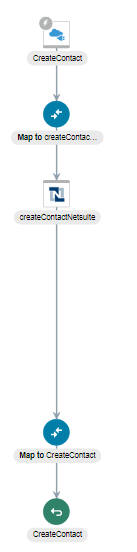
I now create a simple integration that will create a Contact in Netsuite -


I test this via Postman - and see the following error -


Looks like my user - Niall Mac Cumascaigh with the role Ecommerce Manager
doesn't have permissions to create a Contact.

I check in Netsuite - Setup - Users/Roles - Manage Roles


As you can see, only view rights on Contact have been specified.

I now change this.


Ok, so back to my favourite tool - Postman - I re-run the test to create a
Contact in Netsuite.


The result is the ID from Netsuite.

Now, I check in Netsuite -


Mapping for Creating a Contact in Netsuite

Finally, let's look at the mapping in OIC for the new contact.
I am no Netsuite expert, so I began by creating a contact in the Netsuite UI,
to work out which fields are mandatory - Name and Subsidiary.

Subsidiary is the division of my company to which this contact belongs.


firstName, lastName and email come from my REST Request Payload.
I have hardcoded the internalId (=1)of the Subsidiary with the id of Honeycomb Mfg.

Where did I find this value?
Setup - Company - Subsidiaries - Search


Add Internal ID to the Search Results -


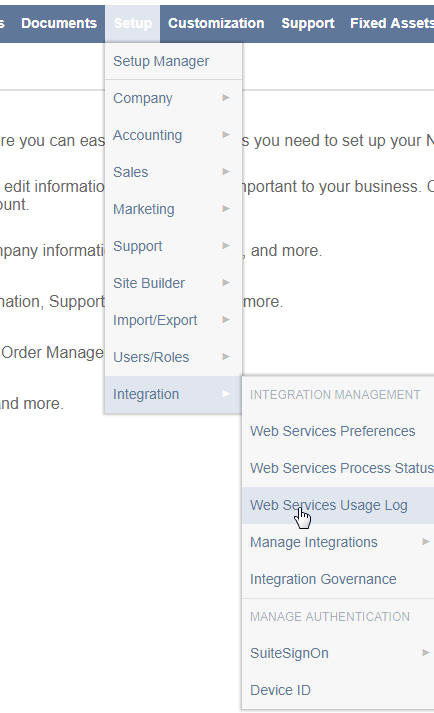
One can also view this via the Netsuite Web Services Usage Log.

Netsuite Web Services Usage Log

Here is a new contact -


Let's check this out -


Note the ability to specify search criteria - I choose
contact/addList.


I can view the request/response -

Here is the request -


The response -


Grand - as we say in Ireland!